Welcome to the Onshape forum! Ask questions and join in the discussions about everything Onshape.
First time visiting? Here are some places to start:- Looking for a certain topic? Check out the categories filter or use Search (upper right).
- Need support? Ask a question to our Community Support category.
- Please submit support tickets for bugs but you can request improvements in the Product Feedback category.
- Be respectful, on topic and if you see a problem, Flag it.
If you would like to contact our Community Manager personally, feel free to send a private message or an email.
Fill pattern Question
 ron_moise
Member Posts: 18 EDU
ron_moise
Member Posts: 18 EDU
Hello, Everyone.
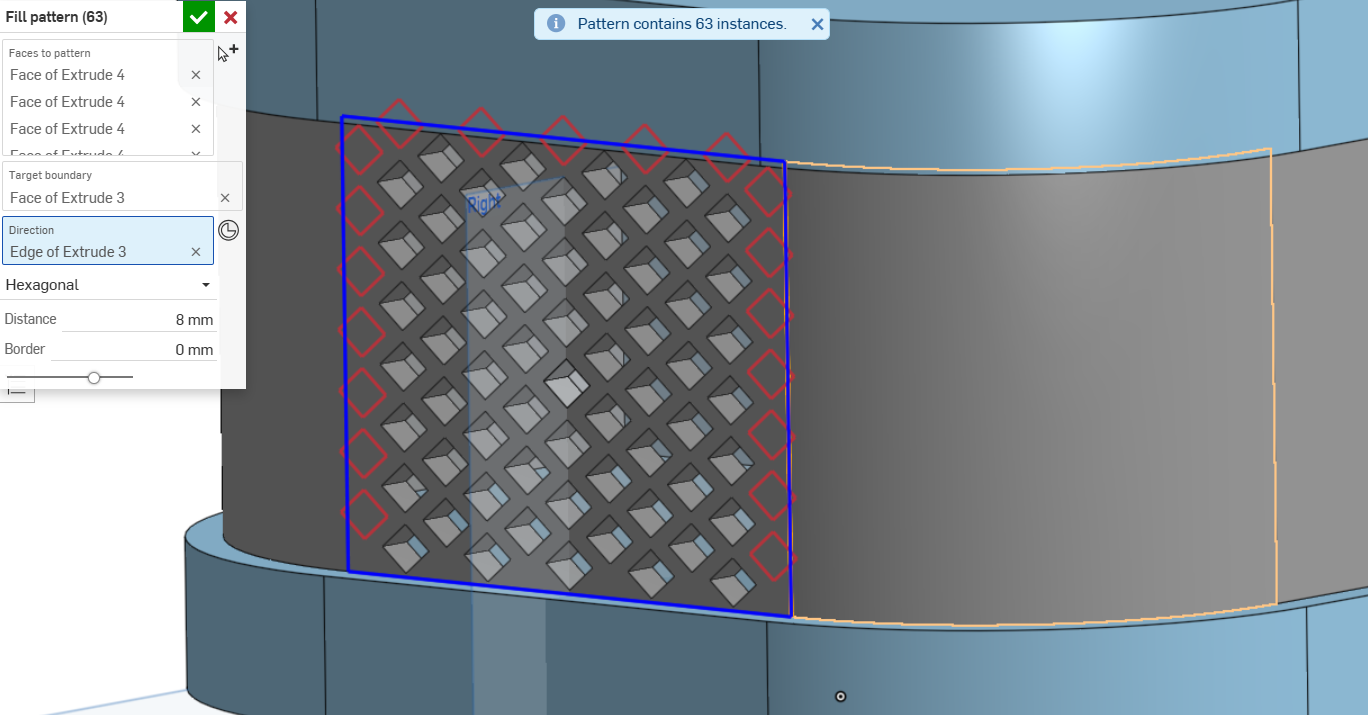
Does someone know how to use the "Fill pattern" custom feature on curved surfaces, in a way that follows the original fill order?
Is there a different custom feature that can do this?
Tagged:
0
Answers
You will have to use something like Approximate Face to "merge" the separated faces into one face then use fill pattern on the one large face.
.
RENDERCAD
rendercad.ai - Photorealistic product rendering.
▚▞▚▞▚▞▚▞▚
________________________________________________________________________
This brings back some PTSD from doing this the hard way in Solidworks many years ago. The holes all needed to be drafted for injection molding. This also involved a font that the designer created to do the Morse code, which was then set up so we could use the text feature to write out the patterns. Oh and those are curvature continuous-ish corners done with crappy fitsplines.
Simon Gatrall | Product Development, Engineering, Design, Onshape | Ex- IDEO, PCH, Unagi, Carbon | LinkedIn
Very cool design. But….What does it say?
I've tried, It "became" one large face yet it just doesn't "allow" it to be selected…Do you know other ways?
Hmmm "citation needed".
https://en.wikipedia.org/wiki/Western_Digital_My_Book
Those were the "brand principles" that we helped define at IDEO for WD.
Simon Gatrall | Product Development, Engineering, Design, Onshape | Ex- IDEO, PCH, Unagi, Carbon | LinkedIn
You could do @S1mon's way 😎
Share your document link (with copy access) and I'll show you how to do it.
.
RENDERCAD
rendercad.ai - Photorealistic product rendering.
▚▞▚▞▚▞▚▞▚
________________________________________________________________________
@S1mon 👍️