Welcome to the Onshape forum! Ask questions and join in the discussions about everything Onshape.
First time visiting? Here are some places to start:- Looking for a certain topic? Check out the categories filter or use Search (upper right).
- Need support? Ask a question to our Community Support category.
- Please submit support tickets for bugs but you can request improvements in the Product Feedback category.
- Be respectful, on topic and if you see a problem, Flag it.
If you would like to contact our Community Manager personally, feel free to send a private message or an email.
How to scale a sketch parametrically?

Hi all,
I am making a simple jewelry box, with the outline of a rose flower debossed into the lid. I created the sketch of the rose in Inkspape, and then imported the resulting .DXF into onshape. The sketch is very complex, lots of curves and vertices. I know that when you open a sketch, and it has no dimensions, that if you add a single dimension and then change that dimension, the whole sketch will scale accordingly. The problem I am having is that that only seems to work when the sketch is open for editing. If I add a single dimension to the rose that I am importing based on a parameter (I am trying to scale the size of the rose based on the outside diameter of the lid), then when I change that paraemter, then the sketch does not scale, instead it tries to pull the sketch apart, which causes the model to fail. So now I'm a bit lost. I figure that there must be a simple way to do this, but I'm afraid the solution is escaping me. Appreciate any tips. Cheers, John
Best Answer
-
Best way to do this is to create solids/ surfaces for what you want to do first and scale these instead.
Basically "delay" the scaling of that part until you are done with the sketch itself.
0

Answers
-
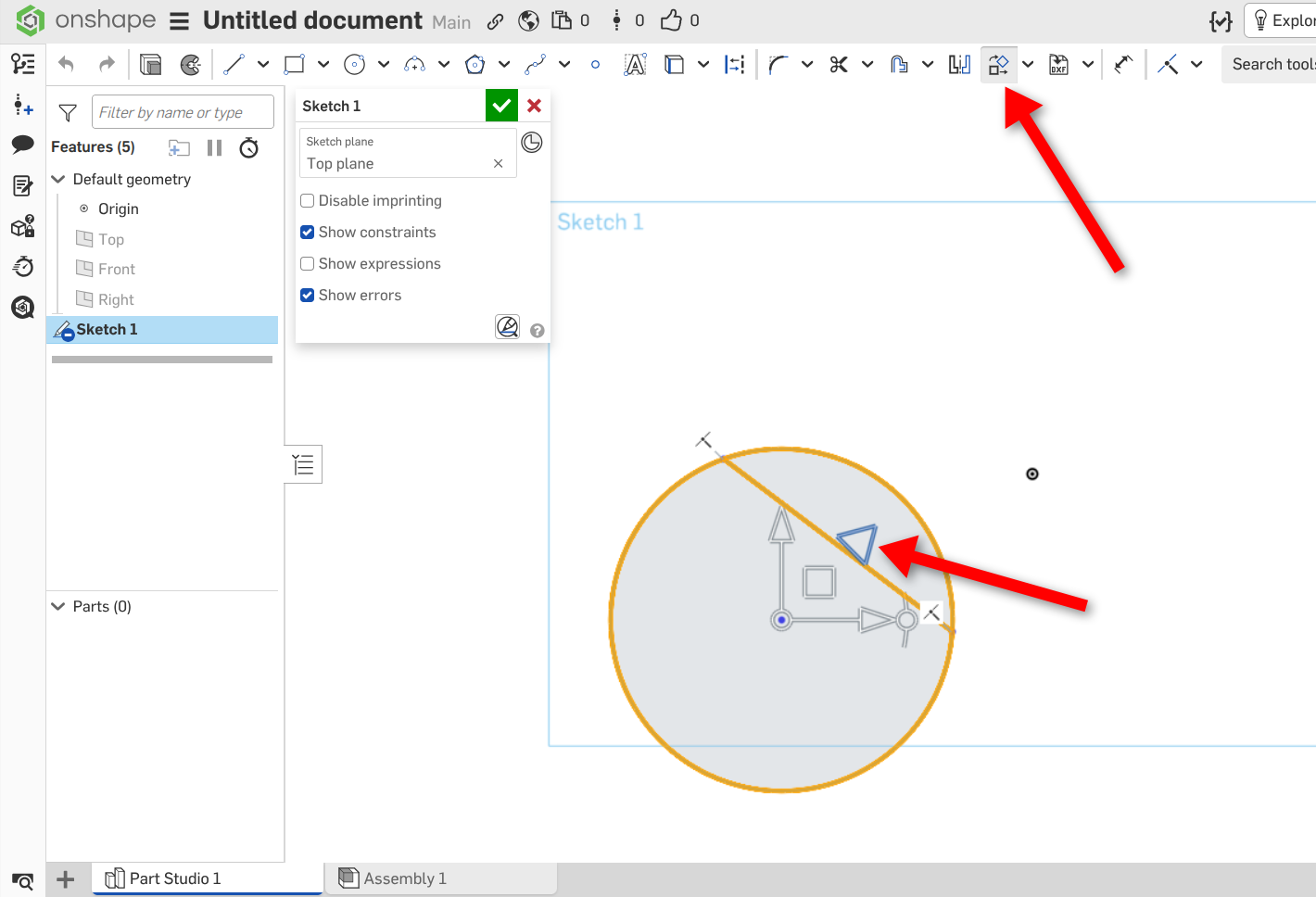
With the sketch open, go to the 'transform' tool, then box-select the entire sketch - a triad-thing should appear - grab the diagonal triangle and pull it outwards and upwards - a dimension box should appear letting you input a scaling factor.
Unemployed Onshaper- Operating on European time - More of me here ➤➤ https://linktr.ee/Liam.G0 -
Best way to do this is to create solids/ surfaces for what you want to do first and scale these instead.
Basically "delay" the scaling of that part until you are done with the sketch itself.
0 -
Thanks very much for the reply. The question is how do you make that parameter-driven? AFAIK, the sketch transform tool is a one-time operation.
0 -
Thank you for the reply. This is what I ended up doing.
0 -
Yes. You're right, a one time operation, which - for some reason - doesn't accept variables. If you search the forum for discussions on 'Sketch Blocks' and why Onshape doesn't have them, you might pick up some tips/advice.
Unemployed Onshaper- Operating on European time - More of me here ➤➤ https://linktr.ee/Liam.G0 -
P.S. - Gave ChatGPT a go at the 'Missing Sketch Blocks' mystery and learned a thing or two . . .
Unemployed Onshaper- Operating on European time - More of me here ➤➤ https://linktr.ee/Liam.G0
