Welcome to the Onshape forum! Ask questions and join in the discussions about everything Onshape.
First time visiting? Here are some places to start:- Looking for a certain topic? Check out the categories filter or use Search (upper right).
- Need support? Ask a question to our Community Support category.
- Please submit support tickets for bugs but you can request improvements in the Product Feedback category.
- Be respectful, on topic and if you see a problem, Flag it.
If you would like to contact our Community Manager personally, feel free to send a private message or an email.
Improvements to Onshape - May 15, 2026


This release introduces new user interface enhancements and workflows across the board to help make your daily work more efficient, plus an illuminating new explicit Light experience for Render Studio Advanced users.
CAD
MATE CONNECTORS REFERENCING A MATE CONNECTOR
Onshape has introduced the ability for Mate Connectors to directly reference other Mate Connectors, enhancing design intelligence and robustness. This capability works in both Part Studios and Assemblies. This can make it easier to access deeply nested Mate Connectors at the assembly level and provide more convenient references for mates.
TYPE FILTER FOR MODEL-BASED DEFINITION INSPECTION TABLE
The MBD inspection table now includes a type filter, making it easier to sort and review inspection data by annotation type.
AI ADVISOR MARKDOWN RENDERING
AI Advisor now properly renders markdown code blocks, improving readability of code snippets and technical responses.
DRAWINGS
HATCH HALOS FOR ANNOTATIONS
Halos now appear around the border of annotations that cross over, or reside overtop of hatched areas on a drawing, so they are not obscured by the hatch pattern. This makes drawings with complex hatch patterns easier to detail, and more readable.
PCB STUDIO
HOLE FILTERING SUPPORT
PCB Studio now supports hole filtering, allowing you to more precisely control which holes are included in your board layout.
CAM STUDIO
SETUP DIALOG REDESIGN
The CAM Setup operation has been converted to a native Onshape-style feature dialog, improving consistency and usability across the platform.
RENDER STUDIO
EXPLICIT LIGHTS
Render Studio Advanced now supports explicit lights, giving you direct control over light placement, type, and intensity for more precise and creative scene illumination.
IMPORT / EXPORT
URDF IMPROVEMENTS
URDF export has been expanded with frames, tool center points (TCPs), cleaner joint definitions, and more consistent naming. Mesh exports now support adjustable tessellation quality for STL and GLTF, making it easier to move from CAD to simulation and control with simulator‑ready geometry.
ENTERPRISE
ENTERPRISE ANALYTICS
Enterprise Analytics introduces a new dashboard experience. Changes include UI improvements, particularly in filtering and navigation.
Please take a moment to try out these new features and improvements and leave your comments below. For a detailed list of all the changes in this update, please see the changelog.
Remember: The updates listed here are now live for all users when creating new Documents. Over the next few days, these features will also be available in Documents created before this update. Mobile app interface updates occur via the Apple App Store or Google Play Store and happen in the days following the update.
Comments
-
Creating a mate connector from another is one of those things I've wanted to do for a long time. There have been a few custom features for it, but first party support is much appreciated.
Improvements to hatched sections/annotations in drawings are nice.
Lighting in Render Studio is a big step towards making it competitive.
Simon Gatrall | Product Development, Engineering, Design, Onshape | Ex- IDEO, PCH, Unagi, Carbon | LinkedIn
8 -
Natively referencing mate connectors is going to be huge! It's gonna make the Publish Geometry workflow just that much more efficient.
Ramon Yip | glassboard.com
3 -
THANK YOU for the MC-MC reference!!!
4 -
Hmm, maybe this mate connector feature will help with some of the "mid plane" like things I've wanted to do but cant.
3 -
Oh boy! Boss is gonna like the annotation haloing let me tell you!
2 -
Ouch!!
Was it something I said? 😕
Unemployed Onshaper- Operating on European time - More of me here ➤➤ https://linktr.ee/Liam.G-7 -
Smaller batch of tea leaves to read in this month's update, but there is another mention of the FGS solver in the errorstringenum file.
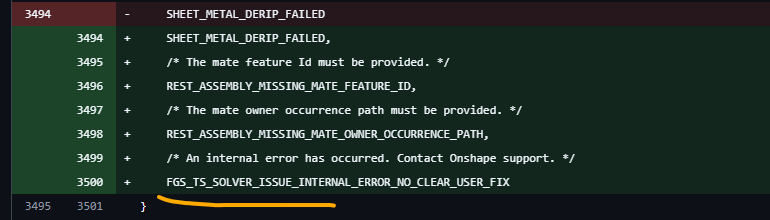
Seems to be more work being done on generative design for Onshape. I can't wait to see it in action in a future update.
3 -
Onshape is looking really good. It's hard to believe it has come this far. Wow!
I've been looking at the new googlebooks coming out soon and I'm ready to say "bye-bye to operating systems" and "hello cloud". No more windows or apples just give me chrome.
2 -
Long story short you'd appreciate justification of the improvements? or just an explenation of use case?
There's tones of deep dive info on basically every aspect of onshape in their education pages (including every time they add new stuff) so I know you don't mean you want deep dives into how to use onshape with the new features here in the update videos.
I don't think I'm getting you're issue0 -
@CADNurd You have a valid argument. Mate connectors have been that way since the beginning trying to get you from here to there. Understanding them is difficult because they are really 3 transformations combined into one. I can't justify them, but I do use all 3 at different times.
With this new referencible scheme, you can create any transformation stack you want. Most of the 3 built in transforms will be identity matrices and should be removed. If you don't check the realign, move or rotate, they shouldn't exist at all in the stack.
Why care? Speed. Every transformation is a matrix multiplication and it takes time.
1 -
Thank you
0 -
Yeah! Mate connectors on mate connectors! Finally! :0)
0 -
I should probably see if there are improvements I can make to Poly-Mates now that mate connectors can reference other mate connectors. I spent a frustrating amount of time attempting to make in-context references work in a stable way in a previous revision that might be fixed now.
0 -
MC-MC references is a really welcome addition. Also really glad to see CAM Studio normalizing into the common Onshape experience. This has been a struggle for our people using it daily.
1 -
Mate connectors via mate connectors is a huge quality of life improvement.
Looking forward to testing out CAM Studio again with all these improvements. Finally finished the base for my WorkBee!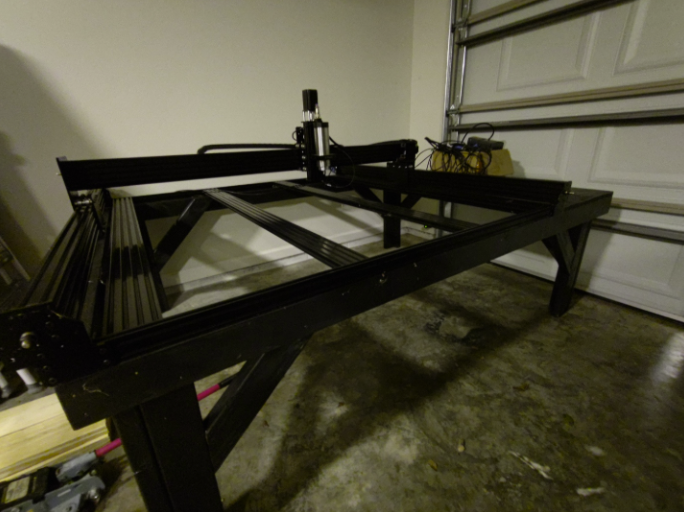 ◉ RENDERCAD - Photorealistic product rendering.◉ CADSharp - Professional CAD + software consulting.
▚▞▚▞▚▞▚▞▚7 -
Mate Connector to Mate Connector is massive! Something coworkers and I have been waiting for for a long time. Excited to see explicit lights in render studio, I never was able to get the hang of some of the workarounds I saw.
0 -
New CAM Studio interface… awesome! I hope this means a full featured tool library is coming soon. It’s prime time for OS to scoop up SolidWorks + HSM Works users since Autodesk is phasing out HSM Works.
2 -
Proudly stepping into the role of the Debbie Downer here: I’m still waiting on several core modeling requests that feel long overdue. Tools like Cam, Render, and MBD are getting a surge of attention lately, yet I rarely rely on them. Meanwhile, foundational capabilities remain untouched. At the top of my list are persistent selections for the curve/surface analysis tool with final button, sketch blocks, and the ability to configure released parts within assemblies. These are the improvements that would meaningfully elevate day‑to‑day modeling work.
5 -
First time poster, long time user. It drives me insane that there are glaring deficiencies within core modelling, assemblies, and drawings (hey, who needs copy annotations between drawing views and all the forthcoming AI nonsense?). Yet CAM, rendering, MBD and a bunch of other irrelevant stuff gets priority. I get it that you are probably bending the knee to the high rollers, but c'mon, how can you be treated as a serious CAD system when the basics are clearly missing? Maybe someone (me?) should start a sticky thread on the forum listing the basics so the non-CAD-literate programmers and leadership can understand what is required from a CAD system and what we, the actual users, need.
P.S. Don't get me wrong, I love Onshape, but for the love of everything holy…….2 -
@Nick_Holzem @feisty_giraffe I agree with you guys. Modeling is 95% of what I do in Onshape. However, I do think that they're also trying to compete with likes of Fusion, which has a great CAM, integrated sim tools, rendering, etc. I'd love for them to focus 100% on the modeling, but you do have to make the investors happy…
I recently went back to SolidWorks and it's nowhere near as crispy as I remember, certainly not as crispy as Onshape. Same with Fusion. I haven't used it in a couple of years, but it's definitely nowhere near Onshape's capabilities.Ramon Yip | glassboard.com
1 -
Seriously, configuring released parts and assemblies is such an oversight I can't believe this problem even exists. Onshape has the best configuration system I have ever seen by a country mile and it gets immediately nuked when you decide to release parts. We design assemblies with extruded parts that can have different lengths and parts nested within. I had stars in my eyes when I figured out how to use the multiple configuration input tables and check-boxes. Functional configuration tables on drawings would also be fantastically useful.
2