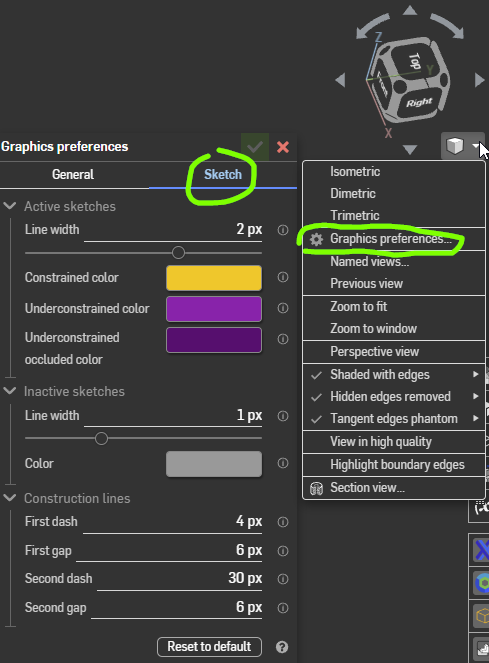
In sketches, how can I change the colour of my under-defined lines ?

john_smith077
Member Posts: 175 ✭✭✭
Hello
In my sketches, I am having trouble visually distinguishing between under-defined lines (blue) and full-defined lines (black). How can I change the colour of my under-defined stuff?
Thanks
J
Tagged:
0
Best Answer
-
@john_smith077 , You have to give dimension for conversion from under-defined line (Blue) to fully- defined line (Black). If you do not want to give dimension then apply fix constrain to line then it will convert into black color.
Currently in Onshape user can not change property of line. This is highly requested improvement request raised in forum. You can vote for this request.
8

Answers
-
@john_smith077 , You have to give dimension for conversion from under-defined line (Blue) to fully- defined line (Black). If you do not want to give dimension then apply fix constrain to line then it will convert into black color.
Currently in Onshape user can not change property of line. This is highly requested improvement request raised in forum. You can vote for this request.
8 -
Thank you.
But that is ridiculous. It's just not all that easy to distinguish between that fairly dark blue and actual black. Edges aren't too bad but vertices can be very difficult. I am still evaluating onshape so voting for things may (or may not!) come later.
EDIT: Btw, exactly how would I go about voting for this request?
1 -
I do not find this to be a problem at all. Onshape time will be better served in continuing to bring advancements to design ability. So far they continue to bring improvements out every 3-4 weeks although I for one am waiting on the biggies (sheet metal , fabrication , and surfacing).
0 -
Peter, yes you may well be right about priorities. Whole lines that are blue are reasonably visible. To explain - I found myself with a black line with what turned out to blue blobs on the ends but it was very hard to see the blue colour. Maybe it doesn't matter in practice, I am only just learning all this... :^/0
-
I would like to see the color selection of defined and undefined lines turned on an off just as if I am looking at layers. Default would be blue, black, and red, An Icon pallet would show up on the drawing indicating a custom pallet is selected. The same would go for line style... Custom line types turned on or off.1
-
Hi @john_smith077 ,
Thanks for the feedback! Some other users were having similar troubles and had a discussion about chrome plugins that can change our site to be of higher contrast:
https://forum.onshape.com/discussion/comment/32391
Our improvement requests are located on this forum in the section marked "Improvement Requests". If you go to that section and click "New Idea", you can type in your idea and similar ideas that have already been submitted will pop up. You can either vote on one of these similar issues or if none of these describe your issue well enough, submit your own request.
Jake Rosenfeld - Modeling Team1 -
Another reason for selecting colors... you could select a color palette that is easier on the eyes, that is why programming editor software gives you a wide range of color palettes, so after spending hours looking at the screen, your eyes aren't bleeding... I use a black background with grey text myself.In addition, some people have varying colorblindness and may have a hard time "seeing" the difference between blue and black."Color vision deficiency (sometimes called color blindness) represents a group of conditions that affect the perception of color. Red-green color vision defects are the most common form of color vision deficiency. Affected individuals have trouble distinguishing between some shades of red, yellow, and green. Blue-yellow color vision defects (also called tritan defects), which are rarer, cause problems with differentiating shades of blue and green and cause difficulty distinguishing dark blue from black. These two forms of color vision deficiency disrupt color perception but do not affect the sharpness of vision (visual acuity)."2
-
I have lost many hours on this. I never been told to be colorblind, only shortsighted, but small pixels of blue next to black are impossible to catch for me. this is then really difficult to get a sketch fully defined when not checking with diagnosis tool at each step. A small line next to another, or 2 close points not coincident will be very difficult to distinguish, but make a sketch not defined, but the feature are all correct, and later on, problem will accumulate…
When using diagnosis in sketch, showing these orange would be nice0 -