Welcome to the Onshape forum! Ask questions and join in the discussions about everything Onshape.
First time visiting? Here are some places to start:- Looking for a certain topic? Check out the categories filter or use Search (upper right).
- Need support? Ask a question to our Community Support category.
- Please submit support tickets for bugs but you can request improvements in the Product Feedback category.
- Be respectful, on topic and if you see a problem, Flag it.
If you would like to contact our Community Manager personally, feel free to send a private message or an email.
Newbie Q: What is the best way to cut a series of rounded, shallow trenches?

john_smith077
Member Posts: 175 ✭✭✭
Hello
[Preface: I keep finding certain things to be extremely painful to build and I am sure that there has to be a much better/easier way!]
In this case I am trying to create a cylinder (shaft) , on one end of which, I then cut a series of shallow radial trenches each of which are at 30 degrees from each other. Each trench should have a shallowly rounded bottom. (see diagram) What is the best way do achieve this?
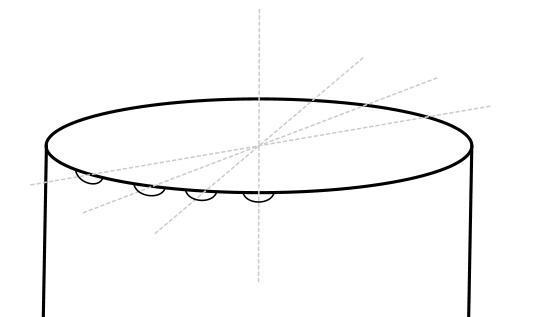
Should I:
A. Create a series of extruded tubes each rotated by 30 degrees and then do a Boolean operation on each of them against the cylinder. (But even if so, what is the best way to create the series of extruded tubes ?)
B. Draw each trench in 2D and then Extrude using Remove, and then Fillet in some way??
C. Do something clever using Patterns?
It would be really helpful to see a video of how to use the Transform tool, but I can't find one. :^/
J
[Preface: I keep finding certain things to be extremely painful to build and I am sure that there has to be a much better/easier way!]
In this case I am trying to create a cylinder (shaft) , on one end of which, I then cut a series of shallow radial trenches each of which are at 30 degrees from each other. Each trench should have a shallowly rounded bottom. (see diagram) What is the best way do achieve this?
Should I:
A. Create a series of extruded tubes each rotated by 30 degrees and then do a Boolean operation on each of them against the cylinder. (But even if so, what is the best way to create the series of extruded tubes ?)
B. Draw each trench in 2D and then Extrude using Remove, and then Fillet in some way??
C. Do something clever using Patterns?
It would be really helpful to see a video of how to use the Transform tool, but I can't find one. :^/
J
0
Answers
-
Sketch the profile, extrude remove, circular pattern?Senior Director, Technical Services, EMEA0
-
I think my problem is that I can't get Circular Patterns to work.
When I try to create a Circular Pattern of Feature Pattern, all instances of the feature seem to disappear. [grrr]
What am I doing wrong... ? :^/
https://cad.onshape.com/documents/848b05260887212f608c64b4/w/262a72a4d698ee5c9266f473/e/8a1dcd3408f0d2c2422185b2
0 -
When you create the cut, Extrude 2, you are removing the outside of the sketch so when you pattern that around it is completely removing the top layer. Make Extrude 2 as adding the material for the "inverted slot" then pattern that instead.Senior Director, Technical Services, EMEA0
-
Sorry but TBH, I don't understand that first sentence(!) but I have now tried changing Extrude 2 to Add rather than Remove and I got a message about not changing any geometry and nothing changed on screen.NeilCooke said:When you create the cut, Extrude 2, you are removing the outside of the sketch so when you pattern that around it is completely removing the top layer. Make Extrude 2 as adding the material for the "inverted slot" then pattern that instead.
And then when I set it back to Remove, suddenly it started to work.
So, now completely confused, I deleted both the extrude and and the circular pattern to see if I could rebuild what I had before and replicate the original problem. And blow me down the circular pattern appears nicely!
All very mysterious, but the problem seems to have fixed itself... :-/
0 -
It was the way you modelled it - the first time you did not add an extrude, you cut the material around it away. Then you patterned the cut which cut away the extrude and all the pattern instances too.Senior Director, Technical Services, EMEA1

