Changing presentation in a drawing

hansrudolf
Member Posts: 57 ✭✭
Maybe this title is a bit cryptic, so I will try to give a better description.
I've drawn a part which has a 'bottom' and a 'top', say like a house with basement and roof. In my drawing this part is always standing on its head, so to speak. I suspected I started the drawing on the wrong plane, but a test with an unsymmetrical part drawn in all 3 planes did not show this problem.
Is there a way to flip this view 180 deg so it is shown in the logical orientation? Not a very important problem I know, but it would make my drawing simpler to understand.
I want to add that in the part and the assembly the part is shown in the correct orientation (except I rotate it deliberately, naturally).
Regards, Hansrudolf
I've drawn a part which has a 'bottom' and a 'top', say like a house with basement and roof. In my drawing this part is always standing on its head, so to speak. I suspected I started the drawing on the wrong plane, but a test with an unsymmetrical part drawn in all 3 planes did not show this problem.
Is there a way to flip this view 180 deg so it is shown in the logical orientation? Not a very important problem I know, but it would make my drawing simpler to understand.
I want to add that in the part and the assembly the part is shown in the correct orientation (except I rotate it deliberately, naturally).
Regards, Hansrudolf
0
Answers
-
Hi Hansrudolf - this is not possible YET (hint, hint) so you have two possible workarounds. Either add a move feature as the last feature in your part to rotate it around 180 degrees or create an assembly of it and detail the assembly instead.Senior Director, Technical Services, EMEA1
-
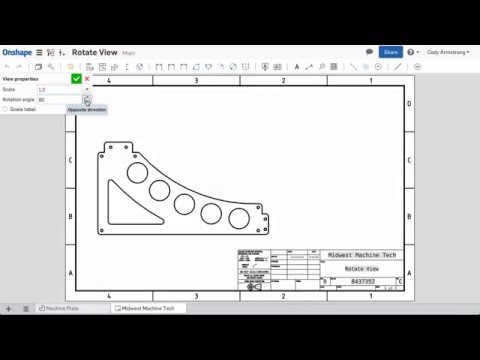
@hansrudolf , Drawing views without parent/child associations can now be rotated in Onshape. Kindly refer improvement to Onshape - March 7th,2016 thread and below video link.
0


