Welcome to the Onshape forum! Ask questions and join in the discussions about everything Onshape.
First time visiting? Here are some places to start:- Looking for a certain topic? Check out the categories filter or use Search (upper right).
- Need support? Ask a question to our Community Support category.
- Please submit support tickets for bugs but you can request improvements in the Product Feedback category.
- Be respectful, on topic and if you see a problem, Flag it.
If you would like to contact our Community Manager personally, feel free to send a private message or an email.
Creating groups in Part Studio

bert_fourie
Member Posts: 103 PRO
Is it possible to create a group in a part studio, or alternatively use an assembly group in a part studio:
I imported a motor-gearbox model, downloaded from the website of a well known supplier, into a part studio. I really only want it to be one solid model, but as often happens with this type of model it will not boolean union all the parts into one. I would like to group all parts associated with the motor gearbox so I only deal with one entity.
Another example is a bearing downloaded from an equally well known supplier.
I imported a motor-gearbox model, downloaded from the website of a well known supplier, into a part studio. I really only want it to be one solid model, but as often happens with this type of model it will not boolean union all the parts into one. I would like to group all parts associated with the motor gearbox so I only deal with one entity.
Another example is a bearing downloaded from an equally well known supplier.
1
Answers
-
You can insert the entire part studio into an assembly and then group them there.0
-
I need to use the group as a group in part studio as I am using it as reference to design :0
-
I'm sorry that is not possible.0
-
@bert_fourie,Currently user cannot create group in part studio of Onshape. You can raise improvement request for this. If all parts acts as merging bodies then you can use work around by performing Boolean union operation.
Kindly refer below steps for your requirement.Boolean

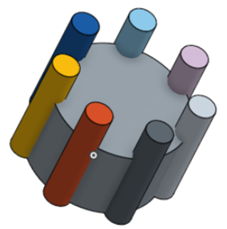
This example starts with these parts in the graphics area (they are 8 different parts):
- Click
 .
.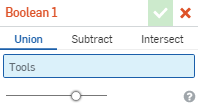
- Confirm that Union is selected.
- Click to set the focus in the Tools field, then click all of the parts (small cylinders and larger cylinder).

- Click
 .
.
If part is apart from each other then Boolean will not work.
1 - Click
-
Actually i see there has been a similar improvement request in the past.0

