Lining up sketches on different planes

tj_thorniley
Member Posts: 65 ✭
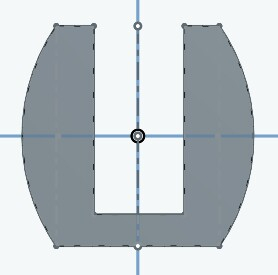
If I draw a rectangle on the front plane, and extrude it by 100mm..
Then rotate my view and start sketching on the right plane..
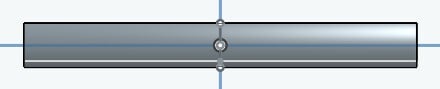
It's like the sketch tools don't acknowledged that there's now an object, edge, or line there. I need it to 'snap to' so I can place some lines and holes in the right spots, relative to the sketch on the front plane.
Here's an example of what I want the right plane to look like:

At the moment, it's like I have to just try my luck and hope I perfectly place construction lines, points, etc. How can I make it cooperate?
Then rotate my view and start sketching on the right plane..
It's like the sketch tools don't acknowledged that there's now an object, edge, or line there. I need it to 'snap to' so I can place some lines and holes in the right spots, relative to the sketch on the front plane.
Here's an example of what I want the right plane to look like:
At the moment, it's like I have to just try my luck and hope I perfectly place construction lines, points, etc. How can I make it cooperate?
0
Best Answer
-
Use command.www.accuratepattern.com7

Answers
-
Use command.www.accuratepattern.com7
-
Yup, what he said ^^^

O.S.
Business Systems and Configuration Controller
HWM-Water Ltd0 -
Okay, found it. Any advice? Not quite sure how this works.0
-
Hi @tj_thorniley
Please don't take this personally and with all due respect I think you've taken the piloting equivalent of waking up, saying I'm going to be a pilot today, and starting at 10K feet.
Much easier to do the ground school first and only then go flying! The use command is one of the first things to learn after basic sketch entities and constraints. Then extrudes and revolves. Then hole tool / shell etc. Then in context editing etc.
The "learning by doing" is good up to a point, but you're making it way harder than it needs to be by not getting a grip on the basics first.
Just my thoughts.
Owen S.
Business Systems and Configuration Controller
HWM-Water Ltd3 -
Is this not the ground school? I thought that's what I was doing. I'm not trying to make things difficult; just trying to make do with what I've got. I don't have a mentor or an instruction manual, so I'm probably missing a lot of relevant information.
I started with extrudes and revolves before learning about anything else.0 -
@tj_thorniley
For 'ground school' See the 'Learning Center' under help menu. The self-paced courses are best place to start, then onto technical briefs, recorded webinars, etc. The Learning Center was updated recently and is excellent. Onshape is doing a very good job with their on-line training and help files. I continue to be amazed at the depth of material.
This forum is a great community of support and I am glad you are putting out questions. It keeps us all sharper.
EDIT - And while solids are cool and of course vital, everything starts with sketches. Establishing a robust model means having sketches that include 'design intent'. The Use command is just one example of esoteric tools that I learned from training materials with practice.
www.accuratepattern.com2 -
You may also need to use the transform command to line everything up.bruce_williams said:Use command.
https://cad.onshape.com/help/#transform-sketch.htm?Highlight=transform
It can be a bit hard to find though. It's hiding in the array drop-down button.1 -
All good. The 'use‘ tool is all I needed. If anyone else needs help; it basically allows you to superimpose lines, points, etc from earlier sketches, to new planes. Its like you can reach over and grab them. You just click the tool, then click the sketch element you need, and it draws it in.2
-
If anyone landed here looking for a guide on how to do this, the USE command can be found in april 2022 at
https://cad.onshape.com/help/Content/sketch-tools-use.htm
1 -
Thank you for posting this. It surprises me how unhelpful some people are on a forum meant to help. 5 years later and you have done me a great service!jaime_de_los_rios said:If anyone landed here looking for a guide on how to do this, the USE command can be found in april 2022 at
https://cad.onshape.com/help/Content/sketch-tools-use.htm0

