[New] Four Bar Linkage Generator FeatureScript

TimRice
Member, Moderator, Onshape Employees Posts: 315 
Hello all,
I have been working on this Four Bar Linkage Generator FS for some time now. It creates the sketch lines for each link and plots the displacement curve for a specified point. All that is needed is a mate connector for the origin. Give it a try and reply with whatever cool linkages you come up with!
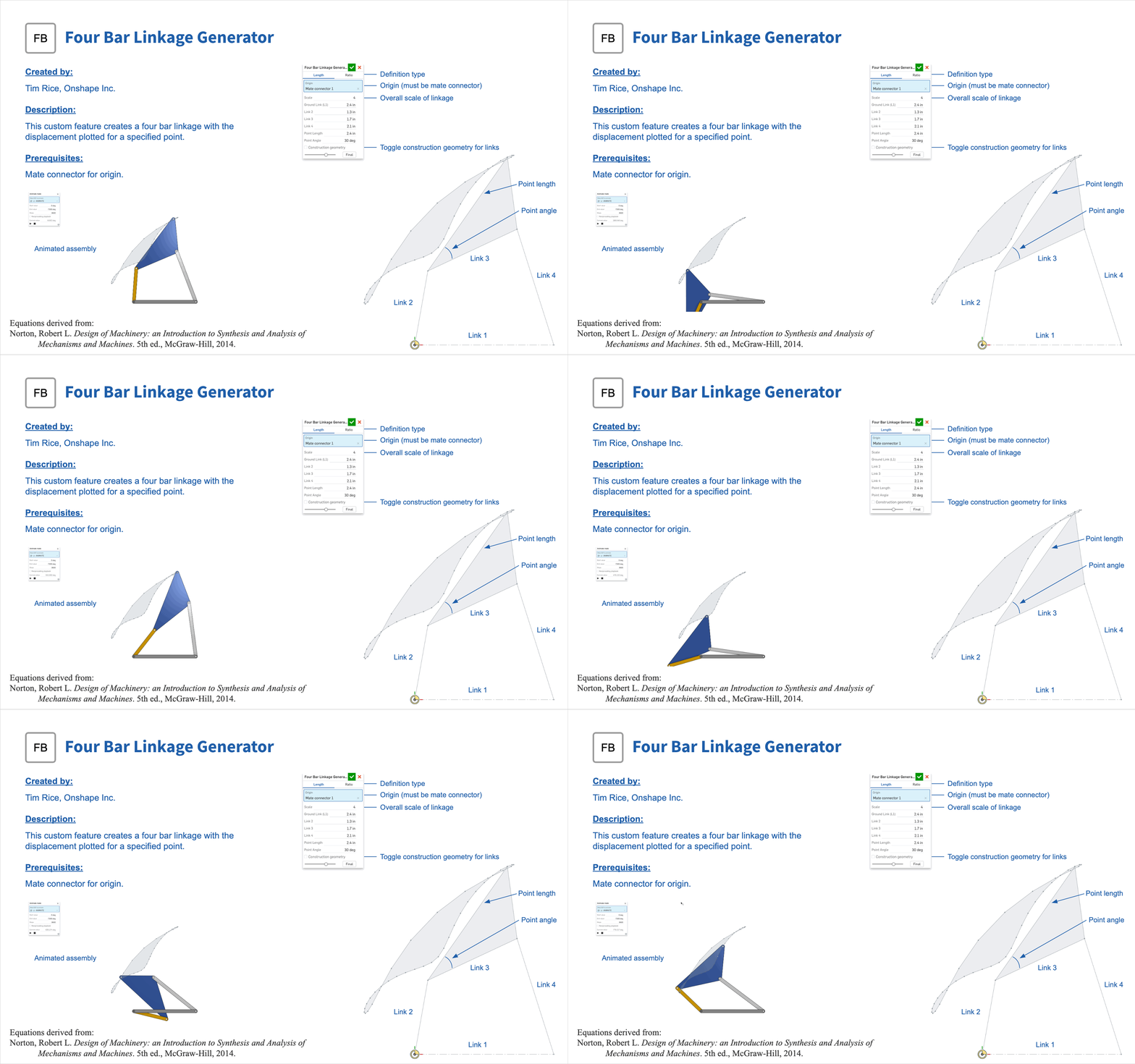
https://cad.onshape.com/documents/a2c6118153454c8ec8491c2b/v/ca97699c9e95d6898b4e3fb3/e/3f4d1bd6cd2e0170597202f6
I have been working on this Four Bar Linkage Generator FS for some time now. It creates the sketch lines for each link and plots the displacement curve for a specified point. All that is needed is a mate connector for the origin. Give it a try and reply with whatever cool linkages you come up with!
https://cad.onshape.com/documents/a2c6118153454c8ec8491c2b/v/ca97699c9e95d6898b4e3fb3/e/3f4d1bd6cd2e0170597202f6
Tim Rice | User Experience | Support
Onshape, Inc.
Onshape, Inc.
Tagged:
2
Comments
-
are you using polylines instead of splines because of the self intersecting trajectories?by the way you may find useful my Curve generator script0
-
I use both. The FS first tries splines and if they intersect reverts to polylines. Thanks for the suggestion, I'll check out your curve generator!konstantin_shiriazdanov said:are you using polylines instead of splines because of the self intersecting trajectories?by the way you may find useful my Curve generator scriptTim Rice | User Experience | Support
Onshape, Inc.0 -
If you are interested in the path, you should see 21Geometry.com. We are trying to build an add-on for Onshape and with that, you can specify the path and the bearing will automatically be built. It's the beginning of path-dependent linkages.3
-
@thomas_dobroth amazing stuff,
How do you lubricate these things? Do you have an examples in automation? For continuous automation you'd be so much faster than any PLC controlled equipment.
How is this going to work when designing equipment?
It'd be fun just to make animations all day long and watch'm run.
0 -
This is awesome!I'm pretty sure I'll find a use for it and your code is elegantly short. One criticism I have before even starting is that a mate connector is required, and to create one, you need to already have an "owner part". I imagine this Feature would be often useful before any parts are created. For now, I'm just making a dummy extrusion to "own" the connector, but it feels a bit silly. Thanks so much for making this though. I may end up using it on a project very soon and I love being able to visualize the path. I also like seeing it broken up into points because you get a sense for the speed of the motion at any given section.1
-
Thanks @Evan_Reese !
Yes unfortunately I think this is the best workflow. Otherwise the user would need to select a plane (or face) and a point for the origin. Mate connectors are therefore a lot more flexible and stable as I can get all the origin information from there.Evan_Reese said:...One criticism I have before even starting is that a mate connector is required, and to create one, you need to already have an "owner part"...Tim Rice | User Experience | Support
Onshape, Inc.0 -
Totally get it. I'm not the best with featurescript, but I've played around enough to understand why that is. I, personally, would use plane/point input if it were an additional option, but who knows if my workflow is what most people would do. Thanks for writing it!TimRice said:Thanks @Evan_Reese !
Yes unfortunately I think this is the best workflow.1 -
@billy2
The tech went public in November. Lubrication is application specific, just like any other machine. The render farm is loaded up with improved speed reducers. A full line should be available in a week.
The tech page spells it out better. The short answer is that you put in your description of motion for two components (X, Y, and Rotation) and the methodology builds you a bearing. It has more design flexibility than any other mechanism.0 -
@Evan_Reese
Due to the hard work of @kevin_o_toole_1 there is some very cool new functionality coming soon that will eliminate the need to make a dummy part first (before anyone asks, I don't mean that we just removed the "owner part" field from the mate connector dialog )
)
Jake Rosenfeld - Modeling Team2 -
What a tease! can't wait.Jake_Rosenfeld said:@Evan_Reese
Due to the hard work of @kevin_o_toole_1 there is some very cool new functionality coming soon that will eliminate the need to make a dummy part first (before anyone asks, I don't mean that we just removed the "owner part" field from the mate connector dialog )1




