Welcome to the Onshape forum! Ask questions and join in the discussions about everything Onshape.
First time visiting? Here are some places to start:- Looking for a certain topic? Check out the categories filter or use Search (upper right).
- Need support? Ask a question to our Community Support category.
- Please submit support tickets for bugs but you can request improvements in the Product Feedback category.
- Be respectful, on topic and if you see a problem, Flag it.
If you would like to contact our Community Manager personally, feel free to send a private message or an email.
How to move a part using BodyType.MATE_CONNECTOR

Fda
Posts: 42 ✭✭
How can I move the cube to the end of the cylinder?
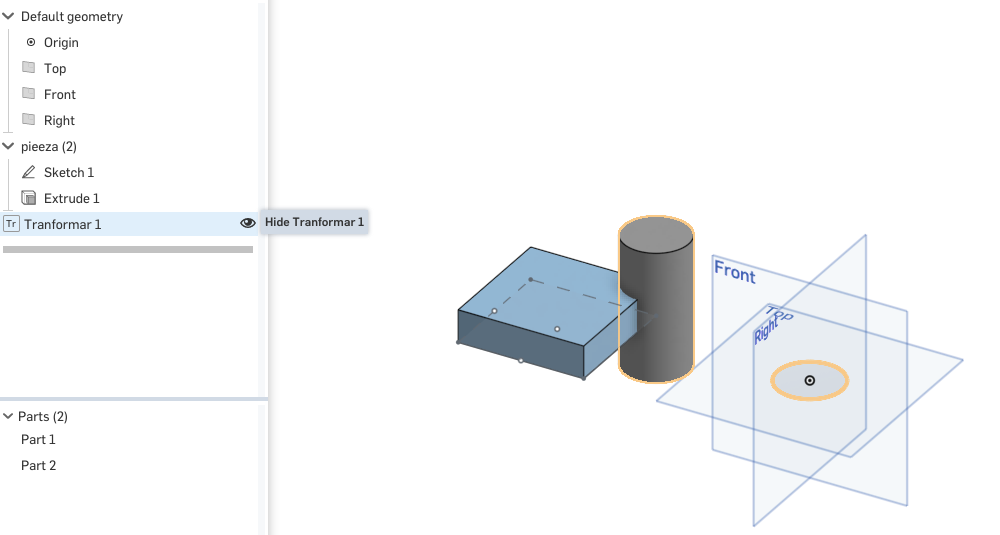
annotation { "Feature Type Name" : "Transform" }
export const myFeature = defineFeature(function(context is Context, id is Id, definition is map)
    precondition
    {
        // Define the parameters of the feature type
        annotation { "Name" : "My Query", "Filter" : BodyType.MATE_CONNECTOR, "MaxNumberOfPicks" : 1 }
        definition.FaceConnector is Query;

    }
    {
        // Define the function's action

        //==============================
        //We create a solid (part) from a sketch
        //==============================
        var sketch1 = newSketch(context, id + "sketch1", {
                "sketchPlane" : qCreatedBy(makeId("Top"), EntityType.FACE)
            });

        skCircle(sketch1, "circle1", {
                    "center" : vector(0, 0) * millimeter,
                    "radius" : 25 * millimeter
                });

        // Create sketch entities here
        skSolve(sketch1);

        extrude(context, id + "extrude1", {
                    "entities" : qSketchRegion(id + "sketch1"),
                    "endBound" : BoundingType.SYMMETRIC,
                    "depth" : 100 * millimeter
                });

        //==============================
        // We create a Mate Connector in part
        // what do we want to move
        //==============================

        var origin = vector(0, 0, 0) * millimeter;

        var com = evApproximateCentroid(context, {
                "entities" : definition.FaceConnector
            });

        var csys = coordSystem(com, vector([1, 0, 0]), vector([0, 0, 1]));

        opMateConnector(context, id + "com", {
                    "coordSystem" : csys,
                    "owner" : definition.FaceConnector
                });


        ///////
        /*How do I change "extrude1" for definition.FaceConnector */ /// ??????
        var myPart = qCreatedBy(id + "extrude1", EntityType.BODY); // ????
        ///////

        var My_vector = toWorld(evMateConnector(context, {
                    "mateConnector" : definition.FaceConnector
                }));

        opTransform(context, id + "transform1", {
                    "bodies" : myPart,
                    //"transform" : transform(vector(1, 2, 0.5) * inch)
                    "transform" : My_vector

                });
        /*
           //==============================
           // We delete the sketch
           //==============================


           opDeleteBodies(context, id + "deleteBodies1", {
           "entities" : qUnion([qCreatedBy(id + "sketch1"), qCreatedBy(id + "sketch1")])
           });

           //==============================
           // Boolean Operation Type UNION
           //==============================

           var PartAndHex = qUnion([qCreatedBy(id + "extrude1", EntityType.BODY)]);
           opBoolean(context, id + "BooleanUnion", {
           "tools" : PartAndHex,
           "operationType" : BooleanOperationType.UNION
           });


         */
});1
Comments
-
@Fda
I am going to assume that what you want is to move the cylinder that you extruded to be build right on top of the mate connector? If not, then I may need additional detail. Instead of using a transform, I would just make the cylinder where you want it in the first place:const mateConnectorCSys = evMateConnector(context, { "mateConnector" : definition.FaceConnector }); const mateConnectorAsPlane = plane(mateConnectorCsys); const sketchId = id + "sketch"; var sketch = newSketchOnPlane(context, sketchId, mateConnectorAsPlane); // Now we are sketching directly on the coordinate system defined by the mate connector ... do any sketching you want ... // It is usually better to use opExtrude (operation) rather than extrude (feature). const extrudeId = id + "extrude"; opExtrude(context, extrudeId, { "entities" : qSketchRegion(sketchId), "direction" : mateConnectorCSys.zAxis, "endBound" : BoundingType.BLIND, "endDepth" : 100 * millimeter }); // Now delete the sketch and you should be done.
Just for the sake of completeness, if you do want to move something from one place to another, you could do it like this:const moveFrom = coordSystem(vector(0, 0, 0) * inch, vector(1, 0, 0), vector(0, 0, 1)); // or any other coordinate system that you want to use as a "base" const moveTo = evMateConnector(context, { "mateConnector" : definition.FaceConnector }); opTransform(context, id + "transform", { "bodies" : someQueryForBodiesToMove, "transform" : toWorld(moveTo) * fromWorld(moveFrom) });
Jake Rosenfeld - Modeling Team1 -
Jake_Rosenfeld said:@Fda
I am going to assume that what you want is to move the cylinder that you extruded to be build right on top of the mate connector? If not, then I may need additional detail. Instead of using a transform, I would just make the cylinder where you want it in the first place:const mateConnectorCSys = evMateConnector(context, { "mateConnector" : definition.FaceConnector }); const mateConnectorAsPlane = plane(mateConnectorCsys); const sketchId = id + "sketch"; var sketch = newSketchOnPlane(context, sketchId, mateConnectorAsPlane); // Now we are sketching directly on the coordinate system defined by the mate connector ... do any sketching you want ... // It is usually better to use opExtrude (operation) rather than extrude (feature). const extrudeId = id + "extrude"; opExtrude(context, extrudeId, { "entities" : qSketchRegion(sketchId), "direction" : mateConnectorCSys.zAxis, "endBound" : BoundingType.BLIND, "endDepth" : 100 * millimeter }); // Now delete the sketch and you should be done.
Just for the sake of completeness, if you do want to move something from one place to another, you could do it like this:const moveFrom = coordSystem(vector(0, 0, 0) * inch, vector(1, 0, 0), vector(0, 0, 1)); // or any other coordinate system that you want to use as a "base" const moveTo = evMateConnector(context, { "mateConnector" : definition.FaceConnector }); opTransform(context, id + "transform", { "bodies" : someQueryForBodiesToMove, "transform" : toWorld(moveTo) * fromWorld(moveFrom) });
I want- select a solid- move the solid to a vector that I already know. It's the sketch
something like thisannotation { "Feature Type Name" : "My Mate" } export const myFeature = defineFeature(function(context is Context, id is Id, definition is map) precondition { // Define the parameters of the feature type annotation { "Name" : "My Query", "Filter" : BodyType.MATE_CONNECTOR && EntityType.BODY , "MaxNumberOfPicks" : 1 } definition.FaceConnector is Query; } { // Define the function's action const moveFrom = coordSystem(vector(0, 0, 0) * inch, vector(1, 0, 0), vector(0, 0, 1)); // or any other coordinate system that you want to use as a "base" const moveTo = evMateConnector(context, { "mateConnector" : definition.FaceConnector }); var myBody = definition.FaceConnector; //// ?????? opTransform(context, id + "transform", { "bodies" : myBody, "transform" : toWorld(moveTo) * fromWorld(moveFrom) }); });
1 -
@Fda
First:
If you are moving parts "from" the selected mate connector "to" the origin, you'll have to switch "moveFrom" and "moveTo". The mate connector is "moveFrom" and the origin is "moveTo".
Second:
The mate connector is not actually associated with the body that you clicked on to create it in any way that is easy to pull out of FeatureScript.
The most direct way to approach this would be to just add a:annotation { "Name" : "Bodies to move", "Filter" : EntityType.BODY } definition.bodiesToMove is Query;to the precondition, and make your user select the bodies they want to move.
Another way of doing it which does not rely on the user selecting the bodies they want to move, but does rely on the mate connector touching the body, and may end up moving bodies that you don't want to move, could be the following:const myBody = qContainsPoint(qConstructionFilter(qEverything(EntityType.BODY), ConstructionObject.NO), moveFrom.origin);
Jake Rosenfeld - Modeling Team0 -
Jake_Rosenfeld said:@Fda
First:
If you are moving parts "from" the selected mate connector "to" the origin, you'll have to switch "moveFrom" and "moveTo". The mate connector is "moveFrom" and the origin is "moveTo".
Second:
The mate connector is not actually associated with the body that you clicked on to create it in any way that is easy to pull out of FeatureScript.
The most direct way to approach this would be to just add a:annotation { "Name" : "Bodies to move", "Filter" : EntityType.BODY } definition.bodiesToMove is Query;to the precondition, and make your user select the bodies they want to move.
Another way of doing it which does not rely on the user selecting the bodies they want to move, but does rely on the mate connector touching the body, and may end up moving bodies that you don't want to move, could be the following:const myBody = qContainsPoint(qConstructionFilter(qEverything(EntityType.BODY), ConstructionObject.NO), moveFrom.origin);
Person who responds late, as can be done with just one### annotation {} is Query ### one click-Without moving the planes-Without moving the origin.annotation { "Feature Type Name" : "My Mate" } export const myFeature = defineFeature(function(context is Context, id is Id, definition is map) precondition { // Define the parameters of the feature type annotation { "Name" : "Bodies to move", "Filter" : EntityType.BODY } definition.bodiesToMove is Query; annotation { "Name" : "My Query", "Filter" : BodyType.MATE_CONNECTOR , "MaxNumberOfPicks" : 1 } definition.FaceConnector is Query; } { // Define the function's action const moveFrom = coordSystem(vector(0, 0, 0) * inch, vector(1, 0, 0), vector(0, 0, 1)); // or any other coordinate system that you want to use as a "base" const moveTo = evMateConnector(context, { "mateConnector" : definition.FaceConnector }); const myBody = qContainsPoint(qConstructionFilter(qEverything(EntityType.BODY), ConstructionObject.NO), moveFrom.origin); opTransform(context, id + "transform", { "bodies" : myBody, "transform" : toWorld(moveTo) * fromWorld(moveFrom) }); });
1 -
@Fda
You do not need both the `definition.bodiesToMove` and the `myBody = qContainsPoint(...)` code. As of right now, your `definition.bodiesToMove` parameter is not used anywhere, and does not do anything.
Either take the bodies to move as a parameter, so that the user must click on the exact bodies they want to move:annotation { "Feature Type Name" : "My Mate" } export const myFeature = defineFeature(function(context is Context, id is Id, definition is map) precondition { // Define the parameters of the feature type annotation { "Name" : "Bodies to move", "Filter" : EntityType.BODY } definition.bodiesToMove is Query; annotation { "Name" : "My Query", "Filter" : BodyType.MATE_CONNECTOR , "MaxNumberOfPicks" : 1 } definition.FaceConnector is Query; } { const moveFrom = coordSystem(vector(0, 0, 0) * inch, vector(1, 0, 0), vector(0, 0, 1)); // or any other coordinate system that you want to use as a "base" const moveTo = evMateConnector(context, { "mateConnector" : definition.FaceConnector }); opTransform(context, id + "transform", { "bodies" : definition.bodiesToMove, "transform" : toWorld(moveTo) * fromWorld(moveFrom) }); });
Or do not make the user select the bodies they want to move, and make an educated guess based on the position of the mate connector:annotation { "Feature Type Name" : "My Mate" } export const myFeature = defineFeature(function(context is Context, id is Id, definition is map) precondition { annotation { "Name" : "My Query", "Filter" : BodyType.MATE_CONNECTOR , "MaxNumberOfPicks" : 1 } definition.FaceConnector is Query; } { const moveFrom = coordSystem(vector(0, 0, 0) * inch, vector(1, 0, 0), vector(0, 0, 1)); // or any other coordinate system that you want to use as a "base" const moveTo = evMateConnector(context, { "mateConnector" : definition.FaceConnector }); const myBody = qContainsPoint(qConstructionFilter(qEverything(EntityType.BODY), ConstructionObject.NO), moveFrom.origin); opTransform(context, id + "transform", { "bodies" : myBody, "transform" : toWorld(moveTo) * fromWorld(moveFrom) }); <span>});</span>Jake Rosenfeld - Modeling Team0 -
Jake Rosenfeld - Modeling Team0
-
@Fda
Is this how you expect it to work:
https://cad.onshape.com/documents/1002ce69245ea445611e4980/w/f52429a498b020c73540b506/e/08e27852c7e1888489504652
I did a couple things:
1) I switched `moveFrom` and `moveTo` (as I mentioned a few comments up, but forgot to do when I copy-pasted your examples later)
2) I added a qSketchFilter in "B" to stop the sketches from moving.
3 ) I deleted C and D, since A and B represent the two options I am trying to show you.Jake Rosenfeld - Modeling Team0 -
Jake_Rosenfeld said:
I would like that when I put a mate Mate connectorannotation {"Name": "My Query", "Filter": BodyType.MATE_CONNECTOR, "MaxNumberOfPicks": 1} definition.FaceConnector is Query;
I made a query of the body to which the face belongs in placed the Mate connector.
Avoiding having to doannotation {"Name": "My Query", "Filter": BodyType.MATE_CONNECTOR, "MaxNumberOfPicks": 1} definition.FaceConnector is Query; annotation {"Name": "My Query", "Filter": BodyType.MATE_CONNECTOR, "MaxNumberOfPicks": 1}
definition.FaceConnector is Query; this way to move the body with a single mouse OfPicks (clicks)0 -
@Fda
In the example I shared back to you ( https://cad.onshape.com/documents/1002ce69245ea445611e4980/w/f52429a498b020c73540b506/e/08e27852c7e1888489504652 ), The "My Mate (B)" feature does what you are asking for:
Jake Rosenfeld - Modeling Team1 -
Wonderfulannotation { "Feature Type Name" : "My Mate (B)" } export const myFeature = defineFeature(function(context is Context, id is Id, definition is map) precondition { annotation { "Name" : "My Query", "Filter" : BodyType.MATE_CONNECTOR, "MaxNumberOfPicks" : 1 } definition.bodiesToMove is Query; } { var moveTo = coordSystem(vector(0, 0, 0) * inch, vector(1, 0, 0), vector(0, 90, 0)); // or any other coordinate system that you want to use as a "base" const moveFrom = evMateConnector(context, { "mateConnector" : definition.bodiesToMove }); var myBody_Transform = qContainsPoint(qConstructionFilter(qSketchFilter(qEverything(EntityType.BODY), SketchObject.NO), ConstructionObject.NO), moveFrom.origin); opTransform(context, id + "transform", { "bodies" : myBody_Transform, "transform" : toWorld(moveTo) * fromWorld(moveFrom) }); });
0


 https://youtu.be/ya67hS_JTrY