David Van Der Wee

davidvanderwee
Member Posts: 2 ✭
I have a long part with top, front and bottom elevations in a drawing. If I do a "Break view" in the front elevation, is there a way of linking this to the other elevations so the views remain in scale to each other. In Solidworks when you apply the break lines to other views it copies the parent break.
0
Best Answer
-
Unfortunately you cannot link the child views if one of the views is broken. (Yet)
You will need to "eye ball" this for now.
Let's hope we see this fixed soon. There should be improvement requests floating out there, get your name on that list to help them prioritize updating this.
The button is here: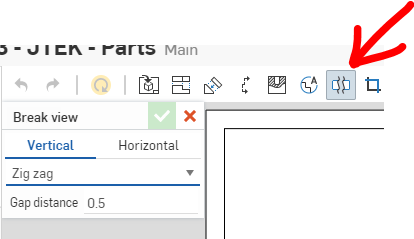
More info here:
https://cad.onshape.com/help/Content/drawings-views.htm?Highlight=break
5

Answers
-
Unfortunately you cannot link the child views if one of the views is broken. (Yet)
You will need to "eye ball" this for now.
Let's hope we see this fixed soon. There should be improvement requests floating out there, get your name on that list to help them prioritize updating this.
The button is here:
More info here:
https://cad.onshape.com/help/Content/drawings-views.htm?Highlight=break
5 -
Update: Break views can now maintain their alignment to parent views. But we still cannot align the break lines themselves.
Half way there.0