Welcome to the Onshape forum! Ask questions and join in the discussions about everything Onshape.
First time visiting? Here are some places to start:- Looking for a certain topic? Check out the categories filter or use Search (upper right).
- Need support? Ask a question to our Community Support category.
- Please submit support tickets for bugs but you can request improvements in the Product Feedback category.
- Be respectful, on topic and if you see a problem, Flag it.
If you would like to contact our Community Manager personally, feel free to send a private message or an email.
Connecting rotation of a shaft to a gear.

peter_golton
Member Posts: 2 ✭✭
Hello,
I'm near the end of a project to make a gear assembly but having the following problem. I've created a shaft which rotates perfectly withe the revolute mate. I can add the 15 tooth gear so that the spline and shaft mesh but the gear will not rotate. If I add a revolute mate to the gear instead, it will rotate but not the shaft. How can I link the motion of one part to the other please? Many thanks.
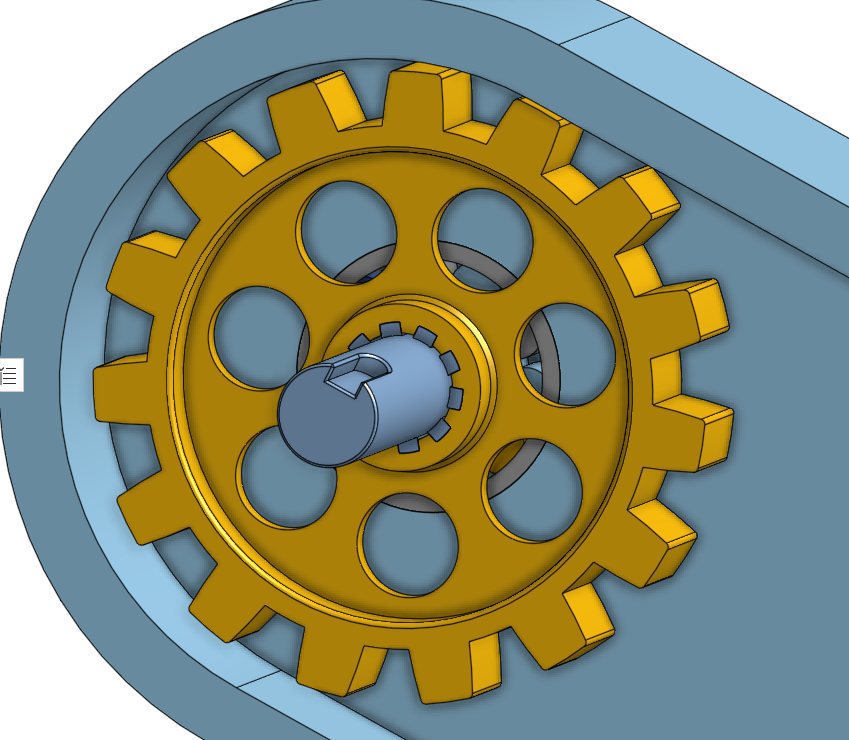
https://cad.onshape.com/documents/89df290326e8e2dafda22ad3/w/3da3d426a810cf088c5cca88/e/51f86caeacf668822846484f
https://cad.onshape.com/documents/89df290326e8e2dafda22ad3/w/3da3d426a810cf088c5cca88/e/51f86caeacf668822846484f
Tagged:
0
Best Answer
-
Hi @peter_golton,
I haven't tried making a copy and editing anything yet, but your approach seems correct and I have a couple of ideas.- Just a bit of advice to make troubleshooting these issues easier - Name your individual parts. I see you have your part studios named, but if you rename your actual parts, it'll be a lot easier to tell what you're doing when you bring them into the assembly.
- How are you moving things around? If you're using the little "play" button inside the mate dialog, you'll only see the the relative motion between the two parts in that mate, which can be a little confusing. So, set up your mates, then try to manually drag the parts around to see how the mates are behaving.
- When mating the gear to the shaft, make sure its a "Fastened" mate and make sure you haven't accidentally selected the case or some other part.
6
Answers
-
Hi @peter_golton,
I haven't tried making a copy and editing anything yet, but your approach seems correct and I have a couple of ideas.- Just a bit of advice to make troubleshooting these issues easier - Name your individual parts. I see you have your part studios named, but if you rename your actual parts, it'll be a lot easier to tell what you're doing when you bring them into the assembly.
- How are you moving things around? If you're using the little "play" button inside the mate dialog, you'll only see the the relative motion between the two parts in that mate, which can be a little confusing. So, set up your mates, then try to manually drag the parts around to see how the mates are behaving.
- When mating the gear to the shaft, make sure its a "Fastened" mate and make sure you haven't accidentally selected the case or some other part.
6 -
Thanks for the tips - I've just tried manually dragging, as you suggested, and both parts move together as they should. That's great, thanks. Pity the play button doesn't work as expected but at least I know the sketches are OK. Pete
0 -
They play button only shows relative motion between the two parts rather than the entire assembly animation. Mostly to save processing time making the play button useful no matter how large the assembly.0
