Welcome to the Onshape forum! Ask questions and join in the discussions about everything Onshape.
First time visiting? Here are some places to start:- Looking for a certain topic? Check out the categories filter or use Search (upper right).
- Need support? Ask a question to our Community Support category.
- Please submit support tickets for bugs but you can request improvements in the Product Feedback category.
- Be respectful, on topic and if you see a problem, Flag it.
If you would like to contact our Community Manager personally, feel free to send a private message or an email.
Is there a simpler way to extrude a spline and have it print?

mitch1138
Member Posts: 9 EDU
I can draw a spline and extrude it as a surface, but the resulting part will not print (no extruded line is visible). I can create a rectangle at the endpoint of the spline and sweep it to create the same appearance and it will print. Is this later the prefered method, is there a more straightforward way to do it. Many thanks.
0
Best Answers
-
I repeated your process. I extruded a spline as a surface, and thickened the surface to form a part. Next, I exported the part as an STL.
I was able to open the part in Simplify3D without any issues. Maybe it is an issue with Cura?
5 -
You might be exporting the surface instead of the thickened part. Try right clicking the part in the part list on the bottom left to make sure you're exporting a solid rather than a surface.
Get in touch: contact@alnis.dev | My personal site: https://alnis.dev
@alnis is my personal account. @alnis_ptc is my official PTC account.5 -
I did a quick screen capture of fixing it. If you have any more questions, please let me know! Sorry for the background noise in the video. I forgot to turn off a noisy dehumidifier I have right by my desk

Link to the model: https://cad.onshape.com/documents/2d8d0ef18bafe5e7a61da7b1/v/f73a04c4187b1da552ff324b/e/ca1c9fe1e03de27a009bdad5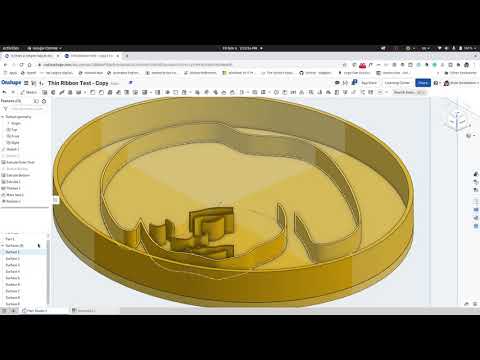 https://youtu.be/MqsE8d1ESBE
Get in touch: contact@alnis.dev | My personal site: https://alnis.dev
@alnis is my personal account. @alnis_ptc is my official PTC account.5



Answers
-
@mitch1138 A surface has no mass or thickness. You can however, thicken a surface to give it volume and create a solid part. I think that should solve your problem.
https://cad.onshape.com/help/Content/thicken.htm?cshid=thicken
0 -
Thank you. It does create the feature, but when the drawing is exported as an .stl, the splicer for the printer doesn't see it.0
-
The drawing or the part? The part should be exported as an STL.0
-
Sorry, the part is exported as an STL. If I only draw a spline line, extrude it as a surface, then thicken it, it looks fine. When I export the part and put it in the splicer (Cura), it doesn't recognize it as a solid object.0
-
If the slicer program is not seeing the stl model it might be because the model is not the right unit. MM or IN. In Onshape, If you right click on the part in the parts list and export as an stl, you have the option to choose the unit. I would try different units or adjust the units from Cura.
Are you exporting the part or the surface from the part studio? 0
0 -
Thanks. It is in millimeter. If I add a "normal" feature (i.e. extruded square) in the same plane, it will print.0
-
I repeated your process. I extruded a spline as a surface, and thickened the surface to form a part. Next, I exported the part as an STL.
I was able to open the part in Simplify3D without any issues. Maybe it is an issue with Cura?
5 -
You might be exporting the surface instead of the thickened part. Try right clicking the part in the part list on the bottom left to make sure you're exporting a solid rather than a surface.
Get in touch: contact@alnis.dev | My personal site: https://alnis.dev
@alnis is my personal account. @alnis_ptc is my official PTC account.5 -
I think you figured out what I was doing! I was exporting from the "Part Studio 1" tab. If I export from the Parts menu on the left it does work. I will need to try it in a more complex drawing.
Many thanks for all your help.
0 -
I was not able to figure out how to do this if the drawing has multiple parts. It looks like it can export only 1 part at a time, the the entire drawing?0
-
There's an option to export parts to separate files which might work in your case:

I usually right-click each part and export it separately, then drag each one into Cura. Here's a quick tutorial that I made mostly for fun that shows the drag and drop action: https://youtu.be/ymduE9utPo4 Get in touch: contact@alnis.dev | My personal site: https://alnis.dev
@alnis is my personal account. @alnis_ptc is my official PTC account.0 -
Thats looks like it would work, but I would then need to combine them to print the entire object.0
-
Could you send a screenshot of your model, or ideally, a link to it with sharing set to public? You might want to use the boolean tool to combine all of the parts for printing.Get in touch: contact@alnis.dev | My personal site: https://alnis.dev
@alnis is my personal account. @alnis_ptc is my official PTC account.0 -
Here is a link to the publlic document (maybe): https://cad.onshape.com/documents/3f56173a9072471571d335cd/w/87f9eeba0a3d00ff90cbec59/e/80987d3772610c05abc74de2
The lines on the sketch are extruded (surfaced) then thickened. It is not complete but should be illustrative. Printing is the issue. Here is a screen shot:
0 -
I did a quick screen capture of fixing it. If you have any more questions, please let me know! Sorry for the background noise in the video. I forgot to turn off a noisy dehumidifier I have right by my desk
Link to the model: https://cad.onshape.com/documents/2d8d0ef18bafe5e7a61da7b1/v/f73a04c4187b1da552ff324b/e/ca1c9fe1e03de27a009bdad5https://youtu.be/MqsE8d1ESBE
Get in touch: contact@alnis.dev | My personal site: https://alnis.dev
@alnis is my personal account. @alnis_ptc is my official PTC account.5 -
That was a great video. Not only fixed my issue, but I learned a few other cool tidbits. Thank you for spending so much time on this.0
-
No problem! Happy to help
 Get in touch: contact@alnis.dev | My personal site: https://alnis.dev
@alnis is my personal account. @alnis_ptc is my official PTC account.0
