Welcome to the Onshape forum! Ask questions and join in the discussions about everything Onshape.
First time visiting? Here are some places to start:- Looking for a certain topic? Check out the categories filter or use Search (upper right).
- Need support? Ask a question to our Community Support category.
- Please submit support tickets for bugs but you can request improvements in the Product Feedback category.
- Be respectful, on topic and if you see a problem, Flag it.
If you would like to contact our Community Manager personally, feel free to send a private message or an email.
Improvement to Onshape - June 21st, 2021


We are excited to bring you our second update this month. This update includes a highly-requested new drawing feature as well as several improvements in different areas of Onshape. Let's dig in.
GENERAL IMPROVEMENTS
PART OUT A TAB FOLDER
Creating folders is a convenient way to organize tabs within a document. With this release you can now move an entire folder out of a document and into a new document in one go.

SPANISH LANGUAGE SUPPORT
The User Interface can now be displayed in Spanish (Universal). Go to My Account > Preferences > Display Language to change languages for individual users.

EXTENDED PERFORMANCE ADVISOR
The performance advisor feature has been improved with this update of Onshape. You’ll find a new “connection” section that gives you ping time and connection region information.
LEARNING CENTER IMPROVEMENT
A new technical briefing has been added in the Learning Center, How to Use Where Used, explaining how to enhance your engineering workflows to capture all design changes in parent assemblies and drawings by using Where Used.
DRAWING IMPROVEMENTS
EDIT CROSS-HATCHING IN DRAWING SECTION VIEWS
In this release, we have added the highly requested feature to modify cross-hatching on section views. You can now modify the spacing, the angle and the color of the cross-hatching. More Hatching styles will be added in the future.
CAD IMPROVEMENTS
SYMMETRIC THROUGH ALL COMMAND
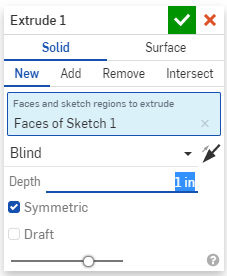
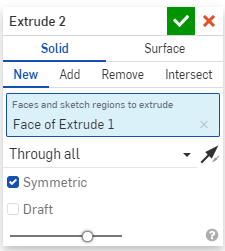
Until now, the cutting through all command only went in one direction. Doing the same thing with a symmetric extrude required typing a large enough number. With this release, the symmetric option is now available as a checkbox for blind and through all, giving you more flexibility in your designs.
ENTERPRISE IMPROVEMENTS
ANALYTICS : IP TRACKING DASHBOARD
Onshape enterprise provides dashboards for a variety of categories of information. In this release, we have added a new intellectual property (IP) tracking dashboard to help track IP by identifying all document exports, copies and access locations.
IMPROVED PUBLIC DOCUMENT ACCESS FOR ENTERPRISES
Enterprise users with access to view public documents can now open public document links from places like the forum and custom features library. Additionally, all enterprise users can now open documents from the Learning Center in their enterprise account. These updates are particularly important for users provisioned through single sign on services who were previously unable to open public documents.
DESTINATION DOCUMENT LINK IN AUDIT TRAIL
When viewing "copy workspace" events in the audit trail, the event description now includes the name of the destination document created when copying another document. If you click on the overflow menu for this event, you'll see an option to open the destination document.

EDUCATION IMPROVEMENTS
RENEW EDUCATION SUBSCRIPTION
Education subscriptions can now be renewed in the Subscription section of My account.
MOBILE IMPROVEMENTS
IOS IPAD SPLIT VIEWS
Split view inside a document is now available. You can now access document details and actions, share information, and Where Used results in a convenient panel that can be expanded, resized, and collapsed as desired.

Please take a moment to try out these new features and improvements and leave your comments below. For a detailed list of all the changes in this update, please see the changelog.
Remember: The updates listed here are now live for all users when creating new Onshape Documents and over the next few days these features will also be available in Documents created before the date of this update.
Comments
-
Nice set of improvements!www.accuratepattern.com3
-
Symmetric through all! Thats a nice one there that will clean things up a bit4
-
Hatching modification! Thanks for the update4
-
Thank's for the improvements Onshape team!
Custom hatching patterns, so close!...
RENDERCAD
rendercad.ai - Photorealistic product rendering.
▚▞▚▞▚▞▚▞▚
________________________________________________________________________0 -
sweet, symmetric thru all! sure beats thru all, second direction thru all.
"large enough number" for thru all... yikes!
4 -
Great Coloring Sections, Thanks.3
-
Nice but PLZ do something about wrap feature (for non-even cylindrical surfaces)1
-
Folder to a separate doc looks handy. And so nice to have hatching options! Thanks Onshape Devs!2
-
Through All symmetric is a great update, only a small detail but makes modelling just a little bit better. Love Onshape for these regular updates!3
-
I was waiting for these hatching options... excellent
Will make drawing much easier to read for my gut on the floor.3 -
Crosshatch editing and Ipad improvements are great additions!!3
-
I was searching "PART OUT A TAB FOLDER" for long time, I didnt know it wasnt implemented
 3
3 -
Sweet stuff guys!2
-
Hurray for Part Out a Folder, needed that about a month ago. Always thought Through All should have a Symmetric option.3
-
¡Gracias por el español!
Thank you!!!2 -
Great set of updates. Thank you1
-
Great to see hatching in the drawings!2
-
Section hatching edit and symmetric through-all are two features I have been eagerly awaiting! Thanks!
1 -
Very nice. Every update is a joy to see how much more we can do with Onshape.1
-
Muchas gracias por el idioma - Español -
Gran Actualizacion !!!
A lot of Thanks for Spanish languaje.
Great Update!!1 -
Thank you for the Extrude and Hatch options!1
-
Symmetric Thru All, Improved Public Access for Enterprise, Part Out - Thanks!2
-
Section hatching addition wonderful .Thanks ONSHAPE TEAM1
-
Really appreciate the Education subscription renew in the My Account tab-- good stuff!2
-
Thank you for
EDIT CROSS-HATCHING IN DRAWING
but, since our problem with hatching is for small parts in big assembly, it is not verry usefull.We would need smaller spacing.Thank you
La simplicité est la sophistication suprême.
Léonard de Vinci0