Welcome to the Onshape forum! Ask questions and join in the discussions about everything Onshape.
First time visiting? Here are some places to start:- Looking for a certain topic? Check out the categories filter or use Search (upper right).
- Need support? Ask a question to our Community Support category.
- Please submit support tickets for bugs but you can request improvements in the Product Feedback category.
- Be respectful, on topic and if you see a problem, Flag it.
If you would like to contact our Community Manager personally, feel free to send a private message or an email.
Creating an extrusion using dimensions of face parallel to sketch plane.

Edward_Harris
Member Posts: 7 PRO
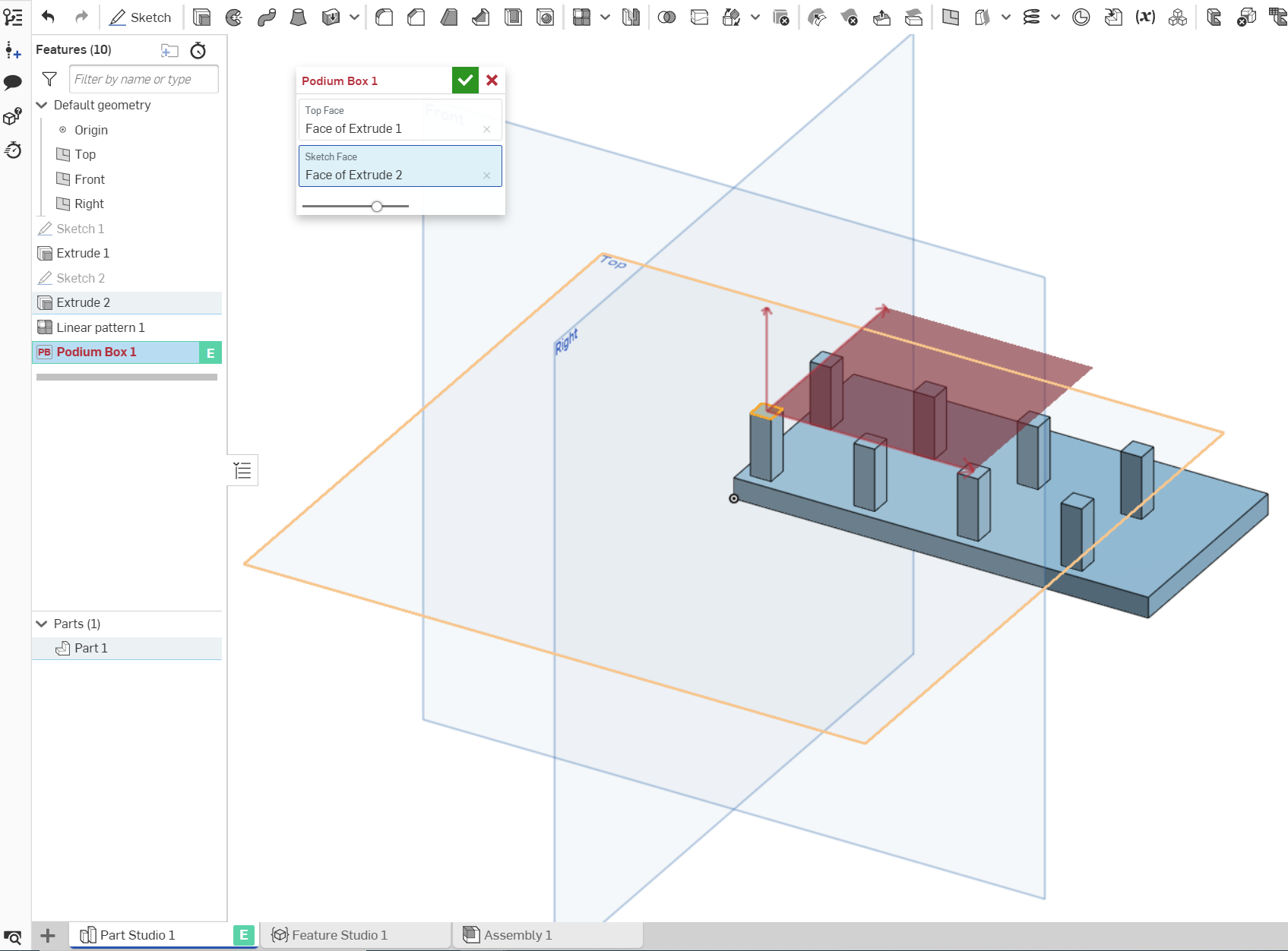
Hello. I am trying to learn FS, and as a step in a larger project, I am trying to get my feature to create an extrusion with the same sketch dimensions as a face parallel to the sketch surface but I am at a loss as to how to best go about this. Do you have any suggestions?
So far I have managed to create a sketch plane where I want the extrusion to be placed, but I am unsure as to which function, query/evaluate, to use in order to get the dimensions of the parallel face and also how I would go about this in general. The main automation in this feature should lie in the identification of the sketch dimensions, the height of the subsequent extrusion is irrelevant at this time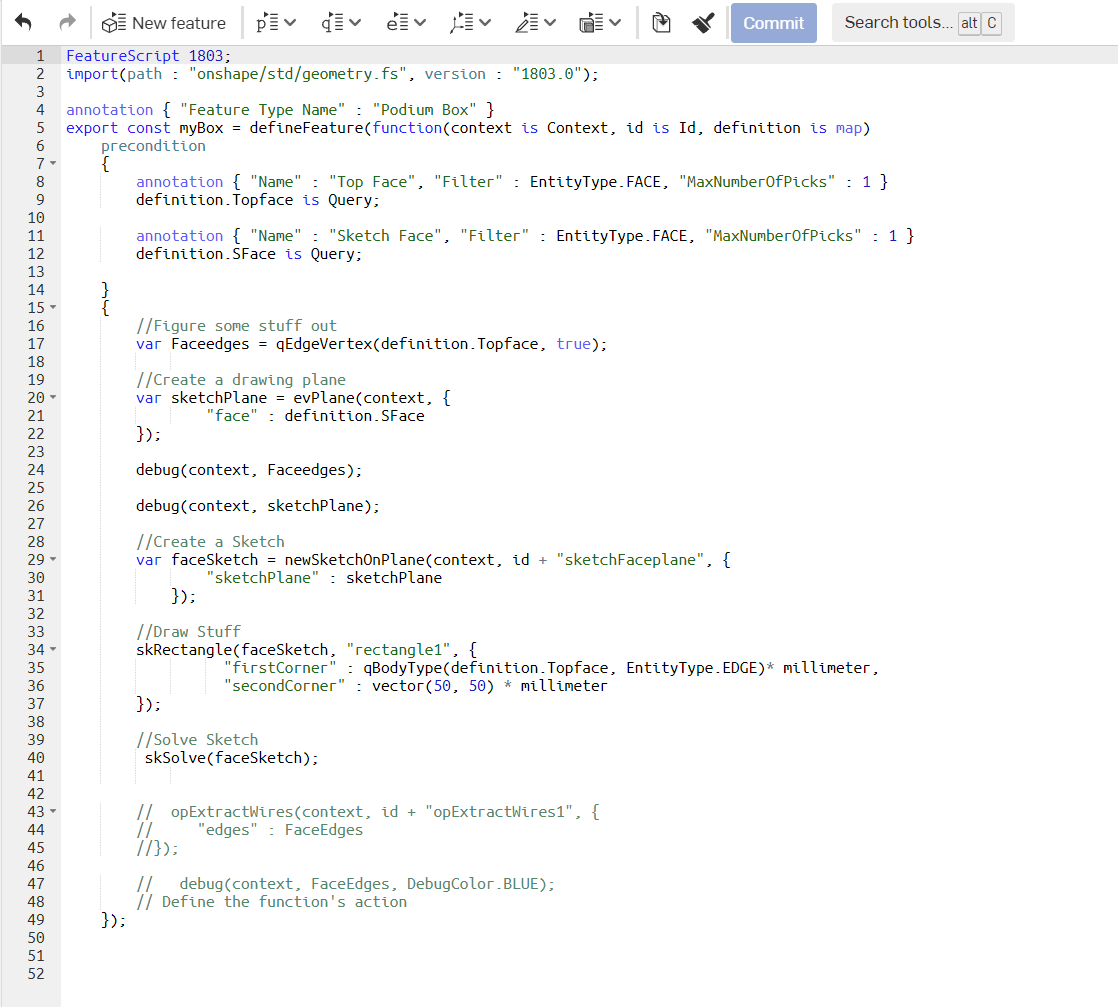
 .
.
So far I have managed to create a sketch plane where I want the extrusion to be placed, but I am unsure as to which function, query/evaluate, to use in order to get the dimensions of the parallel face and also how I would go about this in general. The main automation in this feature should lie in the identification of the sketch dimensions, the height of the subsequent extrusion is irrelevant at this time
.FeatureScript 1803;
import(path : "onshape/std/geometry.fs", version : "1803.0");
annotation { "Feature Type Name" : "Podium Box" }
export const myBox = defineFeature(function(context is Context, id is Id, definition is map)
precondition
{
annotation { "Name" : "Top Face", "Filter" : EntityType.FACE, "MaxNumberOfPicks" : 1 }
definition.Topface is Query;
annotation { "Name" : "Sketch Face", "Filter" : EntityType.FACE, "MaxNumberOfPicks" : 1 }
definition.SFace is Query;
}
{
//Figure some stuff out
var Faceedges = qEdgeVertex(definition.Topface, true);
//Create a drawing plane
var sketchPlane = evPlane(context, {
"face" : definition.SFace
});
debug(context, Faceedges);
debug(context, sketchPlane);
//Create a Sketch
var faceSketch = newSketchOnPlane(context, id + "sketchFaceplane", {
"sketchPlane" : sketchPlane
});
//Draw Stuff
skRectangle(faceSketch, "rectangle1", {
"firstCorner" : qBodyType(definition.Topface, EntityType.EDGE)* millimeter,
"secondCorner" : vector(50, 50) * millimeter
});
//Solve Sketch
skSolve(faceSketch);
// opExtractWires(context, id + "opExtractWires1", {
// "edges" : FaceEdges
//});
// debug(context, FaceEdges, DebugColor.BLUE);
// Define the function's action
});
I have been stuck for 3 days now, any help would be greatly appreciated.
Best regards
Edward
I have been stuck for 3 days now, any help would be greatly appreciated.
Best regards
Edward
Tagged:
0
Comments
-
Based on your code comments it looks like you've watched the videos from @adamohern. Great resource! This should be doable, and it's all about querying the right thing and evaluating its length. Will you annotate your screenshot to show which dimensions you want to get at with FS to reference?
1 -
Why opExtractWires? opExtrude is what you need.
Senior Director, Technical Services, EMEA0 -
I hope the annotations make it more clear as to what I am trying to query, and yes, what and how to query it have been my biggest challenge, as well as how to call it in a function.Evan_Reese said:Based on your code comments it looks like you've watched the videos from @adamohern. Great resource! This should be doable, and it's all about querying the right thing and evaluating its length. Will you annotate your screenshot to show which dimensions you want to get at with FS to reference?
0 -
Geometry is generally easier to work with than sketches in Featurescript (perhaps even in Onshape in general
 ). Here's one solution - linkDesign Engineer | Anerdgy AG1
 -
I'll give this a go, anything that can simplify the process is a big help haha!brooke_spreen said:Geometry is generally easier to work with than sketches in Featurescript (perhaps even in Onshape in general ). Here's one solution - link 0
0 -
Do you have any suggestions as to what I should query?Evan_Reese said:Based on your code comments it looks like you've watched the videos from @adamohern. Great resource! This should be doable, and it's all about querying the right thing and evaluating its length. Will you annotate your screenshot to show which dimensions you want to get at with FS to reference?0 -
Any luck?Edward_Harris said:I'll give this a go, anything that can simplify the process is a big help haha!
Design Engineer | Anerdgy AG0