Welcome to the Onshape forum! Ask questions and join in the discussions about everything Onshape.
First time visiting? Here are some places to start:- Looking for a certain topic? Check out the categories filter or use Search (upper right).
- Need support? Ask a question to our Community Support category.
- Please submit support tickets for bugs but you can request improvements in the Product Feedback category.
- Be respectful, on topic and if you see a problem, Flag it.
If you would like to contact our Community Manager personally, feel free to send a private message or an email.
Improvements to Onshape - September 19th, 2022

ONSHAPE ENTERPRISE
ONSHAPE - ARENA CONNECTION
Earlier this week, we announced the Onshape - Arena Connection, which provides integrated cloud-native CAD, PDM, and PLM. With the click of a button, product data is instantly shared between systems, helping engineering and supply chain teams collaborate and iterate on product designs earlier in the design process. The Onshape-Arena Connection is available for all Onshape Enterprise users who also have Arena Launch or Arena Scale, at no additional cost.GENERAL IMPROVEMENTS
PROJECTED CURVE
The Projected curve feature now allows curves to be defined using the projection of a curve and a face.REVERT MERGE
After a merge, a message bubble appears to allow the user to revert the merge, providing a shortcut to restore the document to its pre-merge state.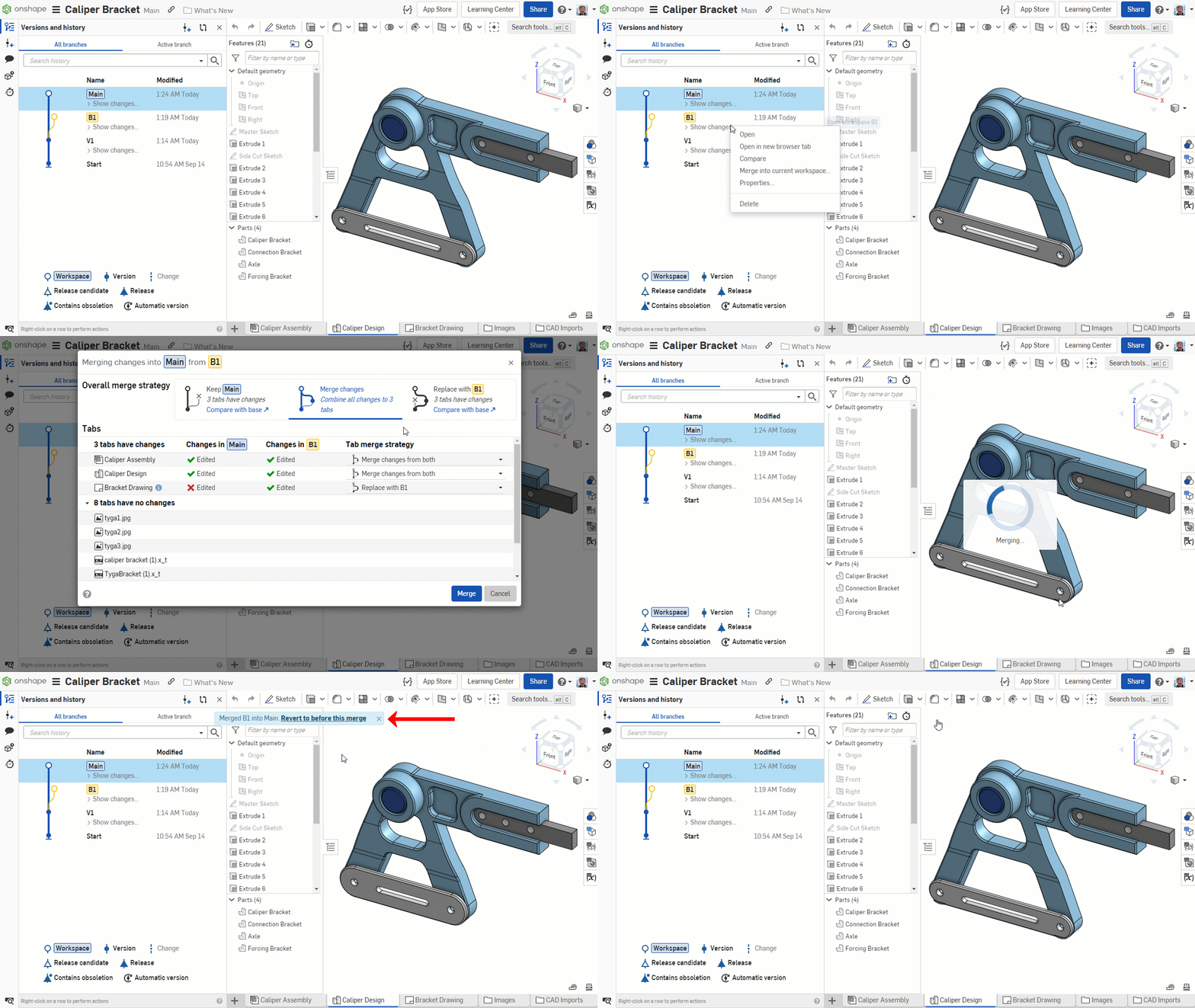
LAST CHANGE TOOLTIP FOR SELECTIVE MERGE
In the Selective merge dialog, a tooltip displays when the last change was made to a tab, and who made that change.
HOLE FEATURE UI IMPROVEMENT
Editing variables for the hole feature is now much more intuitive, as hole depth, tapped depth, and tap clearance can all now be used as driving variables.
TAB MANAGER UI IMPROVEMENT
An updated Tab manager interface matches behavior from the documents page and improves visibility.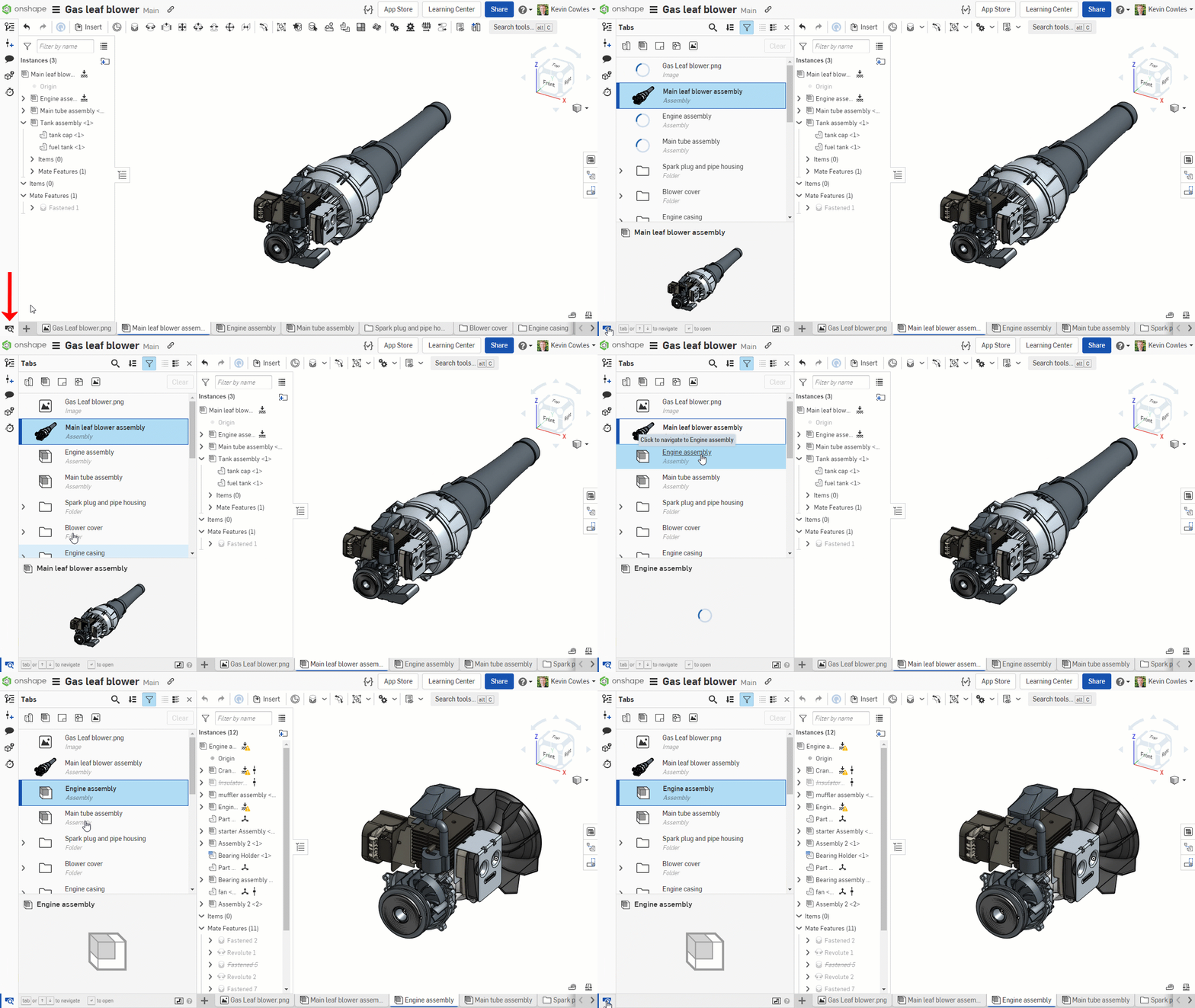
DRAWING IMPROVEMENTS
JOGS IN DIMENSION EXTENSION LINES
Create jogs in dimension extension lines to improve the organization and clarity of your Onshape Drawings.ANNOTATIONS IN DRAWING FORMAT LAYERS
Move Geometric tolerances and Surface finish annotations between drawing layers. Move any annotation type not linked to geometry to the format layers, making drawing templatization even more powerful.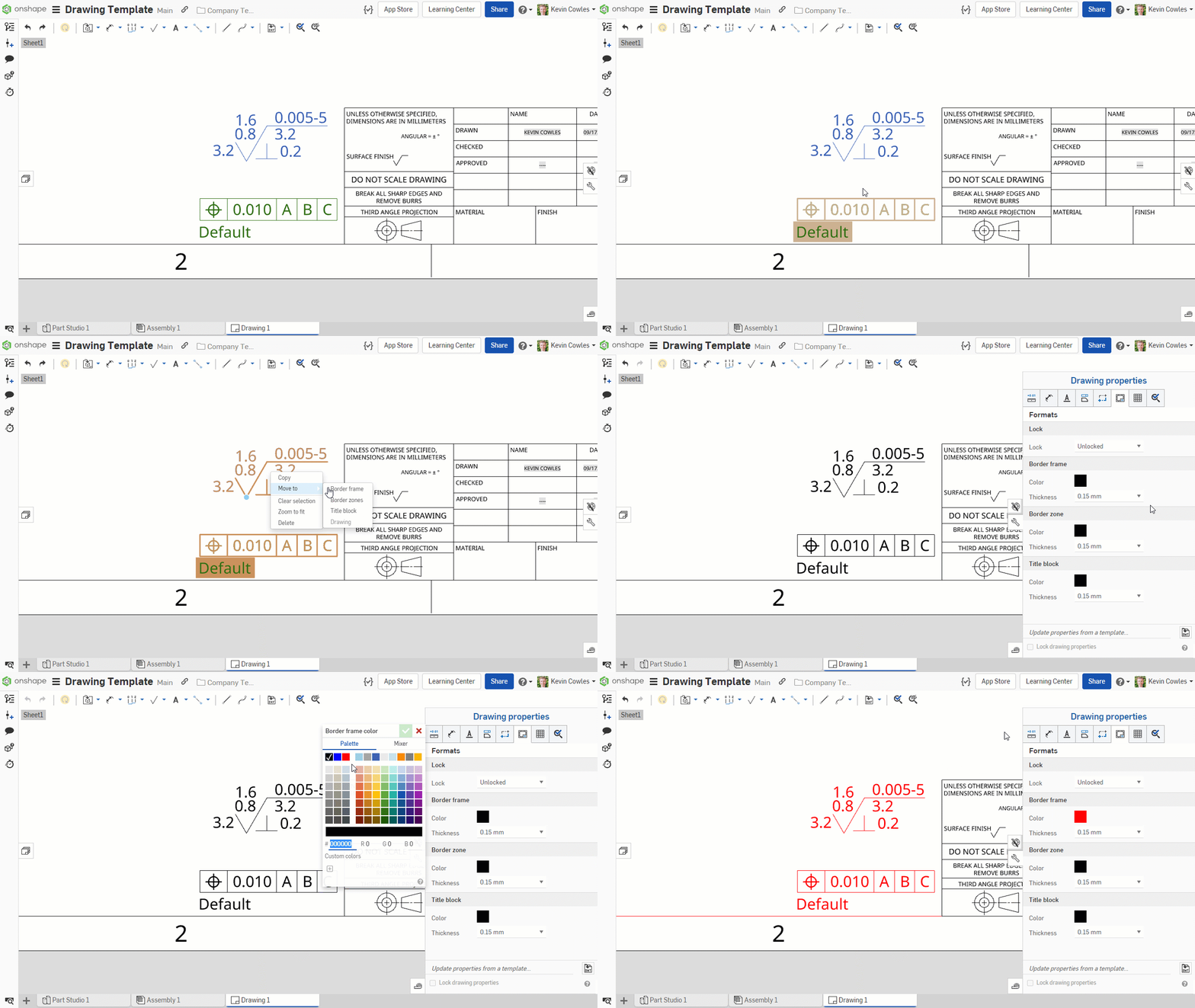
ASSEMBLY IMPROVEMENTS
ASSEMBLY TREE RIGIDITY INFORMATION
The assembly tree now provides additional information regarding the rigidity of the assembly and its subassemblies, as well as whether instances have unconstrained degrees of freedom. This helps assembly performance by ensuring that subassemblies are appropriately constrained.EDIT SUPPRESSED MATES
You can now edit suppressed mates.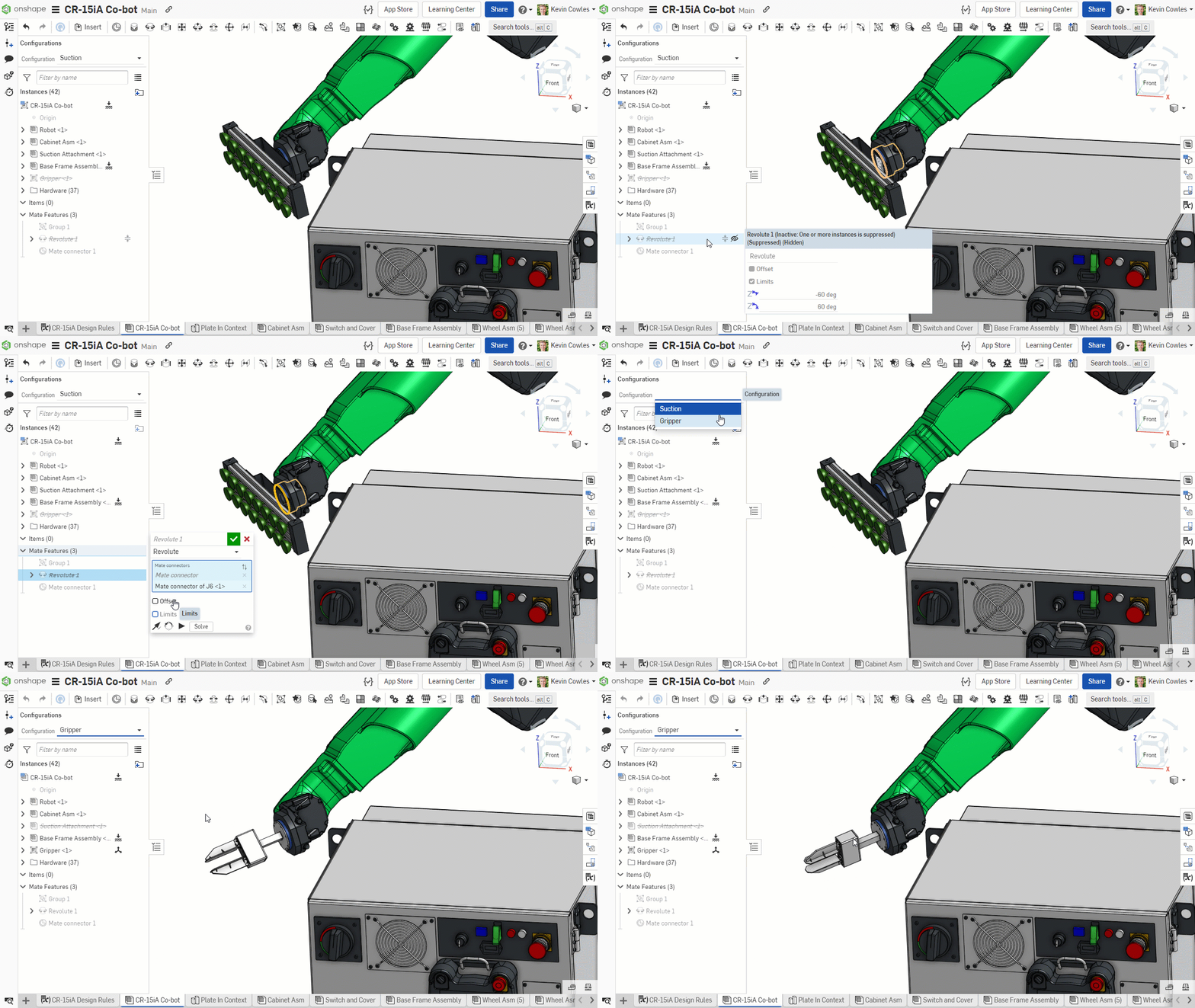
LEARNING CENTER IMPROVEMENTS
ADVANCED ONSHAPE ASSEMBLIES
A new self-paced course, Advanced Onshape Assemblies, is now available in the Onshape Learning Center. This course explores advanced assembly techniques including mate relations, assembly patterns and replication, display states, named positions, exploded views, items, and interference detection. This course is available to Standard, Professional, Enterprise, and EDU Onshape users.PCB STUDIO FUNDAMENTALS
A new self-paced course, PCB Studio Fundamentals, is available in the Onshape Learning Center. This course describes the fundamentals for getting started with PCB Studio including importing ECAD data, creating boards and syncing to a Part Studio and Assembly, modifying PCB designs, exporting ECAD data, sharing and data management of ECAD data, and managing PCB Studio settings. This course is available to Professional and Enterprise Onshape users.VIDEO UPDATES
There have been several video updates to existing courses in the Onshape Learning Center, including:
Introduction to Assemblies course
Update to the introduction to assemblies video to include tangent edge display option.
Onshape Assemblies course
Update to the BOM video to include column sorting option.
Update to the mating video to include new icons in the interface for limits.
Detailed Drawings course
New video on how to use the format painter tool.
New video on view simplification.
New video on assembly view options including adding exploded views, named positions, display states, and hiding/showing components in a drawing.
Multi-part Part Studios course
- Feature list filters and folders video updated to include nested folders.
Please take a moment to try out these new features and improvements and leave your comments in the Forum post. For a detailed list of all the changes in this update, please see the changelog.
Remember: The updates listed here are now live for all users when creating new Documents. Over the next few days, these features will also be available in Documents created before this update.
Comments
-
Love the degree of freedom indicators, but... It would really help if they were "recursive" as it doesn't show you things that can move that are within a sub-assembly, which is unfortunate! I hope this gets added soon!4
-
Great to see improvements in the assembly to better understand unconstrained parts. No more need to wildly drag parts to find the free one 😂3
-
I've always wanted DOF indication. This will save a lot of time.4
-
Assembly tree rigidity indicators are super! Icons are thoughtful and clear. Insight into structure at a glance. Very Onshape!
2 -
good update
thanks1 -
Fab...thank you. A great update1
-
Good update, thank you Onshape Team for your great work!

And best is, that I don't have to install anything 0
0 -
Join Richard Doyle the User Group Guy and Mike LaFleche for discussion and demonstration of the new features in Onshape today! On Twitter @mlaflecheCAD, on Twitch @mlaflecheCAD and Onshape Youtube and LinkedIn below.
LinkedIn. https://www.linkedin.com/video/event/urn:li:ugcPost:6977940041100627968/
Youtube. https://www.youtube.com/watch?v=BUjAXA0DzV0
Regards,Mike LaFleche @mlaflecheCAD3 -
Thank you for the nice Improvement! My favourite is "ASSEMBLY TREE RIGIDITY INFORMATION".1
-
Nice improvements, but I still need Arial font.
2 -
Just keep going! 1
-
Nice on the DoF indication. Would it also be possible to show the amount of DoF a part still has? Or even display the free translation or rotation directions?2
-
I was complaining about the clearance threads yesterday!! Can we please get through to next on the hole depth though?3
-
Great work!!
I love all the UI improvementsUn saludo,
Eduardo Magdalena C2i Change 2 improve ☑ ¿Por qué no organizamos una reunión online?
Partner de PTC - Onshape Averigua a quién conocemos en común1 -
As usual. All great updates!1
-
All we need now is the hard-to-see blue spinning circle that shows something is still loading to be more visible!!!
4 -
Un saludo,
Eduardo Magdalena C2i Change 2 improve ☑ ¿Por qué no organizamos una reunión online?
Partner de PTC - Onshape Averigua a quién conocemos en común1 -
Assembly tree rigidity, OMG Thank you!
Been craving this one for years!
I like how it also warns you on over constrained mistakes and sub assembly rigidity!
edit suppressed mates will also come in handy
I don't understand what has changed with Hole UI, and Tab Manager UI.
Isn't that how they were before?1 -
Both UI updates are subtle changes, but definitely make the features easier to use. For the Hole feature, it is now more intuitive to establish a specific tapped depth, and for Tab manager it is easier to see which tab is active and only one click to open a tab.john_mcclary said:
I don't understand what has changed with Hole UI, and Tab Manager UI.
Isn't that how they were before?1 -
Prior to this improvement for these hole parameters there were cases where you needed to back into specific tap drill and tap depths using fractional thread clearance values, which was odd especially when you may not have cared about thread clearance as much. This was due to not having control over what values were driving. Now we assume the currently edited value becomes the driver on the fly and we adjust the 3rd most recently edited value as a consequence. So you don't see overt driving controls and we intuitively switch that based on recent edit order. It's a clean UI still and should give users what they want in all cases. Sometimes improvements just work as you would expect they always would have.5
-
Really appreciate the single click in tab manager. I would like to see the single click brought to the drawing mode. Pain in the b.. to double click for sheet change.Kevin_Cowles said:
Both UI updates are subtle changes, but definitely make the features easier to use. For the Hole feature, it is now more intuitive to establish a specific tapped depth, and for Tab manager it is easier to see which tab is active and only one click to open a tab.john_mcclary said:
I don't understand what has changed with Hole UI, and Tab Manager UI.
Isn't that how they were before?2 -
OOHhh!
I see, it's completely highlighted now.
That's right, I got so used to looking at the thick vertical blue line, that I didn't even see the giant blue selection! Ha!
Yea, I remember now years ago I requested something like this because my monitor would wash out that blue line on the edge of the screen, since then Onshape added a toolbar there for the version and performance stuff, so the blue bar stood out better and fixed that old issue so I just forgot about it.
Thanks for sticking to your old IRs
3 -
Yes that would be nice especially since double clicking the current active one brings up the properties so it's a bit weird, single click to switch to the sheet would help a lot!glen_dewsbury said:Really appreciate the single click in tab manager. I would like to see the single click brought to the drawing mode. Pain in the b.. to double click for sheet change.
That said, I have found myself using the keyboard shortucts more and more to switch between sheets: pgup, pgdn, home and end. If you have less than 5 sheets, any sheet is only two keystrokes away!0 -
Oo, Arena. Nice! Thanks team!
RENDERCAD
rendercad.ai - Photorealistic product rendering.
▚▞▚▞▚▞▚▞▚
________________________________________________________________________2 -
Rigid assembly icons are great.
RENDERCAD
rendercad.ai - Photorealistic product rendering.
▚▞▚▞▚▞▚▞▚
________________________________________________________________________1 -
holy I cant believe what im seeing1
-
Really great update. I love how we keep getting new features but OS still works on making subtle tweaks to improve the UI.1















 https://youtu.be/q4a3wXAXyME