How do I print a document or drawing 1:1?

mario_darceuil
Member Posts: 113 ✭✭
I wan to print a drawing in the ratio 1:1 or the same size as it is drawn. Please give instructions.
0
Answers
-
In the drawing, make sure the sheet is 1:1 scale. When you send it to your printer, make sure you have the printer scale at 100%, and also make sure the paper size in the printer dialog matches the Onshape drawing size.
To double check you got it all correct, put a dimension on your drawing, and after it prints out, measure that with a ruler.0 -
I just want to add to this from my experience.Do not use your browser to print. Onshape creates a PDF to enable printing most browsers will display the PDF but when printing your browser *may* still scale the print. mine was off by about 2%By using Adobe PDF Reader to print the accuracy increased dramatically. however still not exact.I use printing to make a paper template fro drill holes.0
-
Where am I supposed to make sure the sheet is 1:1 scale?
I don't see any place where it shows me that information. I can scale it with a scroll wheel at the print/preview dialog but nowhere does it show a % scale. FreeCAD does this properly and so does Fusion and NanoCAD, offering the ability to fix scale at the print dialog.
0 -
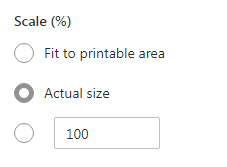
when pritting make sure Actual size is selected and not fit to printable area. In actual size, make sure it's set to 100%.
 0
-
When in the drawing TAB double click on the Sheet in the feature tree on the left i.e. "Sheet1" and a dialogue box will open showing th sheet scale……adjust to suit
0