Welcome to the Onshape forum! Ask questions and join in the discussions about everything Onshape.
First time visiting? Here are some places to start:- Looking for a certain topic? Check out the categories filter or use Search (upper right).
- Need support? Ask a question to our Community Support category.
- Please submit support tickets for bugs but you can request improvements in the Product Feedback category.
- Be respectful, on topic and if you see a problem, Flag it.
If you would like to contact our Community Manager personally, feel free to send a private message or an email.
Best Of
Re: Sheet metal export

Re: Improvements to Onshape - January 9th, 2026
I'll call attention to one more item from the changelog for heavy FeatureScript authors. The performance panel now tells you how many modules you're importing in a Part Studio or a Feature Studio. People writing massive FS libraries have run into performance issues with too many modules being imported (typically via many different versions of std being referenced) so now you can at least see how much you're bringing in and how imports affect the module count.

Improvements to Onshape - January 9th, 2026
Last year brought 17 new Onshape releases, with countless new features and improvements. We hope you have found them beneficial to your designs and workflows every day. But now is hardly the time to reflect on what we have accomplished together - instead, we are excited to start off the year strong with some new features in our first release of 2026!
PART STUDIO IMPROVEMENTS
REVOLVE FEATURE END CONDITIONS
Onshape has introduced new end conditions for Revolve features that provide more flexible ways to define how revolve operations terminate. The new options include Up to Next (terminates when intersecting with existing geometry), Up to Part (terminates into a specified part or body), Up to Vertex (terminates at any selected point), and Up to Face (terminates at any specified face). These enhancements streamline the design process by removing the need to manually calculate angles or clean up geometry after creating revolve features.SKETCH DIALOG REMEMBERS ON/OFF STATE
In the sketch dialog, the Show constraints, Show expressions, and Show errors checkbox on/off state now persists. The state of these settings is remembered on a per user basis across all documents and sessions, and is maintained everywhere in Onshape until changed. This includes both editing old sketches and creating new ones. The Disable imprinting checkbox state persists only when creating a new sketch.SKETCH SLOTS - CLOSED CURVES
The sketch Slot tool now supports the creation of slots based on selecting a closed curve.CONNECTION ANALYSIS TOOL
A new Connection analysis tool allows you to quickly evaluate the connection type of two surfaces. It displays G0 (connection), G1 (tangency), and G2 (curvature continuity), with the option to prescribe a tolerance value for G1 and G2 types.ASSEMBLY IMPROVEMENTS
LINK PART STUDIO CONTEXT TO ASSEMBLY NAMED POSITIONS
You can now set an Part studio's assembly context to follow one of the assembly’s Named positions. By linking a context to a Named position, Onshape only presents the option to update the Part studio's context when the assembly’s Named position has changed. You may link and unlink a context freely as required, allowing for even clearer control of multiple contexts, even in an assembly with complex motion.MIRRORED SHEET METAL FLAT PATTERN VIEW
When creating derived, or opposite hand versions of sheet metal parts using Assembly mirror, Onshape now automatically provides the flat pattern for those parts. This eliminates the need to reference the original reference part's flat pattern for manufacturing purposes.GENERAL IMPROVEMENTS
CONFIGURATION VISIBILITY - ALWAYS SHOW
A new option makes it easier to always show a configuration input, regardless of any other applied Configuration visibility conditions.VARIABLE TABLE IMPORT FROM CSV
You can now create or update an Onshape Variable table from an external CSV file.As a note, it is possible to configure fields to extract different table values depending on your Onshape configuration. To further understand the depth of this functionality, we encourage you to review the help documentation.
LEVEL OF DETAIL GRAPHICS IMPROVEMENT - TRANSPARENCY
Just a few releases ago, we introduced a graphical level of detail improvement when zooming in on complex designs. This load-on-demand graphics behavior is now implemented for parts with transparency.ONSHAPE-ARENA CONNECTION
AUTOMATIC CREATION OF SHEET METAL DXF ON RELEASE SYNC
When a sync operation occurs at the creation of a release, Onshape now automatically generates a DXF of the flat pattern for any Sheet metal parts contained in the release candidate. The DXF file(s) are displayed in the Files view in Arena after being synced.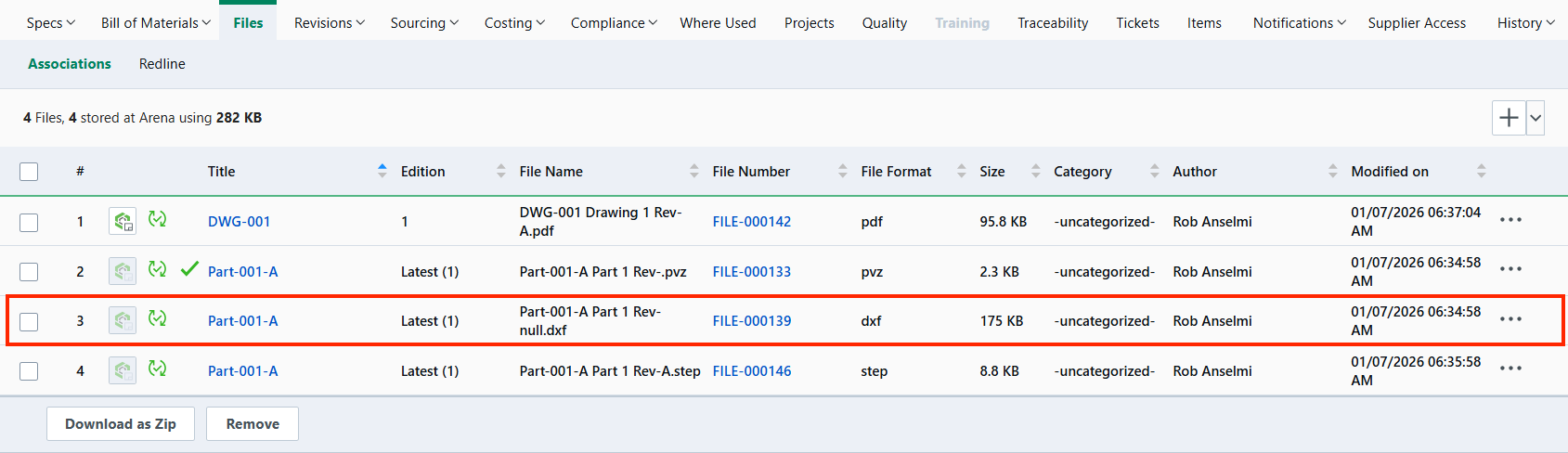
NOTE: While enabled in Onshape at this release, this improvement will not be functional in your environment until an update to Arena is completed. Currently, that update is scheduled to be complete on or before January 11th, 2026. The update has been completed successfully, and this feature is now available for all Onshape-Arena connected environments.
CAM STUDIO IMPROVEMENTS
ADAPTIVE CUTTING OPTIONS
Adaptive cutting options are now available for 2D roughing, 3D roughing, and flatlands in all versions of Onshape CAM Studio. These strategies maintain a constant chip load, which improves machining accuracy, reduces cycle times, and results in smoother toolpaths.WORKPLANES AND DATUMS
Onshape CAM Studio now supports work planes and datums for all users, enabling the definition and management of custom coordinate systems within CAM projects. This update improves setup efficiency and precision.DATUM OVERRIDES
CAM Studio has introduced a new datum overrides feature that gives users complete control over assigning work coordinate system identifiers. This enhancement allows users to apply unique identifiers to each setup or work plane they create, providing greater flexibility and organization in their CAM workflows.SHIFT WORK COORDINATE SYSTEM
You can now manually shift a work coordinate system location using X, Y, and Z values. If a user needs to assign a work coordinate system on a specific feature or a specific location, users can measure and apply those values.WORKHOLDING
CAM Studio now allows workholding selection at the job level. This means users can assign and manage specific workholding elements for each job, so simulations display only the relevant fixtures. This improves simulation accuracy and streamlines the manufacturing setup.TOOL HAND
Onshape CAM now automatically sets the spindle direction for milling, drilling, and tapping operations based on the tool hand. For tapping tools, thread direction is linked to the tool hand. These changes ensure consistent NC output and simplify setup.Please take a moment to try out these new features and improvements and leave your comments below. For a detailed list of all the changes in this update, please see the changelog.
Remember: The updates listed here are now live for all users when creating new Documents. Over the next few days, these features will also be available in Documents created before this update. Mobile app interface updates occur via the Apple App store or Google Play store and happen in the days following the update.
 Roy_Mutalik
Re: CAD Battle #1 - January 2026 (Best of the Worst Competition)
Good to see more entries trickling in. The more the merrier. I will say that I've been noticing the undefined sketches and while I approve, in this competition your guys' trees are allowed to be much more colorful than just blue and white. For example, my self submission.

Re: CAD Battle #1 - January 2026 (Best of the Worst Competition)
I wish I had the time to contribute, but can somebody please make one that is entirely made from offset faces nit together from standard content in an in-context part studio.

How to get REAL Textures in Onshape?! 🤯
Here is a short tutorial on how to get REAL textures in Onshape.
Let's see what you guys can make! Post your cool textured models below. 😎
Example Document to get you started.
Shout out to @EvanReese for creating the mind-blowing Displacement Map feature + Image to CSV app.
Also thanks
 CADSharp for sponsoring this tutorial.
.
How to get REAL textures in Onshape:
- Choose a texture from here or your favorite texture site:
- Convert the displacement map image to csv using Evan's app:
- ⚠️Note: Changing the "Output size" is going to directly affect your texture surface quality.
- 60 x 60 for low detail images, 300 x 300 for high detail images
- Convert the texture files into a square rendered image:
- Import the CSV and Render into Onshape then use the Decal feature followed by the Displacement Map feature.
- Displacement map tips:
- The "Degree" input is the smoothness of the spline. 2 will be very detailed while 15 will be very smooth.
- Displacement map tips:
.

A few more undocumented FeatureScript functions
Over on the SmartBench blog I've written another article discussing a few undocumented FeatureScript functions that I find useful.
While there are some hidden gems in the std code, just keep in mind that undocumented functions could produce unexpected results, or change without warning. Something to keep in mind if you use these in any business critical applications.
Are there any gems hidden in the featurescript std code that you've found to be useful?
Re: Ridiculous design decisions with your Configurations
Just wanna say that I love the courteous replies coming from the incredibly smart people who have dedicated the past 13+ years of their life building Onshape from scratch and who's decisions have just been called "ridiculous" and "terrible". The company culture is on point.
