Welcome to the Onshape forum! Ask questions and join in the discussions about everything Onshape.
First time visiting? Here are some places to start:- Looking for a certain topic? Check out the categories filter or use Search (upper right).
- Need support? Ask a question to our Community Support category.
- Please submit support tickets for bugs but you can request improvements in the Product Feedback category.
- Be respectful, on topic and if you see a problem, Flag it.
If you would like to contact our Community Manager personally, feel free to send a private message or an email.
Best Of
Re: How to move an imported part to origin
You can use a transform feature to move a part. If there is a specific point you'd like to dock at the origin, there is a "Translate by line" option where you can select two points to infer the line to move it. In this case, you can select the origin and the point you want to dock and have it translate the part to the origin. If you want a more free-form move, you can use "Translate by XYZ" and use the manipulator to move the part where you want it to be.
1. Start a transform feature

2. In the transform feature, select the part or parts you want to move to the origin. In my case, I only have 1 part.

3. Make sure the type is "Translate by line" and in the selection box for "Line or points" first select the point you want docked to the origin.

4. Next, select the origin. This will infer a line to translate the part by and essentially move the part(s) to the origin. You may need to toggle the flip direction if the part(s) moved in the opposite direction.


Re: Midpoint of Two Points
If a point is placed on the line between the two existing points you can make the new point at midpoint between the original two points by selecting the two original points and then the new point and assign the midpoint constraint to it. - Scotty

Re: Hide part in an active feature.
Your comment is formatted as code. I like to do it on purpose sometimes in my posts. For the intrusive thoughts

Re: MCMASTER 2 ONSHAPE
This is up and working again.
I'm using pdf scraping vs the api to get the data. This may be a more univeral way of doing it.

Re: Improvements to Onshape - January 9th, 2026
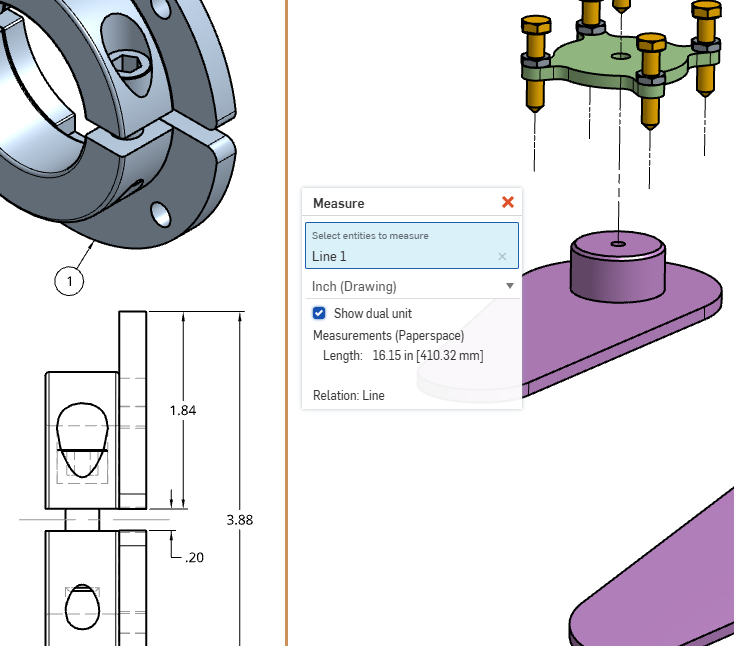
I just noticed there is Measure command in drawings… and it has Dual Units!!
When can we get dual units in the Assemblies and Part Studios???

Re: Hide part in an active feature.
I would love to have more flexibility to use hide or isolate whenever, but in the mean time, I would try at least temporarily working in translucent shade mode, and using the select other (~ tilde key, or whatever is above your Tab key) to cycle until you get the right thing.
 S1mon
S1mon
Re: Remove over extrusion from sweep that extends past face on another part
@Martin_29 The center of the arc needs to be at the vertex of the square. Like this. The sketch on the right shows the center of the arc is slightly above and will cause the sweep to come in at that angle. That is why your sweep is not working.
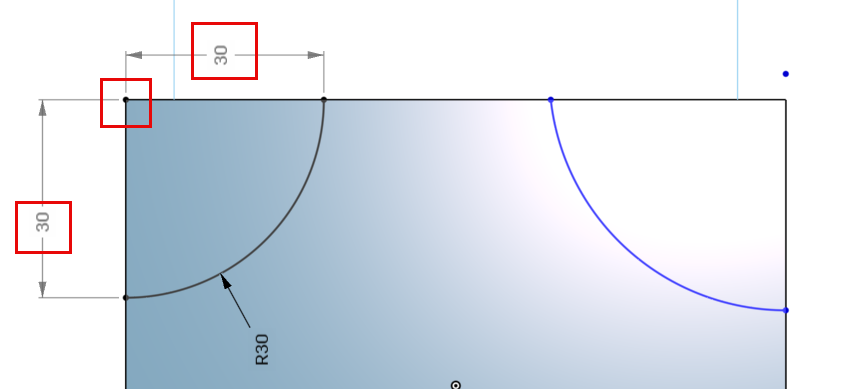
Here is the document for reference https://cad.onshape.com/documents/40b95184acc45ffc4546befa/w/0ff2ed48542ada6efa509cf6/e/6f01d7e2f78c9df4f40a52d0

Re: Can you add a point/vertex to an existing sketch? (Trying to fix a twisting loft)
Yes, of course. Something like this to blend better.