Welcome to the Onshape forum! Ask questions and join in the discussions about everything Onshape.
First time visiting? Here are some places to start:- Looking for a certain topic? Check out the categories filter or use Search (upper right).
- Need support? Ask a question to our Community Support category.
- Please submit support tickets for bugs but you can request improvements in the Product Feedback category.
- Be respectful, on topic and if you see a problem, Flag it.
If you would like to contact our Community Manager personally, feel free to send a private message or an email.
Best Of
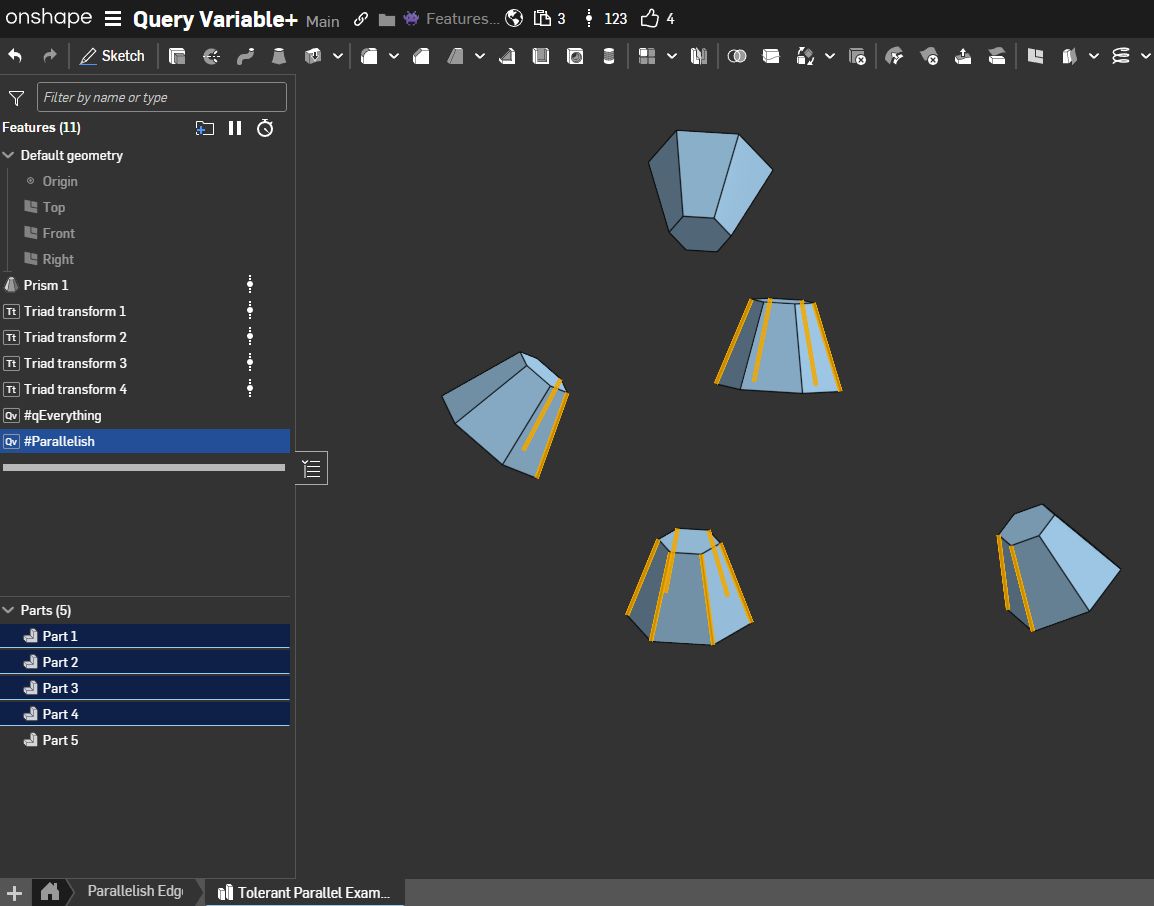
Re: Custom Feature: Query Variable+
@Konst_Sh Those could be really useful. I also realized that I might be able to get some use out of a generally tolerant equal to size query since I've already got the conditions built for larger than / equal and smaller than / equal. Different from qMatching if I'm looking for things that differ in geometry.
@jelte_steur_info I implemented a modified version of tolerant parallel that doesn't assume a qEverything because there are cases where I'd like to filter for parallelish items on a specific subset of queries. To make it up to you I also implemented qEverything so you can still get the job done with two QV+s in a trenchcoat. Actually I needed some qEverything for other use-cases anyway so we can knock that one off the list.

Improvements to Onshape - December 12, 2025
Happy holidays from Onshape! The last official Onshape release of 2025 offers some highly requested goodies, including robust methods for displaying hole quantities on drawings, never before seen realism with the Volume entity in Render Studio Advanced, and CAM Studio usability improvements.
DRAWINGS
QUANTITY FOR HOLE CALLOUTS
Hole callouts in Drawings now support displaying quantities, improving clarity when documenting drilled holes.
RECTANGULAR BORDER FOR DETAIL VIEW CREATION
Detail views now support a rectangular boundary option in addition to circular profiles, splines, and closed polygons.
RENDER STUDIO ADVANCED
VOLUME ENTITY
Render Studio Advanced introduces Volumes, enabling more realistic visualizations of volumetric objects such as fluids, smoke, gels, or translucent bodies. A volume can optionally be an OpenVDB 3D texture. Non-advanced users can open a scene that contains Volumes, but their properties are non-editable. Learn how to Create a Volume.
Sample OpenVDB volumes can be found at https://www.openvdb.org/download/
CAM STUDIO
CAM JOBS USER INTERFACE
The Jobs tree in CAM Studio has been redesigned to align more closely with native Onshape UI patterns, improving usability, clarity, and consistency across the platform.
HOLE CUTTING STRATEGY
Hole selection workflows now support improved ordering behavior, allowing hole-making operations to follow more predictable and intuitive selection sequences.
REVERSE FACE NORMALS
A new option allows you to reverse face normals directly within CAM operations, simplifying toolpath generation and reducing the need to modify geometry in the Part Studio.
MOBILE
SUPPORT FOR CONFIGURABLE VARIABLE STUDIOS
The Onshape mobile apps for iOS and iPadOS now support viewing details of configurable Variable Studios, allowing you to understand part and assembly behavior directly on mobile devices.
LEARNING CENTER
INSPECTION AND REPAIR TOOLS
The Learning Center now offers the Inspection and Repair Tools course, where you’ll learn how to detect and resolve missing references using Onshape’s diagnostic tools, including the Profile Inspector, Constraint Manager, and Repair panel.
ARTICLES
Build a strong foundation in Onshape Assemblies with the newly updated Mating Basics article, which introduces core mating strategies in a clear and refreshed format.
Learn best practices for sharing projects, folders, and documents with users outside your Enterprise in the Sharing Outside an Enterprise article.
Learn how to set up and manage Onshape’s integration with Arena in the Onshape Arena Connection Admin Guide article.
Please take a moment to try out these new features and improvements and leave your comments below. For a detailed list of all the changes in this update, please see the changelog.
Remember: The updates listed here are now live for all users when creating new Documents. Over the next few days, these features will also be available in Documents created before this update. Mobile app interface updates occur via the Apple App store or Google Play store and happen in the days following the update.

Re: Old/New custom feature: Intersect+ (a.k.a. Subtract complement)
@MichaelPascoe that request ended up being the impetus for me to develop Better Than Boolean since the bosses didn't end up signing off on it and I needed a tool for personal projects. I did have to wrestle with the wonders of combinatorics hell with my version which implements a collision check map to minimize the number of intersection booleans that the script runs for cases where you have more than a handful of input bodies at once.
How can I generate a mass override with equations
I am making a parametric chain for FTC robotics and in an effort to simplify rendering it is a hitbox for all the links, how can I use a variable as the mass property override for the part? I have a variable with the mass already but says "enter a valid expression"


 zach_the
Re: Old/New custom feature: Intersect+ (a.k.a. Subtract complement)
We really need that Feature Store.
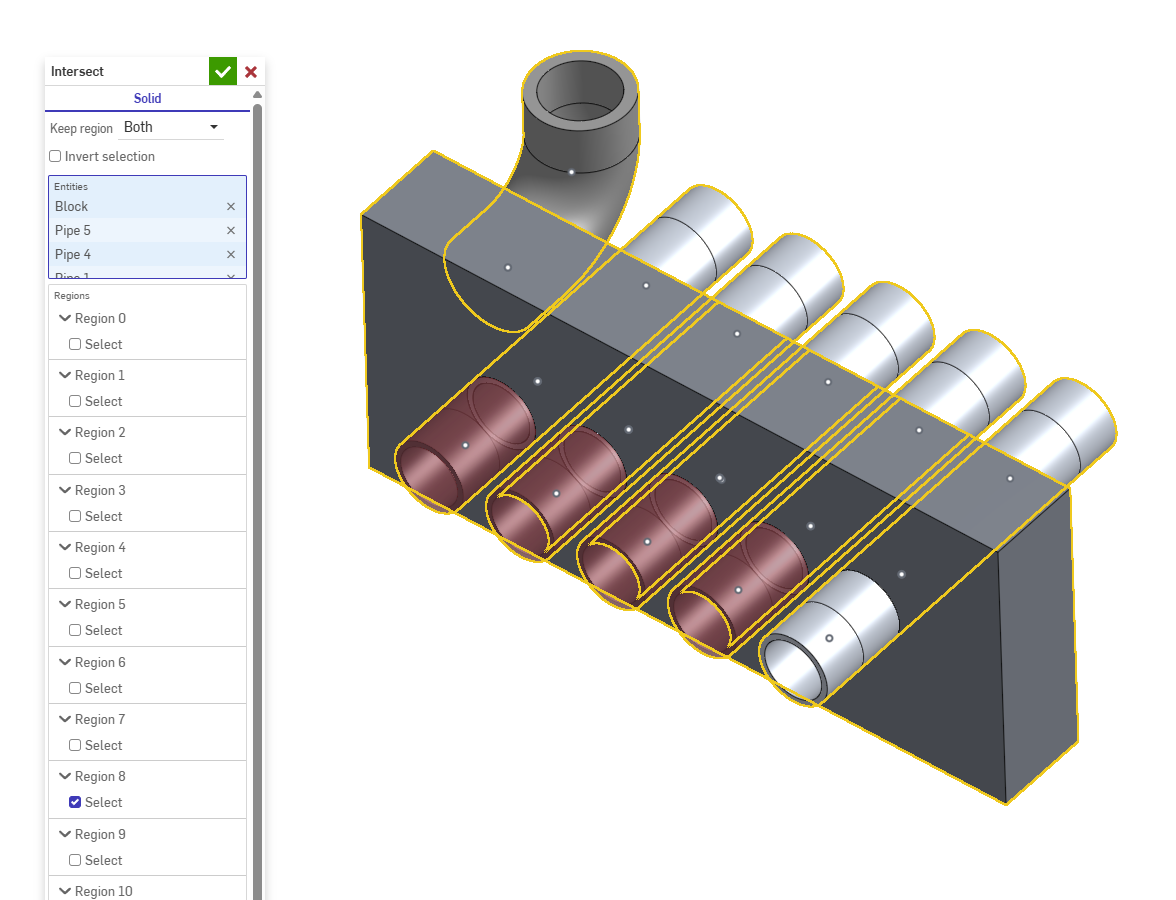
In case you want it, here is one I made a while back but never really published. Takes a little different approach.
It was originally intended for @Derek_Van_Allen_BD to match the SolidWorks intersect feature. 😎
 Intersect (CADSharp)
Intersect everything, and select the instances you want to keep or get rid of.
https://cad.onshape.com/documents/080c82a70987731ca32f29ab/w/59e2152d814b429f905407c7/e/5de5…
.

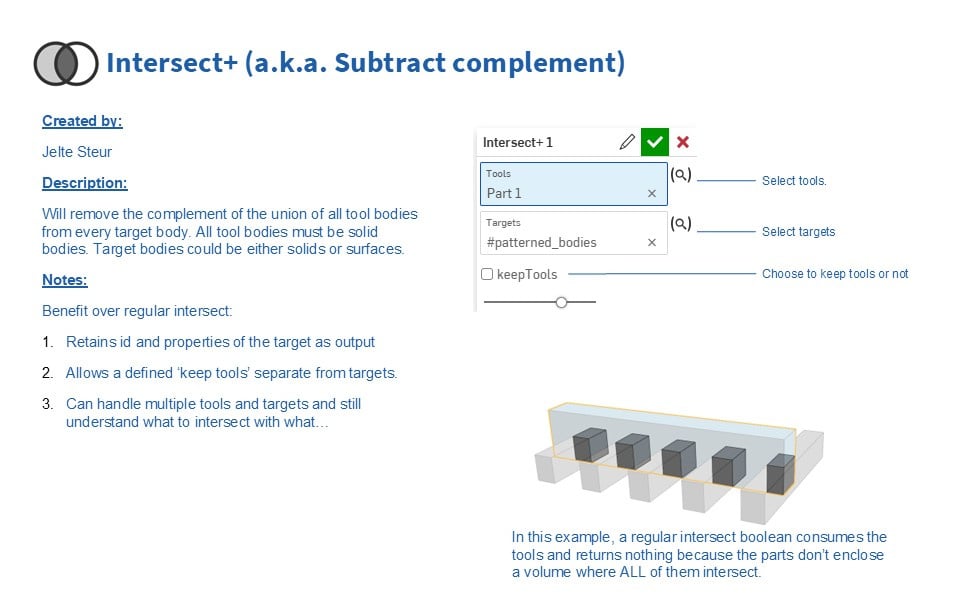
Old/New custom feature: Intersect+ (a.k.a. Subtract complement)
This feature is so easy to code that there are probably many of them, but due to custom feature's being hard to search/find and names aren't always as clear, I did so once over a while back.
I just took the effort to add an icon, a pdf and publish it so it might be easier to find for others:
Intersect+ (a.k.a. Subtract complement)