Welcome to the Onshape forum! Ask questions and join in the discussions about everything Onshape.
First time visiting? Here are some places to start:- Looking for a certain topic? Check out the categories filter or use Search (upper right).
- Need support? Ask a question to our Community Support category.
- Please submit support tickets for bugs but you can request improvements in the Product Feedback category.
- Be respectful, on topic and if you see a problem, Flag it.
If you would like to contact our Community Manager personally, feel free to send a private message or an email.
Best Of
Re: Sketch could not be solved - Maximum size sketch
I think using a variable in a dimension isn't a "constraint" so shouldn't count towards towards the limit (although now that I think about it I'm not so sure).
It looks like you are making your live much harder than you need to…Create the centerline only and then you can sweep each pipe in one feature (so you would need just 4 features to create what you have in your example).
I would do a "layout" sketch with all your key locations for machines etc… Then either use routing curves to make the paths, maybe adding an intermediate sketch before that referencing your key "routing" points (using the machine position sketch as a reference) if that helps.
Something along these lines:
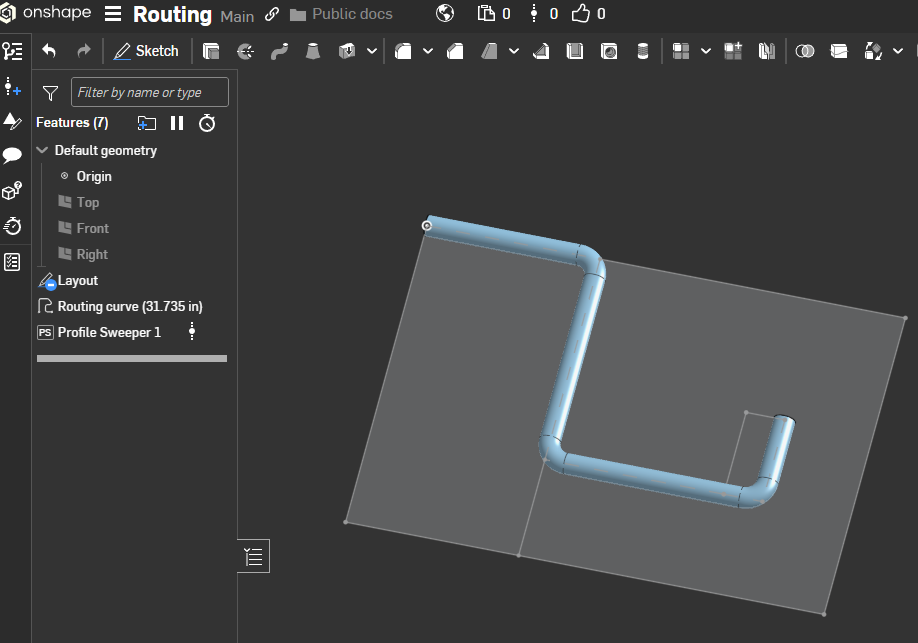
https://cad.onshape.com/documents/80ed14a5ca259405fd5235c9/w/7a95c5e32472a7989e2f0124/e/13dca827a1ea827be20ebc12
I used the "profile sweeper" FS so I don't need to create the circular profile for the path.

Re: How do we create a centered linear pattern of four?
It's also slightly inconsistent with symmetrical extrudes which use the total dimension for the overall and doesn't add it to both sides of the sketch.
 MDesign
Re: How do we create a centered linear pattern of four?
Wouldn't it be weird if you apply a pattern and the position of the original shifts? That's what would need to be required for something like this wouldn't it? Or would there be a dropdown so you can indicate on what side more will be added than on the other?

Re: splitting slected sketch
You can't split a revolved face on one side. What you probably need/want to do is cut a very tiny amount off the top, and extrude a very thin cut down the side where you wanted to split. Then you can convert to sheet metal and unfold.
 S1mon
S1mon
Re: Copying a sketch from one plane to another
If you want the sketch to be identical (and update if you change the original one) you can do a circular pattern of the sketch itself (using "feature" pattern).
Re: ThreadLab - Internal/External Modeled/Cosmetic Threads with External Thread Callouts
@antlu65 ,
I noticed recently that the chamfer on internal threads isn't working as expected and leaves a flat face:


I would expect this (achieved with a "replace face":

Re: Copying a component with all sketches and extrusions to another Part Studio
It might be helpful to know what it is that’s trying to be accomplished by what you’re asking for. The “why” if you will.
MDesign
Re: McMaster Carr PLUG IN for ONSHAPE
If you're still interested in a McMaster Carr app or integration, could you send me an email at amagnin@onshape .com?
Thanks!

Re: MCMASTER 2 ONSHAPE
If you're still interested in a McMaster Carr app or integration, could you send me an email at amagnin@onshape.com?
Thanks!
Re: Translating a part leaves sketches, extrusions, etc behind
It would help you a lot to learn how to fully constrain your sketches. If you clean them up and constrain them and dimension them from the origin you can put the part where it should be.
https://learn.onshape.com/courses/fundamentals-sketching
S1mon