Welcome to the Onshape forum! Ask questions and join in the discussions about everything Onshape.
First time visiting? Here are some places to start:- Looking for a certain topic? Check out the categories filter or use Search (upper right).
- Need support? Ask a question to our Community Support category.
- Please submit support tickets for bugs but you can request improvements in the Product Feedback category.
- Be respectful, on topic and if you see a problem, Flag it.
If you would like to contact our Community Manager personally, feel free to send a private message or an email.
Best Of
Re: Custom Features Collection
Dang, so many different collectors out there putting together lists of useful scripts and not a single one of mine made the cut in anyone's list XD
Guess I'll have to commit the time to writing the user docs and publishing them properly to make them more discoverable and explain their use cases a little better.

Re: Custom Features Collection
I knew I was messing with my axe, but how could I...? (You're lame, here's a hump!)
Thanks for letting me manage your custom features, but I'm afraid that by the time I come out with a new release, you'll have released two new scripts...
I'm ashamed, but I didn't get involved in your Feature Store initiative, so I didn't even know about its existence. I really support it!
Thank you for sharing your list, I didn't know about its existence and its free access, but I'm flattered that I found ¾ of it anyway. I think this also proves the right to have a Feature Store, which Onshape should provide.
I hope you don't take it as an intrusion, but I would also expect an official statement towards our community. It's possible that the existence or management of this causes them a serious problem, we just don't know about it, but it would be nice if they informed us about it.
Freedom for script writers! Feature Store! Feature Store! Feature Store! Feature Store!... 😎📢😎

Re: How do I remove unwanted bend dimensions from a drawing?
Still no update on this? I would love to have an option other than all or nothing.

How do I remove connected app (realityserver) now that it is no longer in the app store?
I have RealityServer listed under my account → applications. I revoked access, but I would really like to remove it from my applications list please since onshape has its own rendering functionality now.

Re: Help fill pattern
Yeah it's a limitation that I haven't got around to addressing - move the hole before the boundary sketch.

Re: 3D Printing Quality Settings
Thanks for this info.
There should be a way to set the Angular deviation (called Angular tolerance for 3MF) so that it sticks and you don't have to keep remembering to adjust it.

Re: Custom Features Collection
@legandras Wow! You've put a lot of work into this. This is something that is badly needed, though it should not be the task of individual volunteer users, but this should be done in some kind of FS-Library integrated in the GUI and the Onshape-Ecosystem. Publishing a FS should automatically put it up in the library, users should be able to search for it by different critieria and also comment on it. Onshape is missing out on a great opportunity and an important asset here!

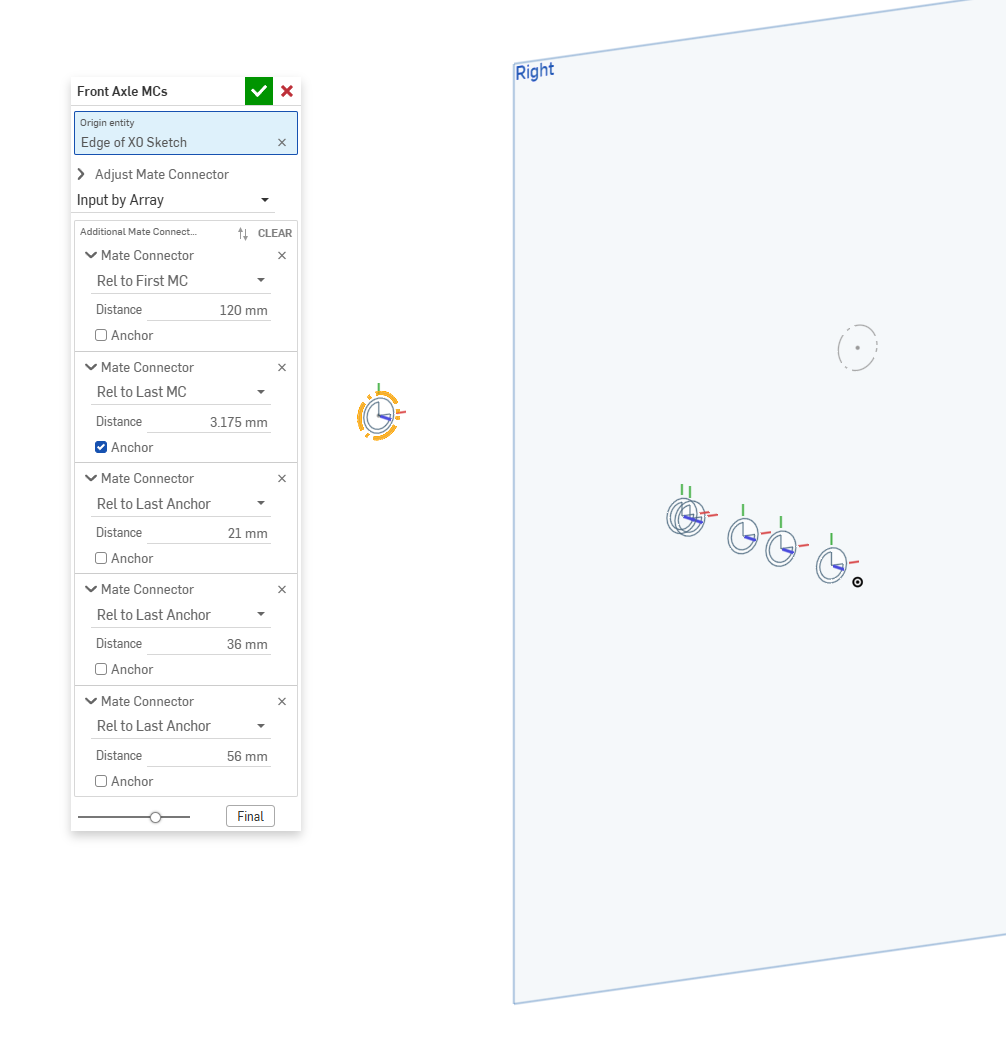
New Custom Feature: MateConnector Stack
Create a linear stack of mate connectors at distances relative to the first MC, the last MC, or the last "Anchor".
Can't figure out how to name each one individually in the Features List.
But the relative positioning has been helpful for me.
https://cad.onshape.com/documents/9aa2c66175de0ee45fcb62c1/v/a460c9f6dbddaaeb783b0294/e/997d37e7edf7e24502f36926

Re: New Custom Feature: Heal All
Oh man, my coworker is gonna be so mad he just did this manually on two recent jobs. I'm excited to show him this feature on Monday
Re: Picking co-ordinates from sketch to dump to csv file
@eric_pesty , exactly what I needed! Thanks.
