Welcome to the Onshape forum! Ask questions and join in the discussions about everything Onshape.
First time visiting? Here are some places to start:- Looking for a certain topic? Check out the categories filter or use Search (upper right).
- Need support? Ask a question to our Community Support category.
- Please submit support tickets for bugs but you can request improvements in the Product Feedback category.
- Be respectful, on topic and if you see a problem, Flag it.
If you would like to contact our Community Manager personally, feel free to send a private message or an email.
Best Of
Automatic redlines to compare drawing revisions
When you are releasing a new revision of a large drawing package the review process can get difficult and tedious even if only a few things have been updated. If I spent several hours carefully reviewing the initial release of a drawing I should only need to review the things that have been changed when a new release candidate is submitted as far as I can tell there is no way to quickly see what has been changed or updated. I either have to ask the designer and hope he doesn't forget anything (or something changed/updated without his knowledge) or look through everything again as if it was the initial release all over again. Onshape has the functionality to compare different versions for 3D models. I would argue that this functionality is even more critical for drawings. I would guess that is also easier to implement. I am surprised this is not an option.
 trevin
Re: Improvements to Onshape - July 18th, 2025
I'm very grateful for the new DXF export options. Sorry to hear tom_watt338 is having issues.
For years, my drawings were exporting 25.4 x too small, which drew some awkward questions from clients. This was despite all units being set to millimetres.
Now, after this improvement my DWGs export at the correct scale. (Very happy!) No feedback from Autocad users yet, but it looks good in the Onshape DWG viewer.
It would be good to take this further and add a custom scale factor. (Similar to Solidworks).
As for configuration tables, drag & drop will save so much time! No more "right-click, move up, right-click, move up, right-click, move up…"
Thanks for the improvements!
Re: Scaling an imported image
I prefer to use the "image" FeatureScript as it provides better control.
I find it tends to be messy to try and add sketch elements in the same sketch as the picture so the fact the image end up in it's own feature isn't a drawback for me.

Re: Improvements to Onshape - July 18th, 2025
@bryan_lagrange Don't think so. If you're talking about drawings (rather than exporting from a part studio) I think it defaults to the units specified in the drawing, but I don't know how to change those. They may be locked into the DWT file of your drawing border. Before export, when you change the settings away from "Use drawing units", it does seem to remember the change for subsequent drawings in the same Onshape document. So you should only need to do it once per OS doc.
My apologies. Onshape doesn't remember the export settings for particular drawings between sessions. Today, the export options were back to the default: "Use drawing units."
But yes, it could be useful to set defaults for this in your company settings or user account preferences.
Re: Holes Around a Spiral
Yes, I need to simulate it, therefore it needs all the holes. It's just a shame how slow this piece is to draw. For the record, I attempted the same in other CAD software, and all of them failed trying it in their respective SheetMetal modules. In Onshape at least I could work around it and find an alternative. Anyway, thanks a lot!
Re: Holes Around a Spiral
I wouldn't say impossible. Just have to be patient for the brain to compute everything. 10min for a single part seems extreme and begs the question, Is there a reason you need to show every single hole vs just a sample of them?
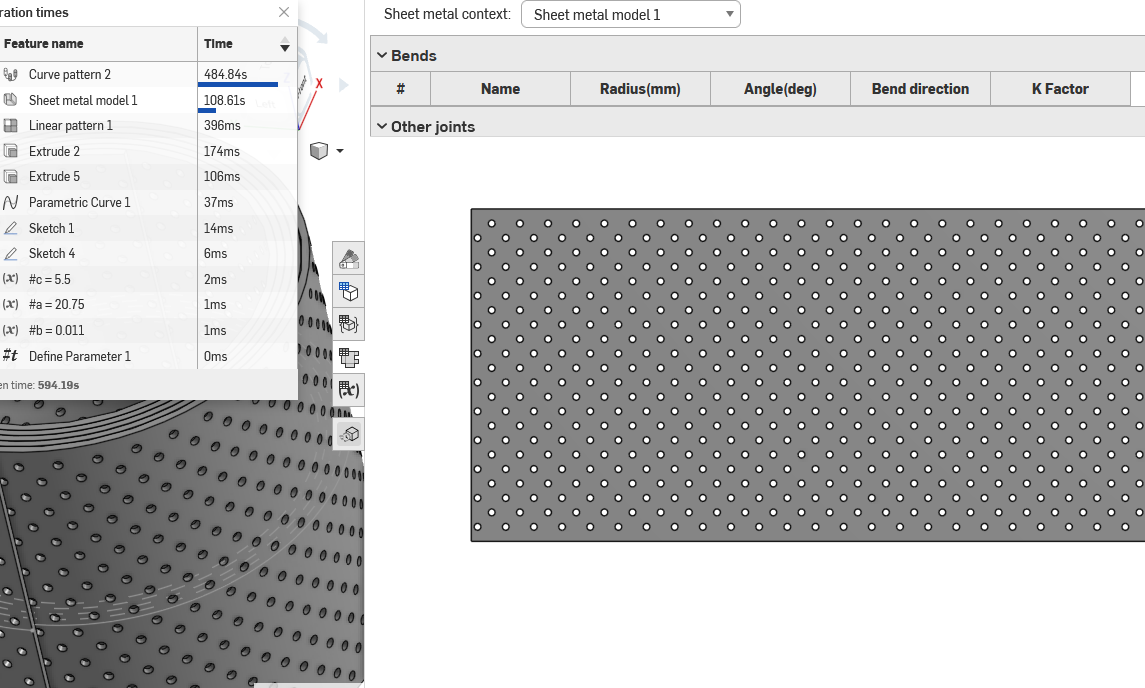
 MDesign
Re: ISEETHATTHEDIFFERENCEOFTHEDIAMTERSOFTHESECIRCLESIS2.8 MM.BUTTHEDISTANBETWECIRCLES'EXTREMITIES ISNOT
#NEILISTHEMAN 😎

Re: Scaling an imported image
This is a known pro tip not sure who gets the credit. but you can't have any other dimensions or contraints in the sketch. create a seperate sketch for each image you want to use.
MDesign
i accidentally made google snake in onshape :D
I made a Google snake type thing by pattering a line a bunch of times so that when you run your mouse over the lines it shows the linear pattern constraint above it with makes a snake type thing… just thought someone may enjoy it.


Re: Improvements to Onshape - July 18th, 2025
Regarding DXF exports.
Since the July 18 update my dxf exports geometry is unusable and scrambled when i open them in a 3rd party nesting software, FASTCAM(for CNC plasma)
Older DXF exports are still functioning fine, and DXF exports from other sources are not problematic.
Is anyone else having similar problems?
Thanks