Welcome to the Onshape forum! Ask questions and join in the discussions about everything Onshape.
First time visiting? Here are some places to start:- Looking for a certain topic? Check out the categories filter or use Search (upper right).
- Need support? Ask a question to our Community Support category.
- Please submit support tickets for bugs but you can request improvements in the Product Feedback category.
- Be respectful, on topic and if you see a problem, Flag it.
If you would like to contact our Community Manager personally, feel free to send a private message or an email.
Best Of
Re: Rename existing part?
Hey @vanowm,
There is this Custom Feature from @MichaelPascoe: Set Property
I have used it here for you if you want to have a look as well: https://cad.onshape.com/documents/db13cc0447856ffe96d25ebe/w/f29ecd938dc063cd6e6ab54e/e/b3e6aaf6c0951c64489d8888

Re: Loft problem - aerofoil shape + offset sketch
If you share the document URL, someone will be able to help you out. Be sure you're not lofting regions or profiles with inner loops. That's not allowed.

Re: Loft problem - aerofoil shape + offset sketch
I would highly recommend not using profile generator. It creates pretty lumpy curves which are not going to help you. Instead use HAVF: https://forum.onshape.com/discussion/24730/new-custom-feature-havf-profiles-standard-airfoil-profiles
Also offsets of offsets are often crappy curves. You're better off offsetting from the original and doing the math to get the result you want.
Are you trying to loft the face which is defined by the inner and outer profiles at the same time? Loft can't handle faces with holes in them. You would need to do two lofts.
 S1mon
S1mon
Re: Can't publish my custom feature
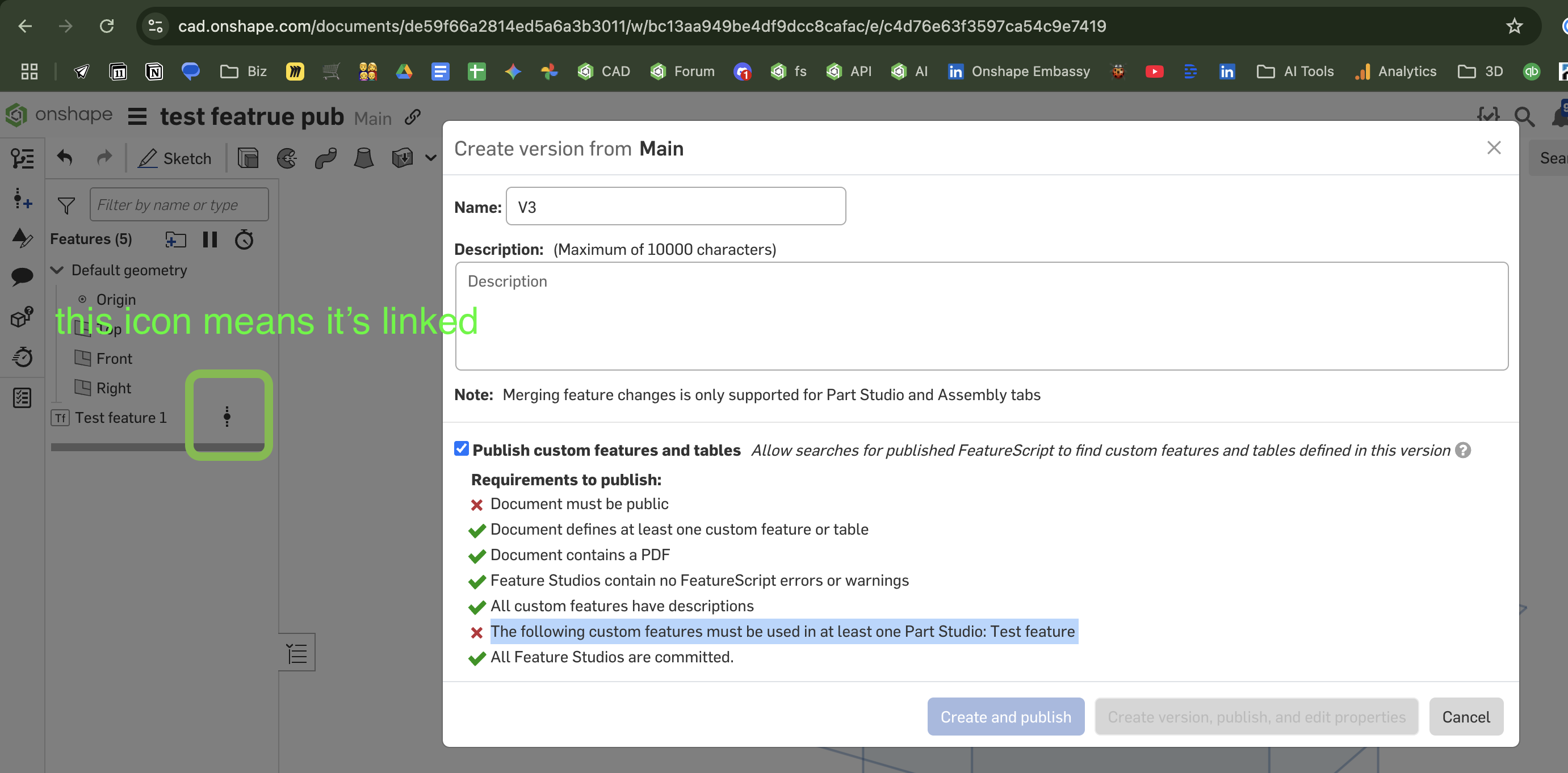
Possibly this is because the uses of the feature in your example are linked to a version, and not from the active workspace. Try adding an example use of the feature from the toolbar area called "Custom features in this workspace"


Re: Can't publish my custom feature
The features used are still liked to a version in this screenshot as indicated by the icon to the right of them. I just did a test, and that does seem to prevent it from working. If I add one from the workspace it works.
Re: Any efficient ways to make a cutlist from a cabinet drawing?
Can confirm that 6 years later, we are still using Onshape and creating 100% of our kitchens with Onshape. We're continuing to generate more and more information solely from the model, and are implementing more integrations with tools like Onshape's API. We've also had conversations with other cabinet manufacturers and have convinced them to make the switch to Onshape. So in terms of feasibility, it's doable. There is some work involved, but we have embraced Onshape as our primary CAD system and have found great success with it.
Quick tips:
- Configurations will be your best friend
- While none of our 150+ custom features are public, there are some on the forum that might help get you started. @MichaelPascoe's Cutlist + might give you a good idea about different ways to create a cut list.
- Onshape is very customizable, much more than even seasoned FeatureScript developers realize. See more at my LiveWorx panel: Customize Your CAD with FeatureScript.
Keep in mind, we're a highly custom cabinet manufacturer, so chances are you probably don't need to invest as much time as we did to get a solution up and running. If you have further questions, feel free to reach out.

Re: Making dimensions that make the orginal scale in a drawing.
I can respect that. We might be showing our age a bit. My only board drafting was in school. AutoCAD on the first couple of jobs. I can't ever remember drawing anything with lines isometrics on a computer from that point on.
 MDesign
Re: Any efficient ways to make a cutlist from a cabinet drawing?
You probably don't need to gauge the possibility. There are companies using it and relying on it for production.
MDesign
Re: Trying to create a curved funnel
I also tried the Loft function. I was missing the end conditions. Thanks a lot for the hint!
 rom_sch
Re: Making dimensions that make the orginal scale in a drawing.
@MDesign For me it was a nostalgia trip to my board drafting and early AutoCAD days.
