Welcome to the Onshape forum! Ask questions and join in the discussions about everything Onshape.
First time visiting? Here are some places to start:
- Looking for a certain topic? Check out the categories filter or use Search (upper right).
- Need support? Ask a question to our Community Support category.
- Please submit support tickets for bugs but you can request improvements in the Product Feedback category.
- Be respectful, on topic and if you see a problem, Flag it.
If you would like to contact our Community Manager personally, feel free to send a private message or an email.
Why am I not getting the expected surface area of a part? Constraints issue?

I'm learning CAD and am currently working my way through the "Introduction to Part Studios" module in Onshape's "Learning Pathways." My goal is to really learn CAD, not just understand the instructions. In the exercise for Basic Features where you extrude a control arm sketch you create, I'm getting close to the surface area in the answer in the quiz, but not precisely: 50195.18 mm² and 50179.71mm², respectively. I'm investigating what things could influence the overall size when the dimensions I was given match up, the nuances of which seem vital for when you're making a part that you need in exactly the right size and profile.
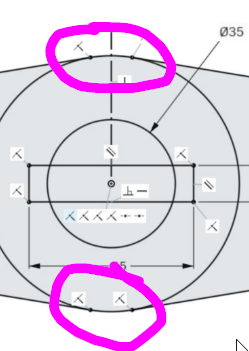
One thing I identified is that where the perimeter lines of the sketch interface with the center circle appear to be located differently than in the sketch provided in the module. I made the line and then applied the "Tangent" constraint to the large outer center circle and the smaller outer lateral circle. I "Mirrored" that line to create all four lines between the circles. I get an error when trying to apply the "Coincident" constraint for the line and circle being different shapes, but it looks like there is a "Coincident" constraint in these spots on the module sketch.
Could this cause the difference in surface area I'm seeing? How do I get my lines to meet with the outer circles at the correct points? Is there anything else that seems off?
Best Answer
-
The end of your lines are coincident with each other and/or the right plane so you can't also make them coincident with the circle.
Bet option is probably to use the trim tool, if you zoom in, you'll be able to see the part of the lines that go from the point where they are tangent to the circle to the midplane, get rid of that bit
0

Answers
-
-
@eric_pesty it looks like you just circled the areas I identified in my post, where I got an error trying to apply the coincident constraint. Would you take a look at the information I gave and my questions, and then respond in words if you have ideas on how to address my questions?
0 -
The end of your lines are coincident with each other and/or the right plane so you can't also make them coincident with the circle.
Bet option is probably to use the trim tool, if you zoom in, you'll be able to see the part of the lines that go from the point where they are tangent to the circle to the midplane, get rid of that bit
0 -
That did it! Thank you @eric_pesty .
0