Welcome to the Onshape forum! Ask questions and join in the discussions about everything Onshape.
First time visiting? Here are some places to start:
- Looking for a certain topic? Check out the categories filter or use Search (upper right).
- Need support? Ask a question to our Community Support category.
- Please submit support tickets for bugs but you can request improvements in the Product Feedback category.
- Be respectful, on topic and if you see a problem, Flag it.
If you would like to contact our Community Manager personally, feel free to send a private message or an email.
Can you help me create a feature script

Can you help me create a feature script to build a custom table with part name, length, width, thickness?
Best Answer
-
getProperty() can only be called from within Edit Logic or from within a table definition. It can not be called from within the feature body of a feature. This is one of the limitations of the way features are built in the tree atm.
Looks like your rounding functions may be off as well. And the table definition.
Here is a very basic example of how to create a custom feature + table + getProperty():
- Note that tableDefinitions are not the same as featureDefinitions.
- In this example, I'm using the feature to tag parts with an attribute, then the table is searching for all parts with that attribute.
- Since the table is running outside the tree, it is able to access the getProperty function.

.
And here is a more advanced example where the table interacts with the custom feature and has sorting and even some editing logic:
Table - Custom FeatureHere is an example where the table has sorting options and table UI:
Measure Cut List - Custom Feature.
▚▞▚▞▚▞▚▞▚0

Answers
-
Here is a custom feature for creating tables. It also is a good example of how to make custom tables via FeatureScript.
Or if you want a step by step video tutorial of how to do it, CADSharp shows how to do this in FS Lesson 16 which is a paid lesson. If you do end up following the lessons, it's important to do them in order because each one teaches the fundamentals for the next lesson, ensuring you have the skills required by the later lessons.
▚▞▚▞▚▞▚▞▚0 -
can i rather show you what i have and why its not working and maybe you can guide me?
0 -
-
FeatureScript 2780;
import(path : "onshape/std/common.fs", version : "2780.0");// Feature name and description
annotation { "Feature Type Name" : "Part Size Table" }
export const partSizeTable = defineFeature(function(context is Context, id is Id, definition is map)precondition { annotation { "Name" : "Parts to include", "Filter" : EntityType.BODY, "MaxNumberOfPicks" : 100, "MinNumberOfPicks" : 1 } definition.parts is Query; } { var tableRows = []; // Header row tableRows = append(tableRows, ["Part Name", "Length (mm)", "Width (mm)", "Thickness (mm)"]); // Loop through selected parts for (var part in evaluateQuery(context, definition.parts)) { const partName = getProperty(context, { "entity" : part, "propertyType" : PropertyType.NAME }); // Compute bounding box var bbox = evBox3d(context, { "topology" : part }); var size = vector(bbox.maxCorner[0] - bbox.minCorner[0], bbox.maxCorner[1] - bbox.minCorner[1], bbox.maxCorner[2] - bbox.minCorner[2]); // Sort dimensions largest to smallest var sorted = sortDescending([size[0], size[1], size[2]]); // Convert meters to mm and round tableRows = append(tableRows, [ partName, round(sorted[0] * 1000, 2), round(sorted[1] * 1000, 2), round(sorted[2] * 1000, 2) ]); } // Create the table table( id + "table", tableRows, { "name" : "Part Dimensions" } ); });// Helper function to sort descending
function sortDescending(list)
{
return sort(list, function(a, b)
{
return b - a;
});
}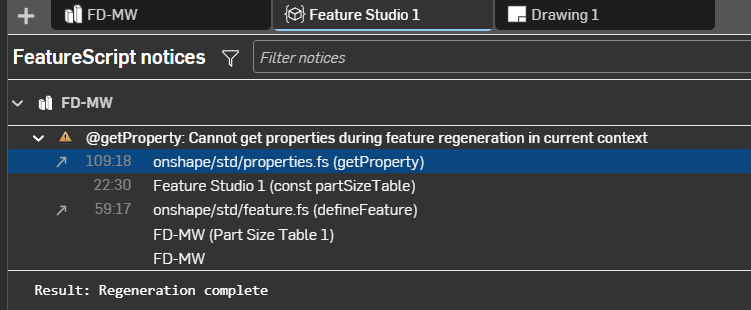
so this is what i have so far but i dont seem to understand what im doing wrong
0 -
getProperty() can only be called from within Edit Logic or from within a table definition. It can not be called from within the feature body of a feature. This is one of the limitations of the way features are built in the tree atm.
Looks like your rounding functions may be off as well. And the table definition.
Here is a very basic example of how to create a custom feature + table + getProperty():
- Note that tableDefinitions are not the same as featureDefinitions.
- In this example, I'm using the feature to tag parts with an attribute, then the table is searching for all parts with that attribute.
- Since the table is running outside the tree, it is able to access the getProperty function.
.
And here is a more advanced example where the table interacts with the custom feature and has sorting and even some editing logic:
Table - Custom FeatureHere is an example where the table has sorting options and table UI:
Measure Cut List - Custom Feature.
▚▞▚▞▚▞▚▞▚0 -
This one works for me so well thank you so much🤗
0
