Welcome to the Onshape forum! Ask questions and join in the discussions about everything Onshape.
First time visiting? Here are some places to start:- Looking for a certain topic? Check out the categories filter or use Search (upper right).
- Need support? Ask a question to our Community Support category.
- Please submit support tickets for bugs but you can request improvements in the Product Feedback category.
- Be respectful, on topic and if you see a problem, Flag it.
If you would like to contact our Community Manager personally, feel free to send a private message or an email.
Extruded feature fails to generate...what is this red thing?
 christopher_luckenbill
Member Posts: 19 ✭
christopher_luckenbill
Member Posts: 19 ✭
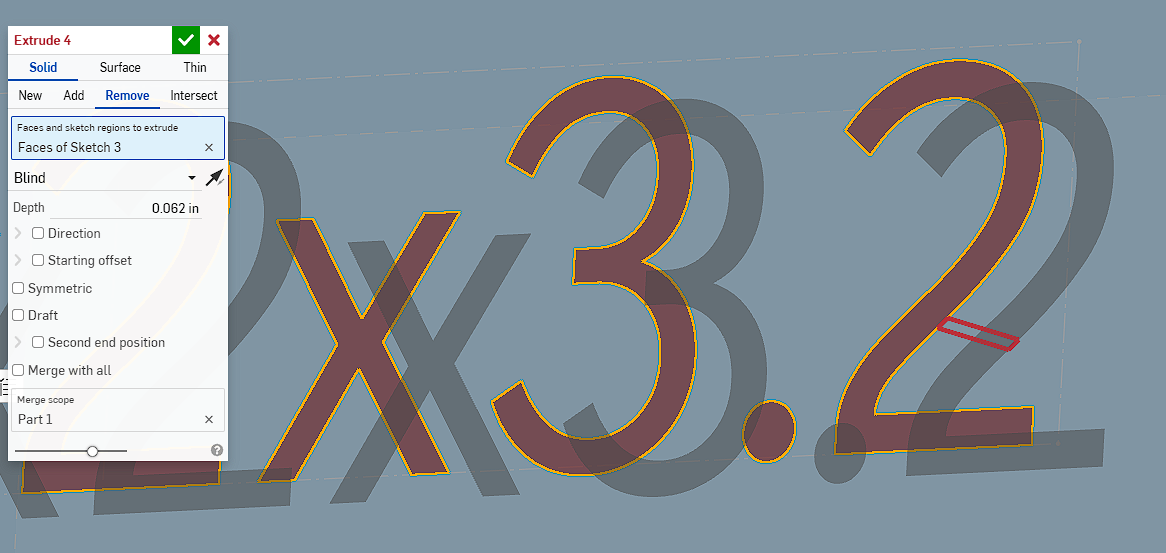
Just as the title says. I am trying to extrude this text into the part, but it won't generate. There is this red line that keeps coming into play..what is it? and, how do I work arond this? I have not had this problem with other models.
Thanks,
Chris
0
Comments
Are you "Remove"-ing in the wrong direction? You can change the direction by toggling the arrow in the Extrude 4 dialog box.
The red geometry shows where Remove operation fails. If you hover over the feature name - you'll see the regeneration error , which also might help to explain what is going on.
It doesn't matter which direction I toggle the arrow it will still show up. If I try to "add" so that it extrudes out from the face, I still get the same thing. THe only way I don't get any errors is if I select "new" and extrude away from the face - but then it creates a part for each character. I don't really care which direction it goes, into the face or out from the face.
It says, "Boolean operation failed to return a valid part". I'll be honest - I have no idea what that means. I am still pretty new at this.
I fixed it. I was using text. For some reason it didn't like it on this part. I have used this text on different parts before without any issue. But, on this one it was a no go. I changed the font and all is normal now.