Welcome to the Onshape forum! Ask questions and join in the discussions about everything Onshape.
First time visiting? Here are some places to start:- Looking for a certain topic? Check out the categories filter or use Search (upper right).
- Need support? Ask a question to our Community Support category.
- Please submit support tickets for bugs but you can request improvements in the Product Feedback category.
- Be respectful, on topic and if you see a problem, Flag it.
If you would like to contact our Community Manager personally, feel free to send a private message or an email.
mirror image, select, extrude
 j_hunter193
Member Posts: 5 ✭
j_hunter193
Member Posts: 5 ✭
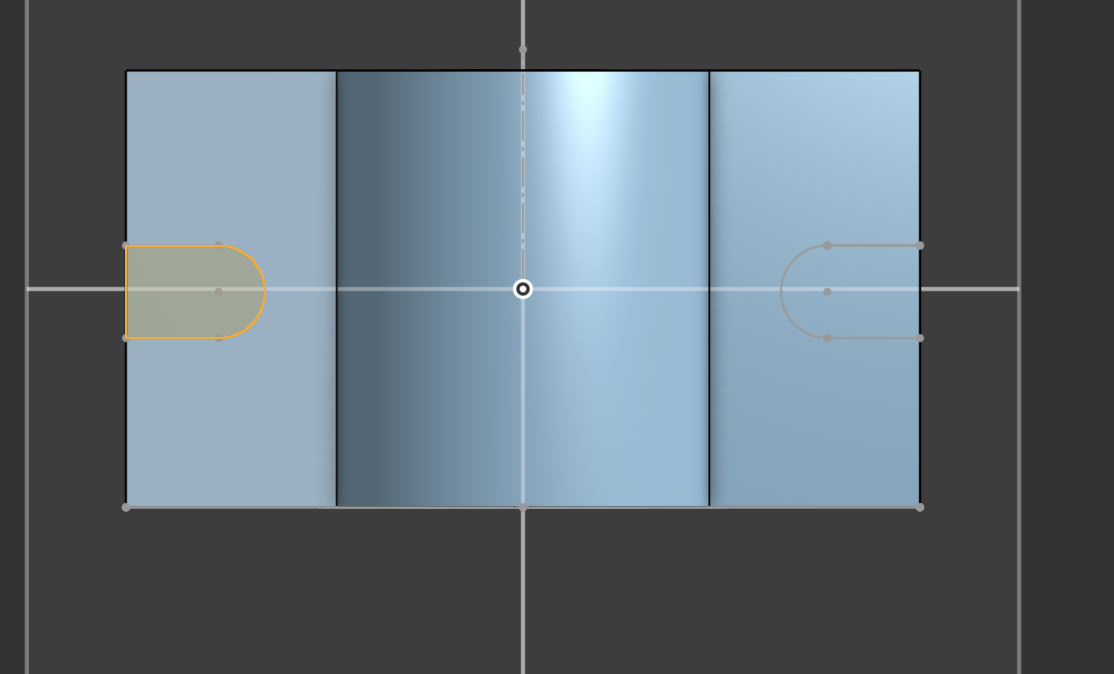
hello, our first time using onshape. so we have mirrored a thing here, but we are unable to select the mirrored on (right side) for extrusion. What might be the issue? thanks
0
Comments
Could you share your document? Otherwise it might be that not all the lines were mirrored and so leaving an open sketch, i.e. not a closed loop
Hard to tell without sharing the doc, but the mirrored sketch geometry on the right might be missing the far right vertical line needed to enclose a region.
When using the mirror tool there are 2 versions. One is in a sketch. Complete the extrude remove after drawing the sketch with one cutout. Then move on to feature/mirror and select the cutout from the feature tree with center plane.
https://cad.onshape.com/documents/9a16e90e97ff0f49350854fe/w/8b1147e1bb96ce49e97d63d0/e/eb0159dce661ef045eeff488