Welcome to the Onshape forum! Ask questions and join in the discussions about everything Onshape.
First time visiting? Here are some places to start:
- Looking for a certain topic? Check out the categories filter or use Search (upper right).
- Need support? Ask a question to our Community Support category.
- Please submit support tickets for bugs but you can request improvements in the Product Feedback category.
- Be respectful, on topic and if you see a problem, Flag it.
If you would like to contact our Community Manager personally, feel free to send a private message or an email.
Custom Feature: Amalgam Tag and Amalgamate
Comments
-
@EvanReese The Not-Hole workflow is very cool. However, thread info from a tapped hole is not propagating through to Sheet Metal target parts using the Amalgamated Not-Hole method (but the native Hole feature does apply threads to sheet metal parts). Is this something that can be fixed? Or might we be doing something wrong?
Thanks again you guys for the amazing work and service to this community!
1 -
Thanks for trying it out, Romeo. The native hole feature does this through a totally different logic pathway than opBoolean. To get this working the change would have to be on the Amalgamate side by looking for things with hole attributes and sending those down a different hole creation pipeline, which sounds like a slog but doable.
1 -
I get ya. Think on it though. I know I can configure a delete body or not making the union body at all, but I have a feeling that I'll be doing that on every single setup I ever make. I'd prefer to only have to do that on setups that have various union bodies (i.e. one for injection molded parts, and another for a CNC part). Either way, respect for thinking it through and being mindful of scope creep and second order effects.
0 -
I just thought of a really neat thing; it's possible to name the Amalgamate feature in the tree based on the source data.
The tag feature would need to have to have an optional 'Name' string field, and the parts can then be named 'Name' + Union, Subtract, and New, (1,2,3 … if there are multiple). While all parts also get an attribute that the Amalgamate can getAttribute from and name the feature in the feature list from! Makes keeping track of multiple Amalgamate features in a target document much cleaner automatically.0 -
Latest build of Amalgamate does have computed property naming built in, though I chose not to bake the name into the tool bodies because we already don't have a one size fits all naming convention internally at Boss so I didn't want to force one unilaterally on everyone else using the feature. The field is just a string in the Amalgam Tag feature that can be driven via expressions to get names to change dynamically by configurations.
0 -
Ah nice! Sorry that I wasn't paying attention to the latest builds, happy you got to the same conclusion!
Totally fair to not name the parts, most likely they are going to be either union to or subtract from something else, so the name is not really sticking anyway.
Thanks for an awesome feature!0 -
Great feature! However, I ran into something that may be a bug or limitation. Trying to set up a company logo as an AM feature. We often use the logo in 3D printing, and text and these types of objects are difficult in Onshape, so it would be really powerful to be able to drop it into a part and automatically create the negative and positive letters. Since the logo is made up of 8 letters, I usually turn it into a closed composite part to simplify the model to one composite part. I made a copy in place of that as the negative to remove. When trying to apply the AT tags, it would not accept the composite negative copy or positive composite in the tag panel for subtraction. However, it would accept that as the part to add.
Is this a bug or known limitation? If not, any chance of an update? Thanks!0 -
I think I recall making this choice consciously due to the potential for closed composites to include surface geometry or other invalid queries for a subtractive operation, but I suppose I could allow the selection and throw a warning that the Boolean will skip the invalid geometry. At the time the people asking for composite support were using ugly import parts as their examples of what they wanted to insert and I figured insertion would be fine for those cases but I definitely didn't want to hear from them when they tried to subtract a surface from a solid. I'll try to work an update in this weekend.
0 -
"ugly import parts" LOL – completely understand the rationale! But a warning should do the trick and allow appropriate use.
Would it retain all the parts in a closed composite if it were "opened" after creation? Just thinking about worst case, or possible editing scenarios. Would it simply break until closed again?
Thanks for the fast response!0 -
I just ran into an interesting situation where I was amalgamating something to an existing part but realize I would rather do the amalgam feature first and create geometry around the new bodies after… I don't have any unioning bodies in the tag but didn't have anything selected there but it errors out without a subtraction scope.
I know I could use a regular derive for that but I already have an amalgam feature that I would have liked to keep as i have multiple locations. Is there any reason you can't have more flexibility in the amalgam feature where you could have the option to not have a subtraction scope (i.e. ignore the subtraction body in the tag)? And probably also have the option to create the union bodies as new. Maybe something like a "ignore scope" checkbox?
0 -
People on my team have asked me for something like what you suggest, and my hesitance to allowing users to skip scope selection was that it opens the door to a feature "successfully" building while the user just forgot to select a really important subtraction step and now we've got parts hitting the mill with interferences due to negligence. Essentially I didn't want Amalgamate's greatest strength of enforcing geometric consistency across an entire company database to become its greatest weakness by requiring model reviewers (usually me) to drill down into each Amalgamate application and making sure that scopes were specified. This does mean those team members have found clever workarounds to create explicit configurations that only include a union scope or subtraction scope for example, or they use some other Point Derive feature to apply so you can argue that the limitation doesn't really serve that goal but that was the rationale, and at least for me I think the efforts they're applying to work around the restriction is forcing them to consider their amalgam geometry more carefully to ensure that it really does apply to all cases they're inserting it.
Certainly I could see arguments in favor of a checkbox that tweaks the Amalgam behavior, I would just want to sit down and consider all possible implications of adding it before it causes me a headache on the floor.2 -
That makes sense, I just wanted to share a specific use case where doing what I described would have been the "nicest"!
I thought about doing a configuration but I ended up just using a regular derive with just the "new" bodies but this might come up again for this specific awkwardly shaped thing that I might have to sometimes jam into existing geometry and sometimes have the option to create new geometry to match it.It's a bit of an edge case for sure, the amalgamate features have been super useful for what I've been doing lately!
0 -
Any cool examples to share? It's always nice to see how other people make use of the tools I develop.
0 -
ostly boring stuff and fairly proprietary. I'm designing a "family" of test fixtures and having to add cutouts in various places, some with tapped holes, etc… Having each one be just one feature and knowing for sure they all match is really nice!
Here's a sample feature tree (I'm also using dynamic suppression controlled by variables to toggle things on and off) :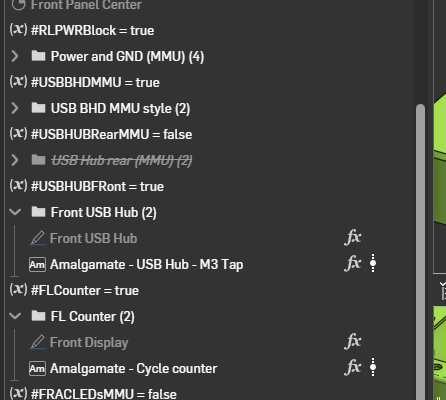
And this is where my example use case came from:
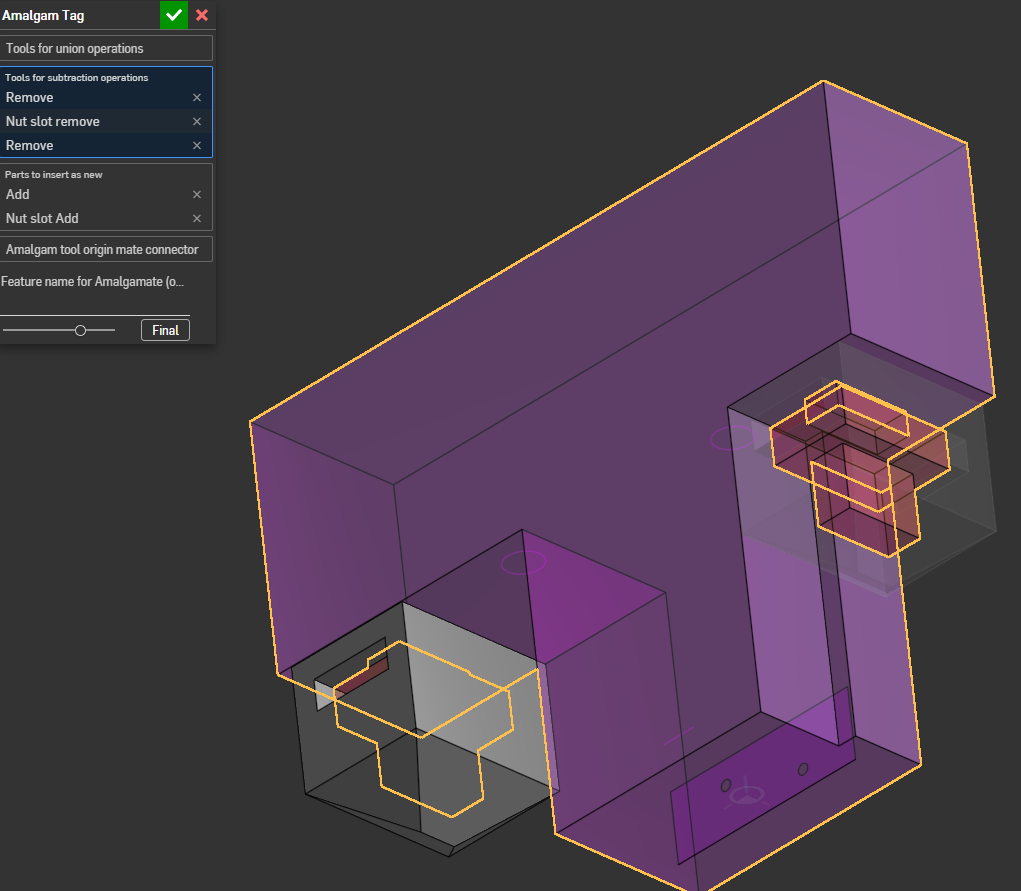
3D printed barcode reading camera bkt that I am incorporating in different places. The feature for square nuts used to provide adjustment would be especially painful to re-create over and over!
And here's an example of it in use: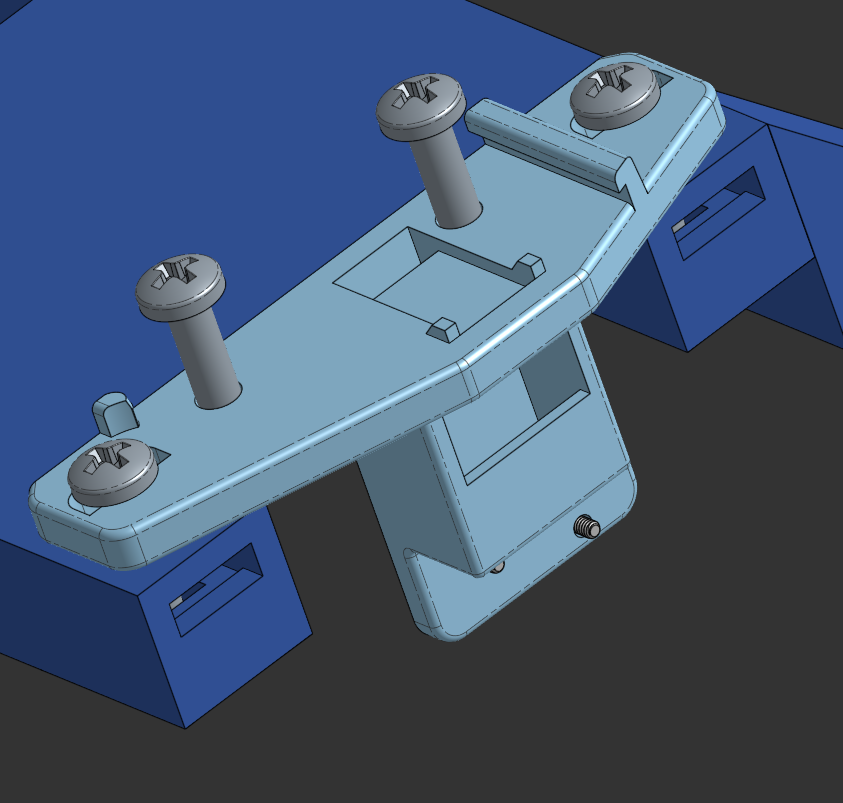 0
0 -
@Derek_Van_Allen_BD I see there has been an update that includes composite parts. Yay! Forgive me if I am missing where a read me for a change log is - may be a missing feature in feature script.
I tried my logo example again, and while I can choose a composite part as the part to insert, I cannot choose a composite as the union or subtraction object. Is there an intentional limitation? To be clear about the example, if there are 4 letter objects, e.g LOGO, and they are combined into a composite to keep, then transform to copy in place as the object to remove, one should be able to select one composite to remove, and the other to add. In my test, I could not select a composite for union or subtraction, only parts to insert new. So in your example, make a first composite before the transform for removal, and a second to add.
Also, the reason to make the first closed composite is to clean up the part tree, and also allow easy application of appearances to multiple bodies.
Thanks for the improvements!0 -
There was some intention behind limiting that, yes. When I added the composite support for insertion I could have added it as well to the union and subtraction steps, but the examples I was working from were composite parts born from ugly import geometry containing surface geometry and curves which would have failed the boolean operation downstream. I could probably allow the composite selection if I add some guarding to that specific kind of case but at the time it was easier to direct my team by telling them no, you can't use composites as tools because it will make all of our work harder.
0 -
Hey Derek,
some user feedback here:
I've found amalgamate very useful. One of the applications I use it for is for logo's on products. I've got them in configured size and thickness and add/subtract them from a molded part.
in the amalgamate tag option, i have to choose though between parts to add/remove/new. Is there a way to make the amalgamate feature such that i could choose the same parts for add/remove/add as new and have the amalgamate feature only add/subtract if a part is in scope there?
or should I add a configuration to my tagged logo Part studio and configure the amalgamate tag feature to work for subtraction/addition/new that way?0 -
@jelte_steur_info I've needed similar things. One approach Derek could take is to add an enum in Amalgamate for a different mode set to remember previous value. That way people who use it most as it is now can keep doing so, but people who need different behavior can make that their default. If not I may get around to making my own version with a few tweaks but still use the same amalgam tag feature so either tool could be used. For example, I've run into times where I wanted the feature to allow non-selection of subtraction bodies or union bodies for similar reasons to what you're describing. In fact I think there's a lot of room for more features in the amalgamate ecosystem. It would be a good way to make a Company Logo feature that handles the instantiation from the tagged studio so no one ever has to navigate to it, and it could enforce a bit more standardization via a drop-down of sizes or depths etc.
0 -
@EvanReese: A company logo feature (or version of amalgamate) could also have a debug body, only visible when the feature is active, that shows the preferred clear space around the logo!
@Derek: at the moment I've implemented this and it works just fine, but having to do this for every tag would be a bit cumbersome perhaps. (composite version is for legacy use).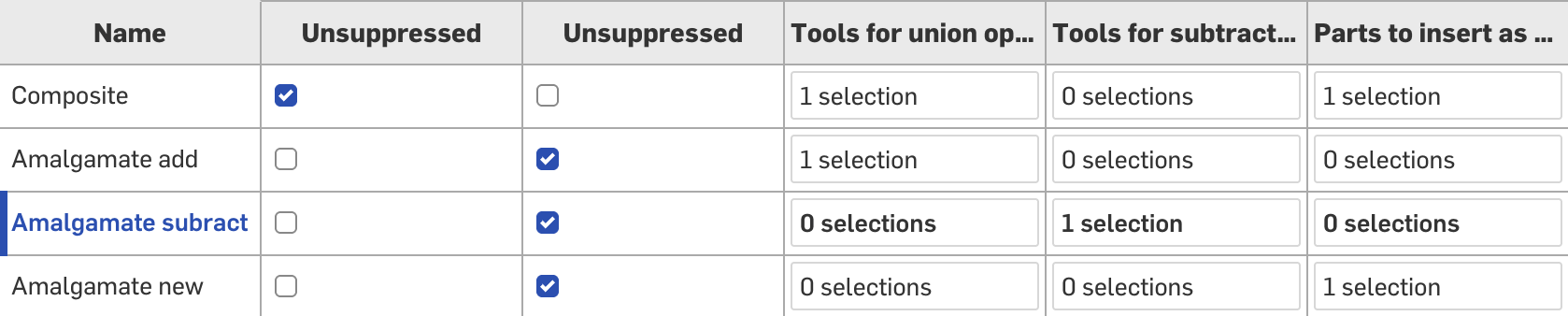 1
1 -
Love the idea of a logo margin
0 -
Sorry for leaving this thread hanging, I'm having a busy week recovering from a brief stint of Red Bull athleticism and preparing for a trip to Europe next week.
To @jelte_steur_info and @EvanReese, you can see the above musings about why I'm hesitant to allow people to skip one of the pre-defined boolean operations that was baked into the tag studio. It's a guaranteed certainty that the moment I add that capability to the feature someone in my office is going to skip a really important hole pattern on something expensive and I'll be accepting the paranoia of reviewing every single instance of their usage of Amalgamate instead of trusting that the standards are being applied correctly wherever used. Unless I can implement it in a way that is highly visible without drilling into the feature itself that a non-compliant mix of boolean targets was chosen via the naming convention or something.
I will likely add composite support for the additive and subtractive operations in the next update, but it'll require some validation that only solid parts are included in the composite to prevent the aforementioned garbage imports as tools issues.
1 -
Hi all,
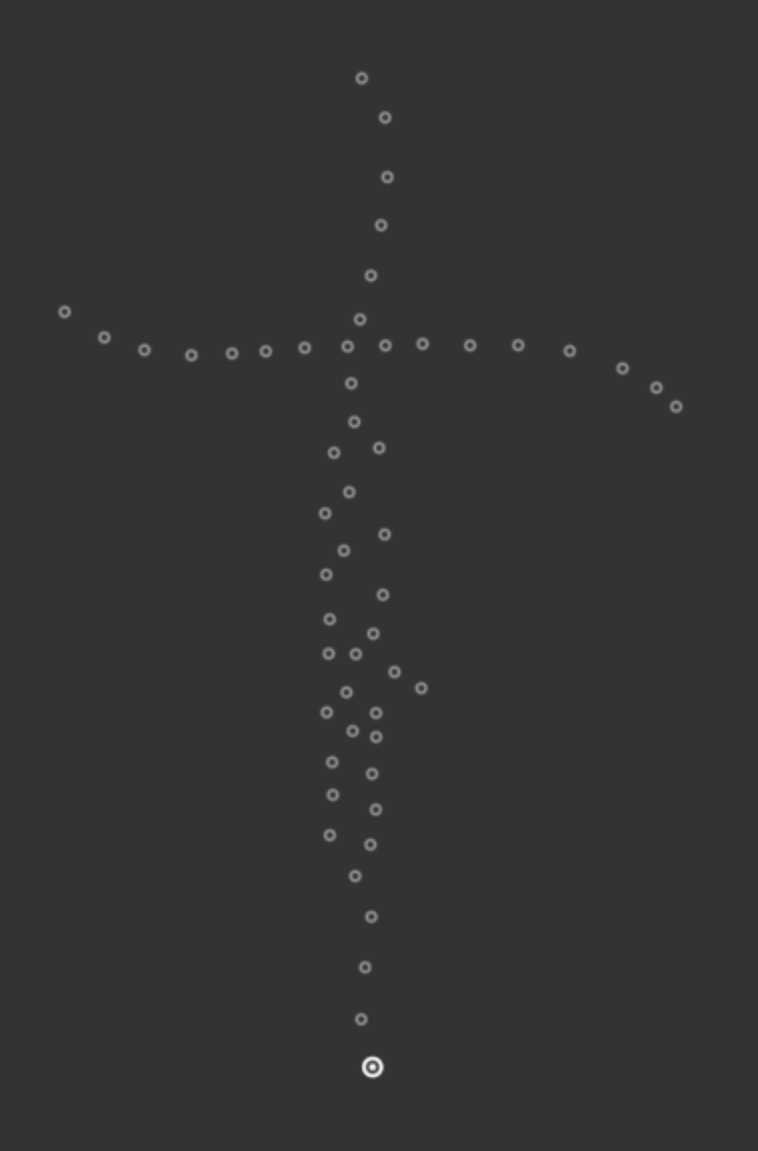
Any one know how to remove this trail of dots from using amalgamate in a million places :-). I have hidden all of the parts, but the dots stick around for some reason. Not a big deal but just kind of clutter up my views. Thanks!
 0
0 -
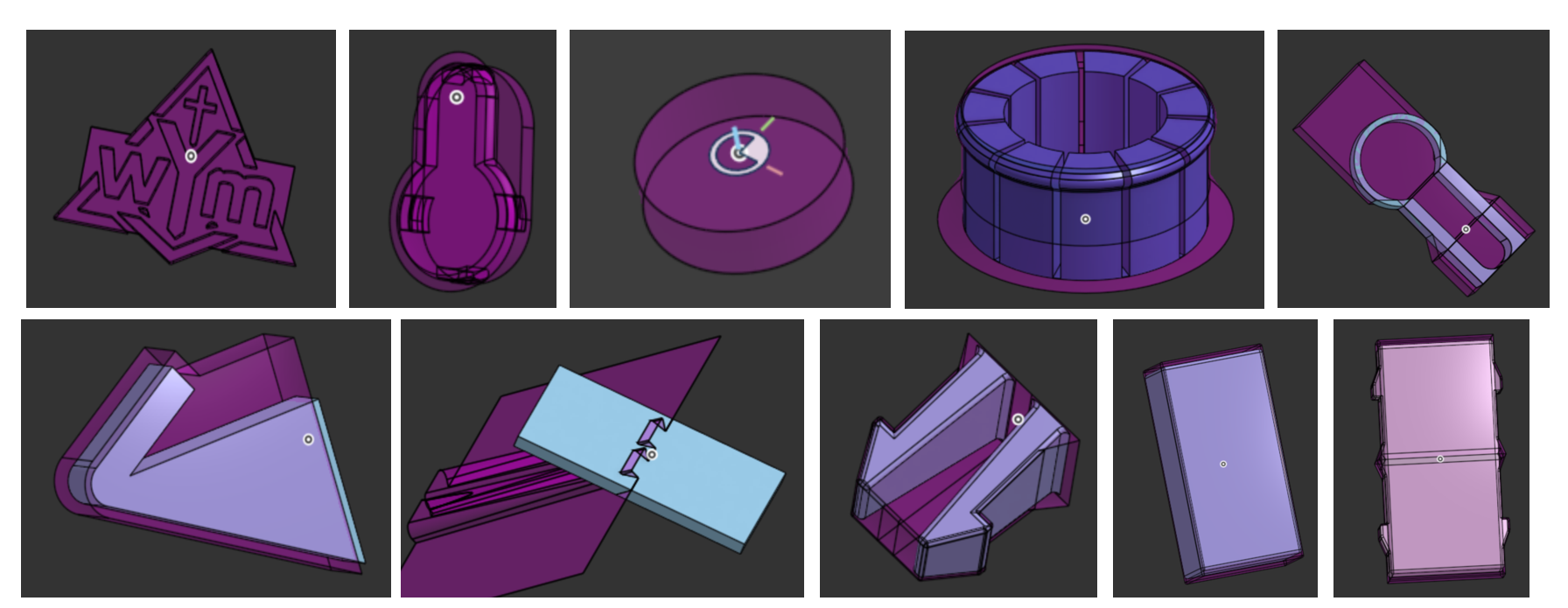
BTW I LOVE ALMAGAMATE! I use it for a bunch of snap features, logos, dowels, magnets, nail holes, even did one for a dovetail/sliding dovetail scarf joint! It is such an awesome feature! It is awesome that with a little code, you can even make most feature "auto size" so you don't need to fiddle around with a bunch of parameters. So cool!
 2
2 -
This is weird behavior indeed. Can you share the source and target docs for me to diagnose?
The examples you're sharing are all excellent demonstrations of the utility of this thing as the everything feature. Some of those are use cases I hadn't even thought of but will definitely be making their way into my own personal library like the nail holes.
0 -
Thanks Derek! Here's a link to the document. Hopefully it's not something stupid that I'm doing, lol.
https://cad.onshape.com/documents/6d00c2ca964243526ec27ae2/w/790a7d898c2eee8008c2e731/e/ee337f8b82f126e4fb466585
0 -
Make sure the permissions are set to be able to share with outside viewers if you haven't already, too. I'm not able to open it on mobile, but that could just be a mobile thing.
0 -
Hi again! I think you may have looked at this previously, but could you please consider to update the code to allow it to work on mesh as well? Maybe it is more complex than I am considering though.
I think maybe this update could work:
    annotation { "Name" : "Subtraction Scope", "Filter" : EntityType.BODY && (BodyType.SOLID || BodyType.MESH) && ModifiableEntityOnly.YES }
    definition.subtractionTargets is Query;

    annotation { "Name" : "Union Scope", "Filter" : EntityType.BODY && (BodyType.SOLID || BodyType.MESH) && ModifiableEntityOnly.YES }
    definition.unionTargets is Query;
I think for now I can work around by making fake bodies and merging them in, I hope, lol. Thanks for considering!
0 -
Hey @Derek_Van_Allen_BD,
Im really enjoying the Amalgamate feature. I have a use case that I think might be useful for others as well.
What I would find useful is the ability to have multiple Amalgam Tag features in the same tool Part Studio, and then choose which one should be used by Amalgamate.
The simple version could be a dropdown in the Amalgamate feature, where you select one Amalgam Tag from the tool Part Studio.
A more powerful version would be allowing one Amalgamate feature to use multiple Amalgam Tags at once. The advantage would be that all selected tags share the same selected snap points / mate connectors. Otherwise, if each Amalgamate feature can only use one tag, the user would need to create multiple Amalgamate features and manually select the same snap points again.
My use case is a snapping/connector feature that sits between two different parts. One tool body needs to subtract from Part A, while another tool body needs to subtract from Part B. Splitting this into separate Amalgam Tags would make the tool setup much clearer, but it would be especially useful if those tags could be applied together using the same placement selection.
So in short:
- allow multiple Amalgam Tag features in one tool Part Studio
- let Amalgamate select which tag to use
- optionally allow Amalgamate to select multiple tags at once, so they share the same snap point / mate connector selections
Thanks for considering it!
0 -
@johannes_dörig I've not yet tested but I think all of this can be done with configurations already. You could make a list config for "Set A" and "Set B", then configure suppression of various tag features. On the use-side you just pick from the drop down. That should work in the case that you want an OR type of choice. If you want it more complex like 2 checkbox configs giving you all options from A, AB, B, NONE, then it gets trickier since amalgam tag does seem to clear previous tags when used twice. I'd rather they stacked on top of one another. You could still do it with dynamic suppression though like this (let's assume your checkboxes are called setA and setB) and you have 3 different tag features; one for each case.
A Only would be
#setA && !#setBB Only would be!#setA && #setBand AB would be#setA && #setB1