Welcome to the Onshape forum! Ask questions and join in the discussions about everything Onshape.
First time visiting? Here are some places to start:- Looking for a certain topic? Check out the categories filter or use Search (upper right).
- Need support? Ask a question to our Community Support category.
- Please submit support tickets for bugs but you can request improvements in the Product Feedback category.
- Be respectful, on topic and if you see a problem, Flag it.
If you would like to contact our Community Manager personally, feel free to send a private message or an email.
CAM Studio: Tool Number Ambiguity
 edward_petrillo
Member Posts: 101 EDU
edward_petrillo
Member Posts: 101 EDU
The third step in creating a Job in CS- "Create Tool" - opens a dialog that invites the user to select an entity referred to as a "cutter" from a list referred to in CS documentation as a "Tool Library"' . Once the cutter is selected, the user can either confirm and exit (OK) or open other dropdown selctions to enable and define an Arbor and/or a Holder. The final dropdown - Assembly- reveals a single input field - Number* - which defaults to the value 1 but can be overridden by user input. When the dialog is confirmed, the tool entry appears as shown.

However, in a job that requires multiple tools to be defined for different toolpaths, CAM Studio accepts redundant assignments of the Assembly Number, leading to the following result:
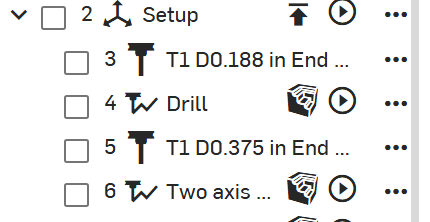
Two different tools assigned the same tool number!! Verification finds nothing amiss- tools are obviously different
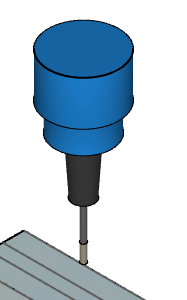
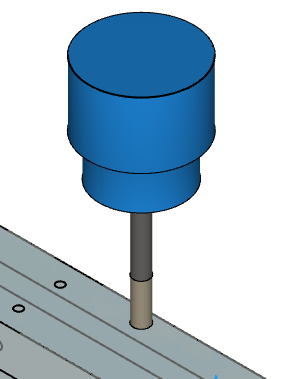
But the posted G-Code (Generic 3-axis Tormach PathPilot reveals the following:
( Operation: Drill)
N3 M06 T1 (D0.201 in A118 Drill)
N4 M03 S3000
N5 G0 G90 G54 G94 ( Setup)
N6 G0 X-6.25 Y0.5021
N7 G43 Z0.5906 H01
……
( Operation: Two axis profile)
N162 M06 T1 (D0.375 in End mill)
N163 M03 S2000
N164 G0 G90 G54 G94 ( Setup)
N165 G0 X-1.8938 Y0.0975
N166 G43 Z0.5906 H01
The machine is commanded to change to T1 for the Drill operation and to T1 for the subsequent profile, even though the tools are different. This situation could ruin a job, or worse, damage a machine. CAM studio puts the burden on the user to avoid this ambiguity. Furthermore, while cutters are stored in a library and can be selected for different jobs, a new assembly must be created each time a new job is created. CS is apparently fine with one-to-many relationships between tool numbers and tools. There is no way to reconcile this situation with the tool libraries associated with Tormach and other machines.
This appears to be a deal-breaker for using CAM Studio in my current environment. Can anyone suggest otherwise?
Comments
@edward_petrillo Thank you for your feedback. This issue is something we are well aware of and we are working hard to add proper libraries to cam studio. Today, users must apply a unique assembly / tool number each time a tool is selected. This is only temporary. Before going to public beta we had to make a decision on how to handle this situation.
Option 1. Saving tool numbers. If we choose to allow users to save the tool number to a tool and a user changes that tool number, anywhere else that tool has been used will also change. For example, if you had a previous job that used T6 for a tool number and in a second job you changed the tool number to T4, the previous job that used that tool will now be set to T4.
Option 2. Static tool numbers. Once a tool is made and the tool assembly number is chosen, that tool assembly number would be permanently fixed to that tool. If a user wanted to changed the tool number they would need to make a copy of the entire tool assembly, and assign a new tool number. This would lead to duplicate tools in the library where the only difference between the tools would be the assembly number.
Faced with these challenges the decision was made that once a tool is created, the only attributes that can be modified without creating a copy are holders, arbors and tool numbers. Each time a tool is selected, the user must choose the assembly number.
Our goal is to have company libraries, job specific libraries and to allow for updating changes to tooling and other options across cam studio jobs using version control.
@John_P_Desilets Thank you for the detailed response. Here's the crux of the issue: In our current workflow, the user chooses the appropriate tool for a toolpath from a library in the CAM application that is linked to the tool offset table stored in the machine- the tool number is the primary key between the two tables. This relationship ensures that the correct Z height offset will be applied when the toolpath is run. If the user errs in the choice of the tool, such as choosing a 3 inch long endmill instead of a 2-inch tool, the correct offset for the tool actually used will be applied.
However, if a CS user errs by assigning the same tool number to the aforementioned pair of tools, the machine will apply the same Z offset to both tools. The consequence could be a tool plunging into a vise, spoilboard, or machine table. The risk is exacerbated by the fact that the verification display in CS doesn't give any hint of the problem- it inappropriately reassures the user. CS obviously has a unique internal identifier for each tool- I'm puzzled at the decision to treat the tool number as merely a label in the current release.
The minimum change necessary to avoid the tool ambiguity risk would be to check whether any two assembly numbers in a job are identical and prompt the user to remove the ambiguity. Manually managing the correspondence between tool numbers in CS and the machine offset table would be cumbersome, but the potentially catastrophic risk of applying an incorrect Z offset to a tool in use would be minimized.