Welcome to the Onshape forum! Ask questions and join in the discussions about everything Onshape.
First time visiting? Here are some places to start:- Looking for a certain topic? Check out the categories filter or use Search (upper right).
- Need support? Ask a question to our Community Support category.
- Please submit support tickets for bugs but you can request improvements in the Product Feedback category.
- Be respectful, on topic and if you see a problem, Flag it.
If you would like to contact our Community Manager personally, feel free to send a private message or an email.
Custom Feature: Loft Fillet

Because of @EvanReese's series on equations, variables, etc. in Onshape, I ended up getting sucked into the FeatureScript rabbit hole. Needless to say, I'm hooked. I'm not a real programmer, but I'm still pretty happy with coming up with something that'll automate a pain point in my CAD workflows. Plus, then I get to share this with the rest of my team.
Link to FeatureScript: Loft Fillet
I created a feature to help avoid the very common (but also very niche) occurrence when that arise from creating edges that terminate on smooth edges, tangent faces, you name it. They generally result in fillets that taper to a point or else just failing altogether. Usually, the workflow to get around this is to:
1. Sweep a circle
2. Extend sweep faces
3. Trim away main body faces
4. Create bridging curves
5. Loft between the open edges
6. Remaining cleanup with booleans, fills, and additional splits
Needless to say, it's a very involved process that requires a few steps and a ton of clicking. Loft Fillet does all of that in one feature. This feature was inspired by @MichaelPascoe's Analyze Fillet. I saw he had a Split Sweep feature, but I couldn't quite get it to work as I intended. I tried to handle as many use cases as I could think of, but obviously, I can't think of everything. Appreciate any feedback that you guys might have. If anything, feel free to peak under the hood to see if there are any optimizations I could implement.


Ramon Yip | glassboard.com
Comments
-
Amazing. I've had thoughts of such a feature many a time, but never even gotten started.
In theory a Face Blend with width control should make this feature unnecessary, but it seems to fail if the dihedral goes to zero. In your test cases, Face blend could only handle test case 4, everything else would take multiple extra features.
Any chance that you can/will make the bridging curves G2 or G3?
Simon Gatrall | Product Development, Engineering, Design, Onshape | Ex- IDEO, PCH, Unagi, Carbon | LinkedIn
1 -
Thanks for checking it out!
I figured this feature is a pretty niche, but I find myself going through the workflow way too often. Some of the test cases are covered by the vanilla Fillet, but I needed some quick geometry to test trimming away end caps and filling gaps.
I can add implementation for G2/G3. It's a pretty simple change in the code. I wanted the feature to be up and running before introducing more complexity to it as I'm still really new to FeatureScript and haven't dealt too deep into programming, really.
Ramon Yip | glassboard.com
1 -
@ry_gb :
Awesome feature! I can see myself using this one a lot in surfacing work. I can already think of a model that I could have simplified or improved with this feature.
I second S1mons improvement request for g2 loft constraints and perhaps even g3 bridges.As a token of my appreciation, please find a Loft-fillet icon you can add to this featurescript to have it stand out!
 2
2 -
That is a very useful one for those who do surface stuff. Thanks a lot.
0 -
Wow this is really cool, Ramon! It will definitely come in handy. I love that I've been able to be at least part of the inspo here.
Here's what comes to mind for improvement ideas. It's already a very useful feature as-is and this is all just my opinion, so do whatever feels right to you and what you have the time and will for:
- it would be nice if the guides were set automatically to tangent if the surrounding geometry is also tangent. You could find those edges with some kind of adjacency query, and check with evEdgeConvexity(), then automatically match that, at least for tangent/positional. If you want to get even more extreme you could also check the curvature of relevant geometry with evCurvature() to compare it and know if you should also use curvature. I agree with others a g2 option is important for a feature like this.
- "Make loft" and "Merge surfaces" should be true by default. In the param map you can just add
"Default" : trueand if you think some users might not like that you could also add"UIHint" : UIHint.REMEMBER_PREVIOUS_VALUEto keep them set to whatever that user used last. - I think "Edge debugging" might have more mass appeal and match the native featureset rebranded to "Preview edges". It should be false default, but remember the value. Btw I love that you added a tooltip to this one. Made it very clear.
- The Trim and Fill options might be automatable. Am I right to think that where the edge meets a sidewall a convex one should always trim and a concave one should always fill? That way you could even handle a mismatch case like this. Currently the trim works, but the fill doesn't happen, making the part a surface body.

1 -
Nicely done! This is impressive work. 😎👍
It seems to handle most cases better that the Sweep blend. Adding this to my toolbar for sure.Doesn't look like you need it, but just in case, here are the two best places to learn FS:
FeatureScript Fundamentals by OnshapeFeatureScript Video Tutorials by CADSharp
With @EvanReese's tutorial spree, I wouldn't be surprised if he has a FeatureScript series cooking somewhere on the back burner? 😃
.
RENDERCAD
rendercad.ai - Photorealistic product rendering.
▚▞▚▞▚▞▚▞▚
________________________________________________________________________1 -
Another thing I forgot to mention earlier, using the radius of the sweep is a little out of line with the width control in other tools. Technically, width and diameter are different, but I would be tempted to switch the parameter to the diameter instead of radius in order to get more similar results with the same number to the width control in the fillet and face blend features.
Simon Gatrall | Product Development, Engineering, Design, Onshape | Ex- IDEO, PCH, Unagi, Carbon | LinkedIn
1 -
You're right sweeping a circle is a bit different than a true chord width fillet, but I'm actually unsure how I'd even do that manually on an edge with varied dihedral angle. Any ideas? This feature definitely automates something I've done manually many times though. I like the idea of changing it to "Diameter". Fillet radius is a bit deceiving, as most people will rightly expect it to produce a blend with that radius of curvature, which it doesn't. I feel like there may be an even clearer wording, but I'm drawing a blank.
2 -
Serendipitous timing putting this feature out there around the same time that those bike guys were on the forums asking for more surfacy fillets for their omega bike studios. Seems like a great tool for product design.
1 -
One bug/feature request: right now this feature will switch a solid part to a surface, even if it's fully enclosed. I haven't done enough testing to see if this is universal, but I see that it happened in most of the test cases in the sample part studio, and in my own tests. It would be much better if solid parts stayed that way and kept the same name/internal ID.
Simon Gatrall | Product Development, Engineering, Design, Onshape | Ex- IDEO, PCH, Unagi, Carbon | LinkedIn
1 -
That's super odd, because in previous versions, it definitely was NOT doing that. I have "makeSolid" set to true in both opBooleans. I'll take a look when I have the time. (Edit: looks like one of those was set to "false", which was the culprit!)
Thanks everyone for the feedback. I'll make sure to implement of bunch of your suggestions. I agree with the point about fillet radius vs diameter. I think I'll just change it to "Blend Width" for now.
Ramon Yip | glassboard.com
1 -
Special shoutout to @jelte_steur_info I was struggling to come up with an icon. What you sent over is perfect!
Ramon Yip | glassboard.com
1 -
I have an update. Here's the list of changes:
- support for g2 and g3 for loft profiles, guide curves, and bridging curves
- on bridging curves, Edit Control Points is set to false and the control points are set to 1 for the sake of simplicity
- replaced "fillet radius" with "blend diameter"
- fixed a bug where merge surfaces wouldn't return a solid
- rearranged some of the ui for clarity
- if both bridging curve options are selected, guide curve tangency is disabled
- Make Loft and Merge surfaces are turned on by default. I figured I can at least try it out for now! @EvanReese
- added an icon. Thanks again! @jelte_steur_info
- added tangent propagation
I'm sure some other stuff I did escapes me, but these are the major changes. I encountered a few bugs that I'm unsure how to fix yet.
Known bugs for now:doesn't work for edges arranged in a u patternbridging curves fail if one of the edges is common between both sets I think it's fixed now.Looks like these were both caused by the same issue.- I encountered one edge case where trim faces didn't work after I created one other Loft Fillet on the same body. It was for just one specific edge, though.
Ramon Yip | glassboard.com
1 -
I've looked at the one's from Onshape, but not the stuff from CADSharp yet! I'll definitely take a look. Still learning a lot as I go.
Ramon Yip | glassboard.com
0 -
I'm really excited to see the progress on this feature. Thanks.
Some observations:
- The "Loft Magnitude" amount doesn't seem to do anything, at least for the case that I'm playing with.
- I'd love to have an option to use a Boundary surface instead of a loft. I realize that it wouldn't work well for many complex cases, but Boundary tends to produce cleaner surfaces than Loft.
- I get that in general edit control points for the Bridging curves could be more complicated, but what I'd love to see is to have the magnitude control apply to the first values of each end of the Bridge curve controls.
Simon Gatrall | Product Development, Engineering, Design, Onshape | Ex- IDEO, PCH, Unagi, Carbon | LinkedIn
0 -
- I'll try to add the Boundary Surface option. It might take a bit, though. I'm not sure how fast it'll be for me to implement. But on paper, it shouldn't be too bad since all the inputs are already there.
- Regarding points 1 and 3, that was the original behavior of Magnitude (i.e. Affects both the loft and bridging curves). When I added the option for G3 in Bridging Curves, you lose the option to set the Bridging Curves by Magnitude/Bias (or at least, that's what I saw in the native Bridging Curve feature). The Loft Magnitude does affect the profile, particularly further away from the guides, just way less so if you have Bridging Curves turned on. I'll explore this a bit more and get back to you on that one.
- Would you rather have all of the Briding Curve parameters included? It felt to me that the more I added, the less user-friendly the feature would be. Then again, I could set the Edit Control Points option available and turned off by default.
Edit: I just re-read your third point. And I can definitely add the influence back in if it's just on the first point. I just didn't want to do it for all three, because of the havoc that would cause.
Ramon Yip | glassboard.com
0 -
I wouldn't include all the Bridging curve parameters, but I would include the Start and End magnitudes, with edit control points on. Here for example, I would like to see 0.6 as the magnitude that is exposed to the user in your feature, but under the hood these would be the settings:
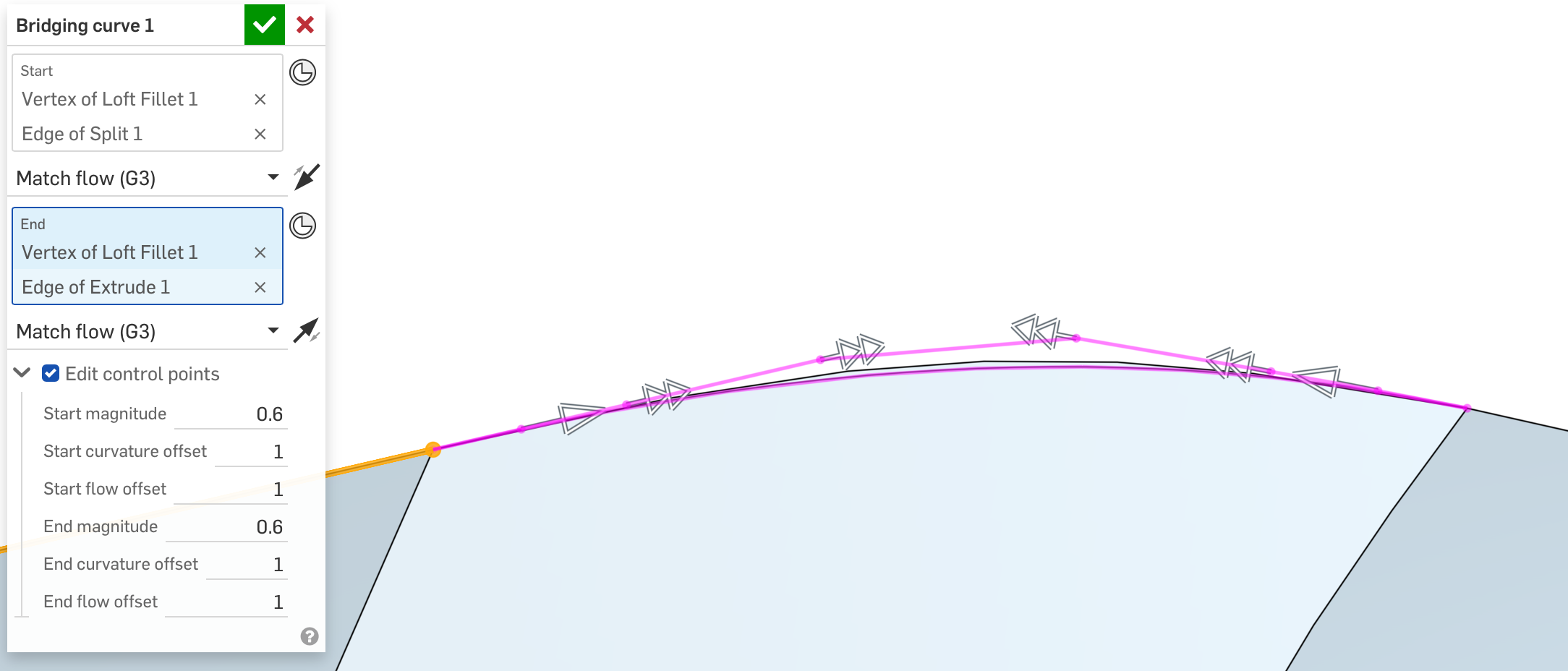
Simon Gatrall | Product Development, Engineering, Design, Onshape | Ex- IDEO, PCH, Unagi, Carbon | LinkedIn
0 -
Pushing another update. I took your suggestion and implemented the change where Magnitude control the start magnitude of each Bridging curve side. That took like 10 minutes to do.
And THEN, I found another bug related when there's only 1 guide curve available and turn on Make Bridging Curve 1, which took the the better part of an hour to figure out. The joys of programming… This reminds me why I'm not a real developer.
Anyway, thanks for all the feedback and really diving in deep! I figured it won't be many of us that use this feature, but the ones who do will get a lot of use out of us (provided it works properly).
Edit1: Grrr… Technical difficulties. Now it's borked for something else. Please hold…
Edit2: I fixed the bug. We're back up and running now.Ramon Yip | glassboard.com
3 -
This the realest thing I've read in a while haha
1 -
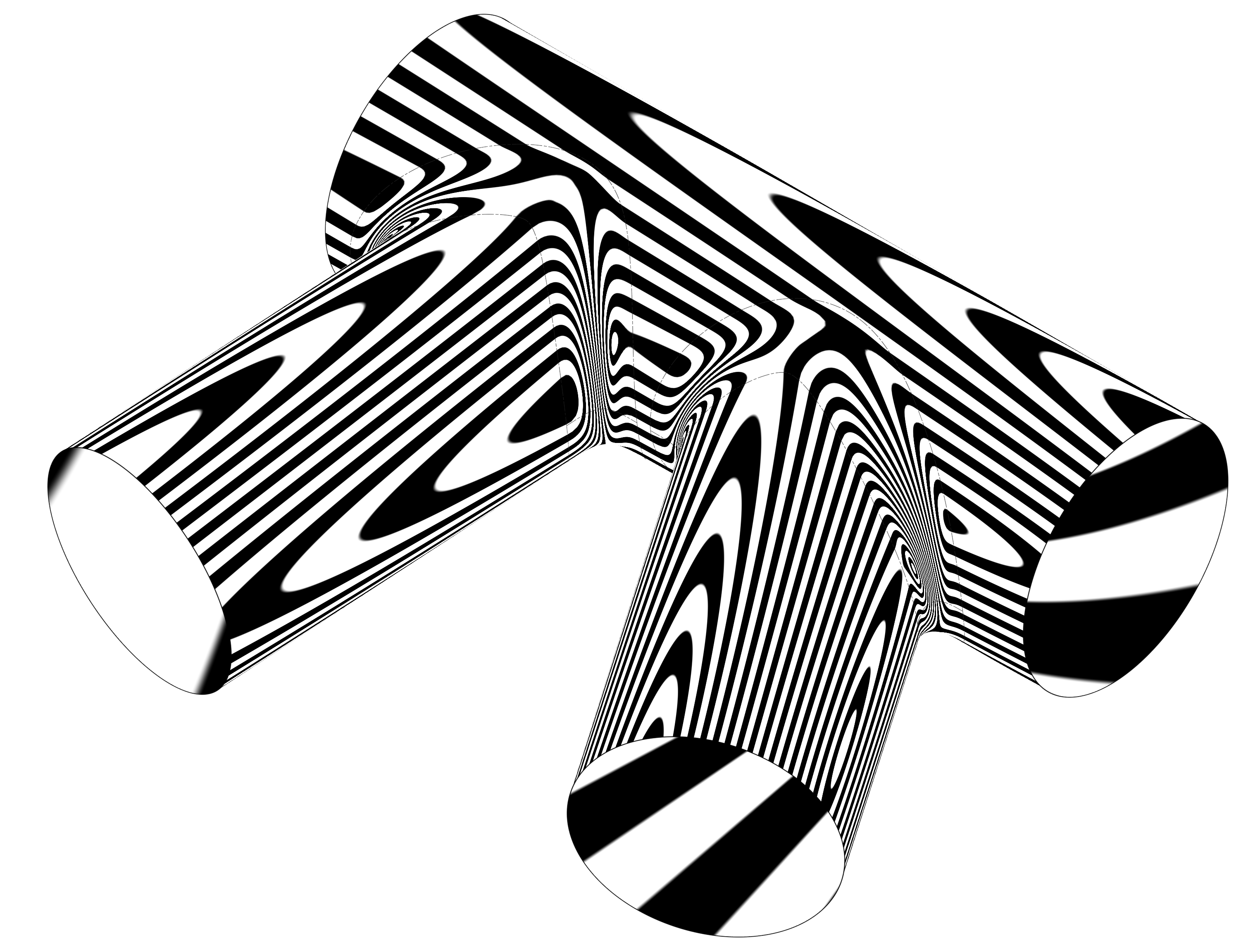
This feature makes me so happy. Being able to dial in things like this within a single feature is amazing. Looking forward to a boundary surface option, but otherwise this is incredibly useful.
Simon Gatrall | Product Development, Engineering, Design, Onshape | Ex- IDEO, PCH, Unagi, Carbon | LinkedIn
1 -
That's great to hear! I figured that not many of us need this feature, but those of us that do would use it quite a bit. Let me know if you have more feedback! I'm sure there's a edge case or two not quite covered yet.
(Although I do think for that specific use-case using the Width option inside of the Fillet tool gives more consistent-width results.)Ramon Yip | glassboard.com
0 -
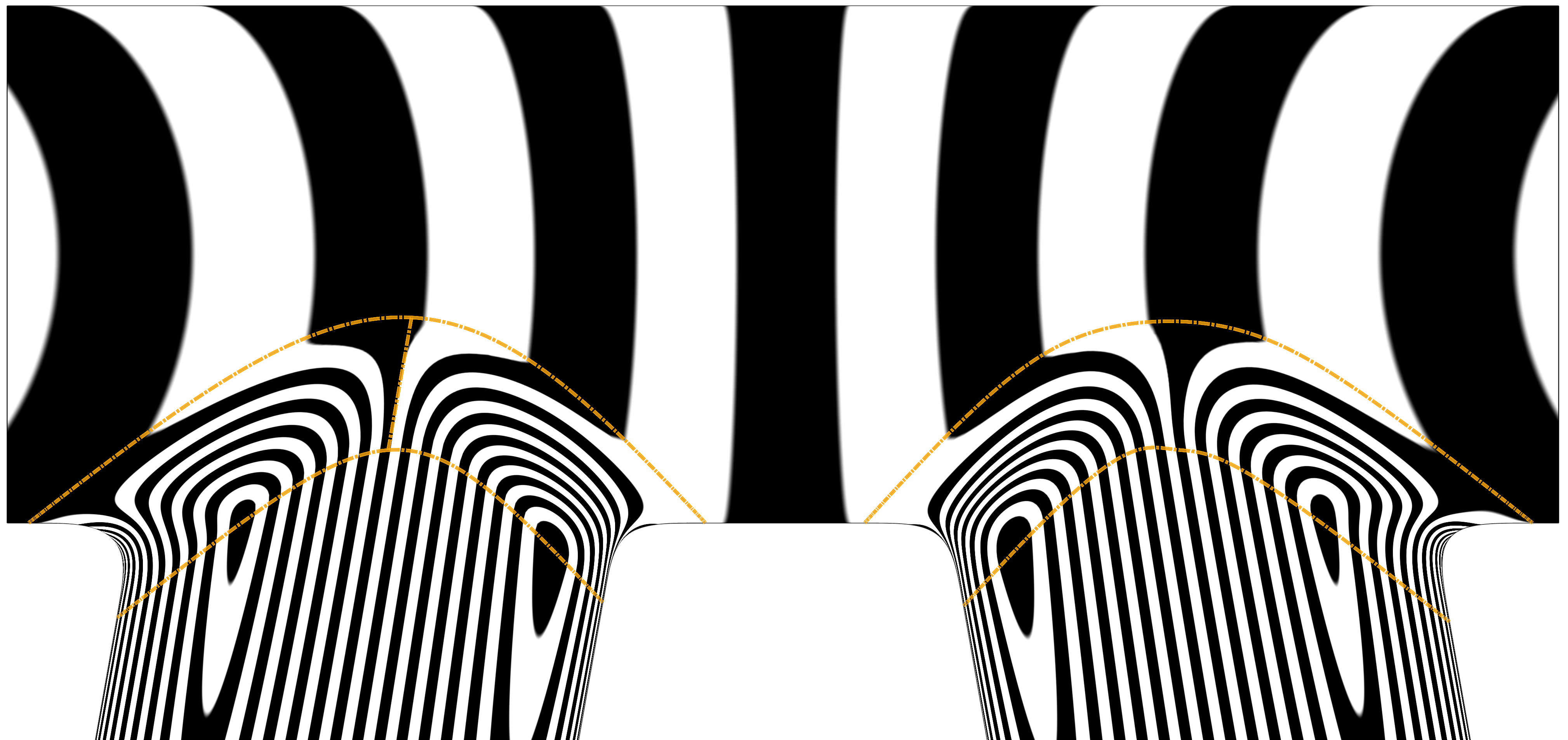
I spent some more time directly comparing the results of the built in fillet tool and the loft fillet in this case (loft fillet is on the left, regular fillet on the right).
You're right that a curvature fillet with width control is pretty good. Some of the trim is a little weird, but overall it works well. In this case, if I was really trying to dial this in, I'd end up building this transition by hand so that I could simplify the trims as much as possible to keep the complexity of the transition surface as low as possible.
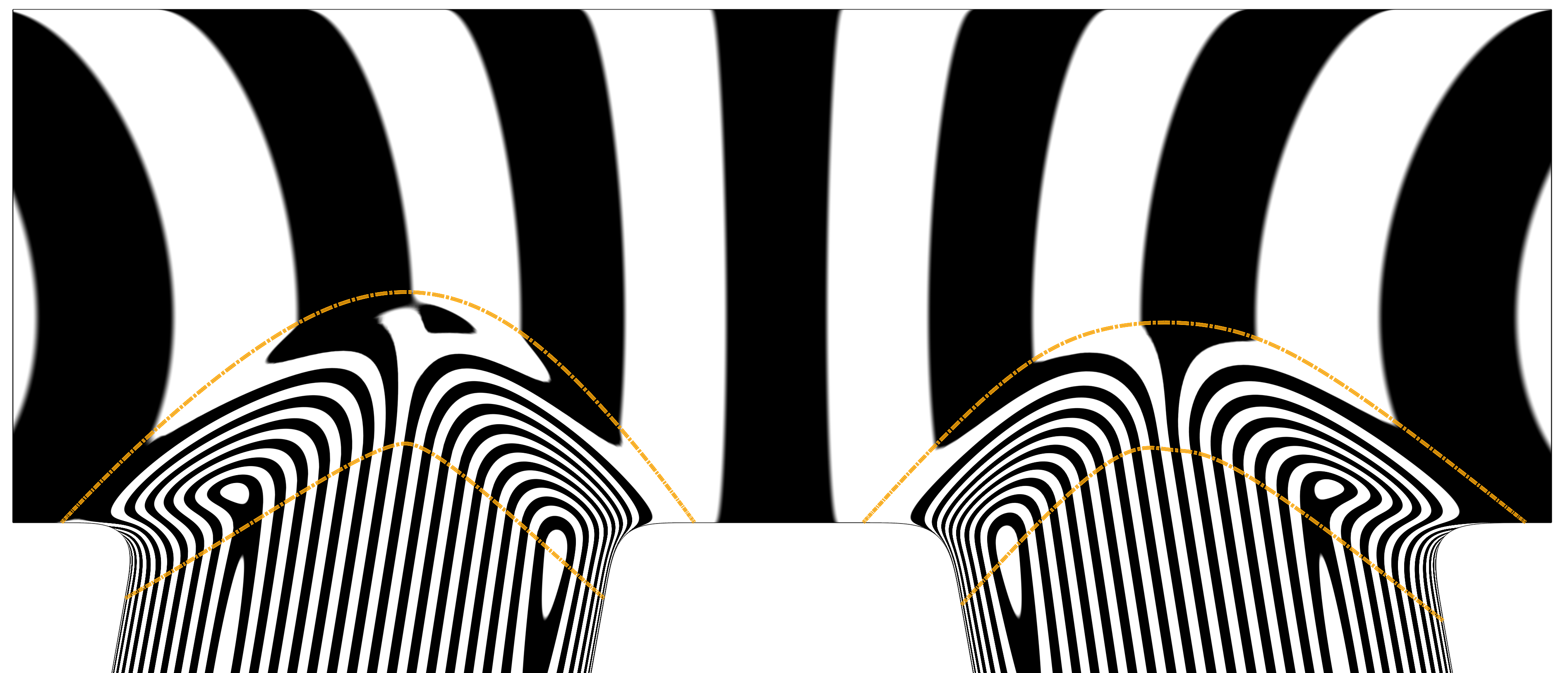
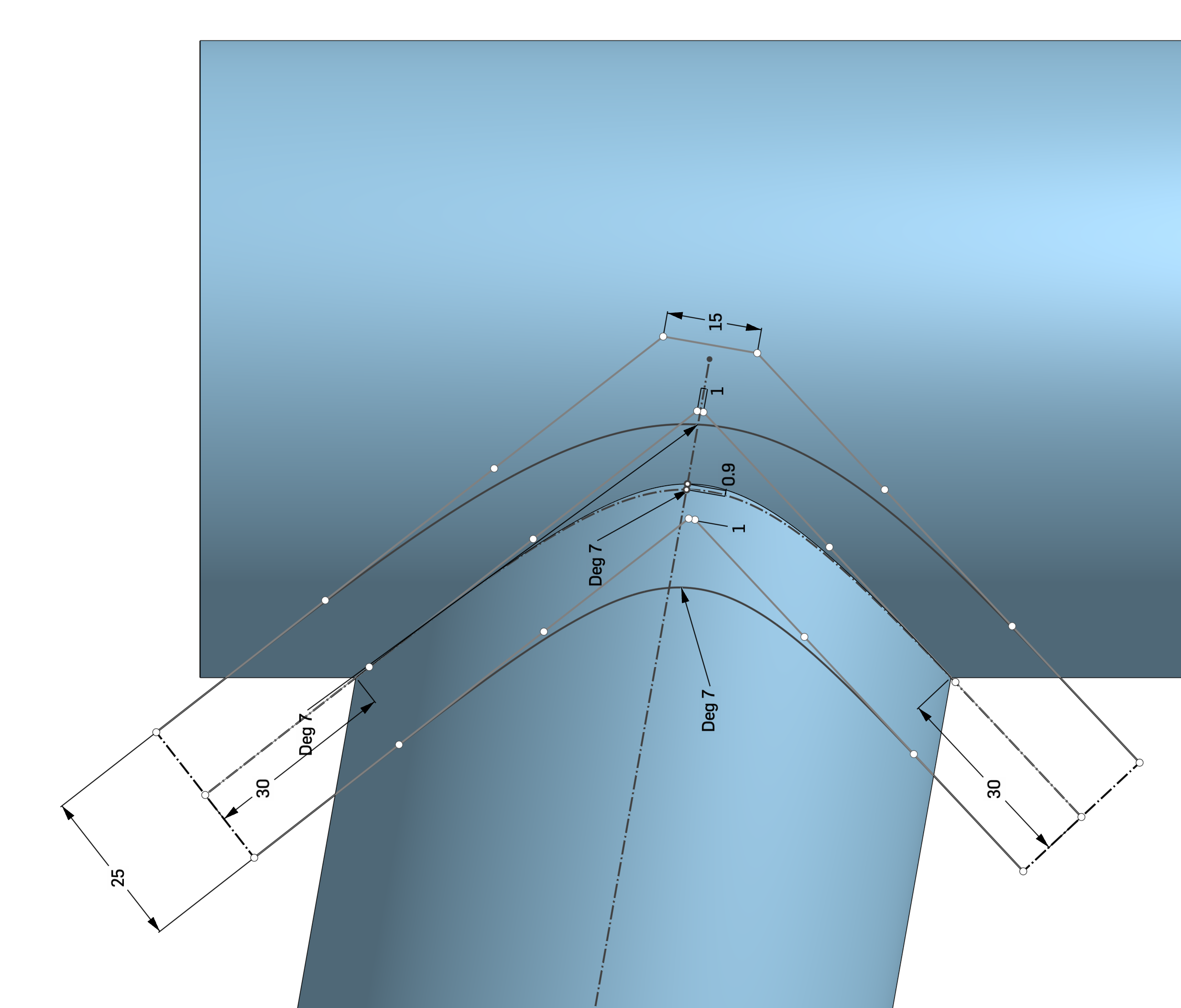
One thing I see people doing with Plasticity, Alias, Rhino etc, is taking the original edge and rebuilding (approximating) that curve to be as simple as possible first, and then sweeping the circle along that to get the trims.
Here's a version where I hand built the trim curves and added a bridging curve in the middle and then built the transition surface with two boundary surfaces. (left is hand built, right is stock curvature fillet with width control.) This makes the highlights at the apex of the transition behave better and keeps it from wobbling so much.
One could noodle this a lot more.
Simon Gatrall | Product Development, Engineering, Design, Onshape | Ex- IDEO, PCH, Unagi, Carbon | LinkedIn
0 -
I saw in Michael Pascoe's Split Sweep feature that there was an Approximate Curve option. I did add that at some point, but the connection points got all messed up from the resulting edges of the adjacent surfaces (say, if side 1 has three faces vs side 2 having one). The edges would probably need to be split evenly to make for good geometry. Do you have any examples or videos you could share where someone approximates the curve? I've been watching some Plasticity videos and have been curious about how close we can get to its results with Onshape (sans xNURBS).
The whole goal of the script was to reduce the amount of steps I need to take when Filleting produces unde (i.e. when it tapers to a singularity point), particularly because the whole Sweep→Split→Trim→Bridging Curve →Loft workflow is pretty time-consuming. However, I'll say that if I wanted even more control, I'd be in your camp and build the surfaces manually.Ramon Yip | glassboard.com
0 -
I really like the idea of an optional approximation of the sweep path. It will make for simpler split edges and cleaner surfaces.
@ry_gb This starts to get into some scope creep, but to automate it even when one side has more edges than the other is to find all of the vertices on one side and use evDistance() to find a corresponding point on the other side so you can build in loft connections that actually make sense.
btw, we will never run out of wishlist items, so you'll just have to call it at some point lol.
2 -
@EvanReese every single feature I've ever written getting scope creeped right out of the starting gate because I work with people that can't keep their splines and edge cases out of the mix.
2 -
Hah! Thanks for looking out for the new guy. I assume you guys all get bombarded with additional requests for your features.
I really did give it an approximate edge option, but like I said, ran into the issue of the loft connections and then yeeted that whole approach out of existence. Your solution makes a ton of sense. evDistance would totally cover that. They really do give you all the tools inside of Featurescript to do whatever you want.Ramon Yip | glassboard.com
0 -
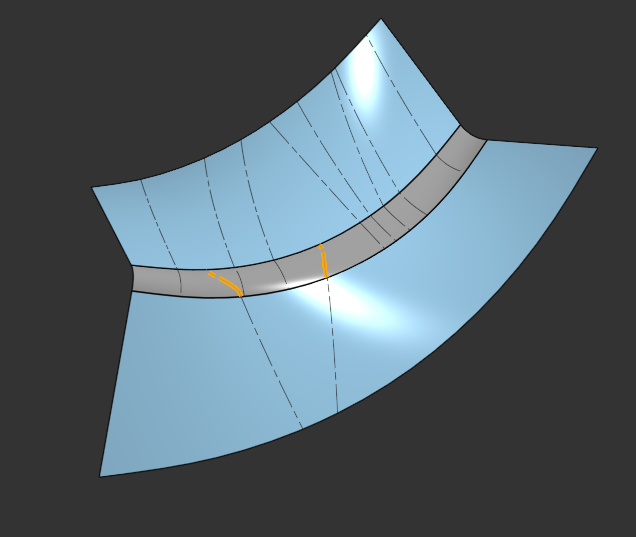
Upfront link to maybe new script? Auto Loft Connections. Still highly a work in progress, but I thought I'd post it to get some ideas on how to improve it.
I've implemented support for Boundary Surface and published the script. I'm not sure how good the Boundary surface implementation is since I feel like it might be limited by Onshape's capabilities. You guys will have to let me know.
I'm also attempting to support a mismatched number of edges and have made some good progress but it's not ready yet. @EvanReese's method of using evDistance worked great, but I need to implement it for both loft profiles and not just one group, it seems. The is mainly in the name of the Approximate option that's been thrown around.
Here's the script that I've made to test out the functionality that I'm attempting to achieve, i.e. Auto Loft Connections. I'd really appreciate some feedback since I feel like I'm starting to feel like I'm out of my depth. I struggled for quite some time last night trying to figure out how the proper syntax for connections. Featurescript just didn't seem to want to play nice. The orange edges highlighted are the rogue edges that haven't been dealt with yet.The script itself seems like it might be useful all on its own, so I might just polish it up a bit. Or else, does it exist already? If it does, I can has the cheat sheet?
Ramon Yip | glassboard.com
0 -
@ry_gb I've got a similar domain matching issue that I haven't yet solved with tween curve to support composite curves with many (and potentially mismatched) segments as an input. The as-yet unapplied thought process was to evaluate the length of each of my curves and the composite segments, normalize the values to a total curve length of 1, split both composite curves at all positions from the normalized unique locations in both lists so that there are a guaranteed matching number of segments that are proportionally the same length of their input curves, then tween each new matched segment.
This means if I have 3 curve segments on input one and 3 curve segments on input 2 my middle curve might be 3 segments but it might also be 5 segments depending on where the lengths align.
0 -
@ry_gb turns out I need auto loft connections to cover an edge case in one of my other features I'm debugging. Deploying some copilot credits to get a working version now.
Edit: The A bone's connected to the B bone. The B bone's connected to the A bone.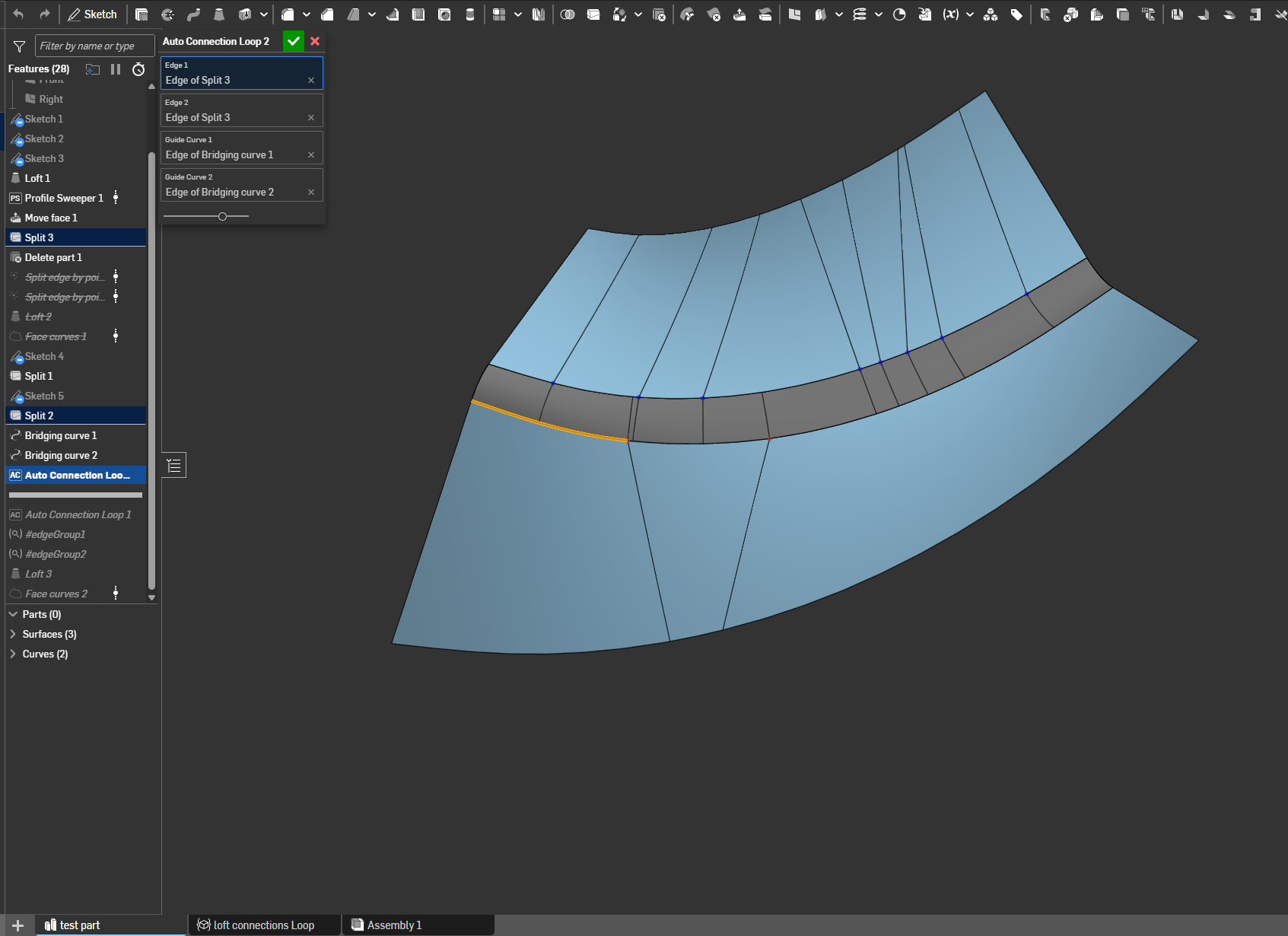 1
1 -