Welcome to the Onshape forum! Ask questions and join in the discussions about everything Onshape.
First time visiting? Here are some places to start:
- Looking for a certain topic? Check out the categories filter or use Search (upper right).
- Need support? Ask a question to our Community Support category.
- Please submit support tickets for bugs but you can request improvements in the Product Feedback category.
- Be respectful, on topic and if you see a problem, Flag it.
If you would like to contact our Community Manager personally, feel free to send a private message or an email.
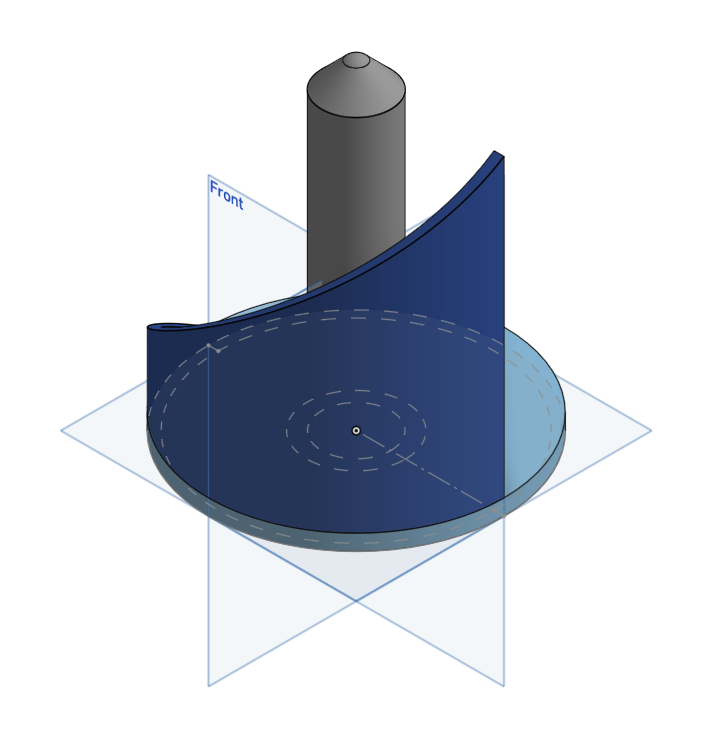
Perforate a cylindrical shape

I have this model I'm working on and I'd like to perforate the dark blue part with a pattern of hexagons. I know you can't user the pattern feature on curves. And I'm struggling to find a way to project the shape and repeat, because of the nature of the curved part. Anybody have a good suggestion?
Thanks
Best Answer
-
Hey Mark. Here is a method you might be able to use to perforate your part. Playing around with the shape (shapes?) in sketch 1 might get what you want. The Circular Pattern feature allows the removal of pattern instances should the pattern fall upon an edge of the part, which I assume would be undesirable.
Beyond using Onshape's native tools. Evan Reese created a custom feature you might be able to use. Check out this post for a discussion, link to the feature script and a video of using the feature script. - Scotty
1
Answers
-
Hey Mark. Here is a method you might be able to use to perforate your part. Playing around with the shape (shapes?) in sketch 1 might get what you want. The Circular Pattern feature allows the removal of pattern instances should the pattern fall upon an edge of the part, which I assume would be undesirable.
Beyond using Onshape's native tools. Evan Reese created a custom feature you might be able to use. Check out this post for a discussion, link to the feature script and a video of using the feature script. - Scotty
1 -
Evan Reese's custom feature is excellent! Thank you.
0 -
So I have a slightly different suggestion: use the native wrap feature, along with a bit of work.
Basically, do this: create a cylinder the same diameter and height as your shape. Create an appropriate sketch with the holes you want to create, and use the native Wrap feature to project that onto the cylinder, and create new solids. You can then simply use those new solid parts to remove portions of your custom shape.
0
