Welcome to the Onshape forum! Ask questions and join in the discussions about everything Onshape.
First time visiting? Here are some places to start:- Looking for a certain topic? Check out the categories filter or use Search (upper right).
- Need support? Ask a question to our Community Support category.
- Please submit support tickets for bugs but you can request improvements in the Product Feedback category.
- Be respectful, on topic and if you see a problem, Flag it.
If you would like to contact our Community Manager personally, feel free to send a private message or an email.
Improvements to Onshape - December 12, 2025


Happy holidays from Onshape! The last official Onshape release of 2025 offers some highly requested goodies, including robust methods for displaying hole quantities on drawings, never before seen realism with the Volume entity in Render Studio Advanced, and CAM Studio usability improvements.
DRAWINGS
QUANTITY FOR HOLE CALLOUTS
Hole callouts in Drawings now support displaying quantities, improving clarity when documenting drilled holes.
RECTANGULAR BORDER FOR DETAIL VIEW CREATION
Detail views now support a rectangular boundary option in addition to circular profiles, splines, and closed polygons.
RENDER STUDIO ADVANCED
VOLUME ENTITY
Render Studio Advanced introduces Volumes, enabling more realistic visualizations of volumetric objects such as fluids, smoke, gels, or translucent bodies. A volume can optionally be an OpenVDB 3D texture. Non-advanced users can open a scene that contains Volumes, but their properties are non-editable. Learn how to Create a Volume.
Sample OpenVDB volumes can be found at https://www.openvdb.org/download/
CAM STUDIO
CAM JOBS USER INTERFACE
The Jobs tree in CAM Studio has been redesigned to align more closely with native Onshape UI patterns, improving usability, clarity, and consistency across the platform.
HOLE CUTTING STRATEGY
Hole selection workflows now support improved ordering behavior, allowing hole-making operations to follow more predictable and intuitive selection sequences.
REVERSE FACE NORMALS
A new option allows you to reverse face normals directly within CAM operations, simplifying toolpath generation and reducing the need to modify geometry in the Part Studio.
MOBILE
SUPPORT FOR CONFIGURABLE VARIABLE STUDIOS
The Onshape mobile apps for iOS and iPadOS now support viewing details of configurable Variable Studios, allowing you to understand part and assembly behavior directly on mobile devices.
LEARNING CENTER
INSPECTION AND REPAIR TOOLS
The Learning Center now offers the Inspection and Repair Tools course, where you’ll learn how to detect and resolve missing references using Onshape’s diagnostic tools, including the Profile Inspector, Constraint Manager, and Repair panel.
ARTICLES
Build a strong foundation in Onshape Assemblies with the newly updated Mating Basics article, which introduces core mating strategies in a clear and refreshed format.
Learn best practices for sharing projects, folders, and documents with users outside your Enterprise in the Sharing Outside an Enterprise article.
Learn how to set up and manage Onshape’s integration with Arena in the Onshape Arena Connection Admin Guide article.
Please take a moment to try out these new features and improvements and leave your comments below. For a detailed list of all the changes in this update, please see the changelog.
Remember: The updates listed here are now live for all users when creating new Documents. Over the next few days, these features will also be available in Documents created before this update. Mobile app interface updates occur via the Apple App store or Google Play store and happen in the days following the update.
Comments
-
-
Hole callout improvements are great, keep those drawing improvements coming.
3 -
-
Great! But could we get some Android Tablet love?
3 -
Funny, I always shunned the hole qty callout in SolidWorks because it wouldn't give the full count of holes. Just what was created in the feature or pattern.
Leave it to Onshape to actually do it right!
8 -
Definitely looking forward to not having to manually count the holes anymore!
The rectangular detail view though should have been included from the start…
I won't personally get to use the other stuff but I am sure it will make some happy!
2 -
finally the quantity for the hole call-out, that is awsome.
0 -
Very happy to have rectangular detail views! Thanks for the update.
0 -
Nice update, especially the update on the hole callout.
PS. Looks like somebody hit ctrl+V a few too many times in the changelog or did you guys really "Fixed an issue with Glassworks API calls counting toward user/company API limits" 5 times?
0 -
@rw_vandenberg it must have been a really persistent bug
0 -
A solid end-of-year update!
1 -
Huge number of fixes in this one! love to see the consistency!
Merry Christmas Onshape crew. You've done amazing. I hope we can make you proud with how we use it next year5 -
From the comment section on reddit of the announcement of this update:
"Cool things with the hole pattern but it seems from the video like it doesn't leave space for annotating according to the ISO standards. The standard state that features should be unabiguous and the unambiguous way of annotating this is something like 6x k and then an arrow and the letter k pointing to every other instance of that hole size so the machinist doesn't have to guess which hole is which size based on the apparent diameter being the same as that one hole that is annotated. The video clearly shows holes of one size all over the part, mixed in with holes of other sizes, so marking all of them unambiguously is key to getting a part that works."
The ISO standard has the amount written above the hole specification exactly so that there's space to add an identifying letter to avoid the ambiguity that comes with not annotating every hole in a drawing when there's multiple holes of different sizes.2 -
Holy cow! These CAM Studio UI improvements are the best yet! I just cammed a part in about half the time it usually takes. So much faster and smoother. Well done!
I look forward to trying the parallel face normal selection soon. It's a huge sigh of relief knowing how many less work arounds have to be done.
How about 3D chamfering and adaptive paths for the first update of 2026?
2 -
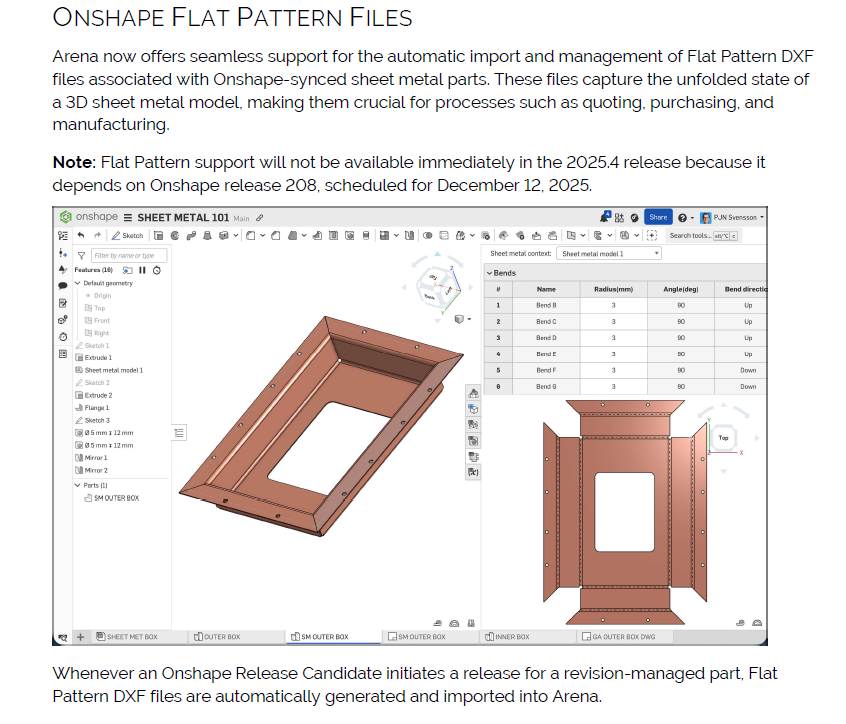
Is the Flat Pattern Automatic Import from Onshape to Arena live as of this release?
 0
0 -
First post of the year attempting to manifest lofted sheet metal into existence this update. I'll settle for the tessellated loft operation though, I got some stuff that could use that.
3 -
Hmm…
I actually hope that the team got a the break they deserved and that today isn't the day!However the last update of 2024 was December 13 and the first of 2025 was Jan 10 so I guess I'll be tentatively hitting F5 a few times today just in case!
2 -
Yep. Thinking very similar thoughts this morning.
Simon Gatrall | Product Development, Engineering, Design, Onshape | Ex- IDEO, PCH, Unagi, Carbon | LinkedIn
2 -
Man, I guess I 'll have to put in a IR for the Onshape to push notification when a release goes live
 Adrian V. | Onshape Ambassador
CAD Engineering Manager1