Welcome to the Onshape forum! Ask questions and join in the discussions about everything Onshape.
First time visiting? Here are some places to start:- Looking for a certain topic? Check out the categories filter or use Search (upper right).
- Need support? Ask a question to our Community Support category.
- Please submit support tickets for bugs but you can request improvements in the Product Feedback category.
- Be respectful, on topic and if you see a problem, Flag it.
If you would like to contact our Community Manager personally, feel free to send a private message or an email.
Can anyone show me how to properly use opLoft Connections?

I'm trying to create a loft with a two sets of edges that have a different edge count to add additional functionality to Loft Fillet. I'm not quite sure I understand how to use the connections portion of opLoft correct.
I'm selecting one group of edges, querying for the endpoints, and then using evDistance to obtain matching points/edges/parameters on the other set of edges. I've at least gotten to that part correctly because I'm able to create splines that connect as expected. From there, I'm having difficulty getting the correct inputs to work in the map. I tried copying the output from the loft feature, but that doesn't seem to work quite right?
Any help is appreciated.
Ramon Yip | glassboard.com
Best Answer
-
connections are not splines - its a parametrization constraint to allow the loft to create segment of surfaces with distinct underlying representation - each connection map defined ordered array of points belonging to a single profile, every other profile should have connection that defines same number of points. the points in connection are defined as either vertices or edges and edge parameters.
So if you have a loft with 2 profiles: [
qUnion(edge11, edge12),
edge21
]
and you want the internal vertex of first profile to be connected to the point in the middle of edge21 then your connections structure will look something like that (assuming common vertex of edge11 and edge12 is adjacent to both of them)
const vertex1 = qIntersection(
qAdjacent(edge11, AdjacenyType.VERTEX, EntityType.VERTEX),
qAdjacent(edge12, AdjacenyType.VERTEX, EntityType.VERTEX)
);
[
{"connectionEntities" : vertex1, "connectionEdges" : [], "connectionEdgeParameters" : []},
{"connectionEntities" : edge21, "connectionEdges" : [edge21], "connectionEdgeParameters" : [0.5]}
]
in case like yours when you have arbitrary number of segments on profiles I would suggest to distribute connections based on path parameter corresponding to each profile for the beginning.
- make a path out of each profile,
- make a helper function that calculates which path parameter corresponds to every unique vertex of path
- for each profile path calculate array of path params, merge this pair of arrays and sort the resulting array , also at this step you might want to remove duplicate path parameters or params that are within certain tolerance. you might want to not only preserve the path parameter but the whole data structure representing profile index, original vertex query and path parameter - that would allow you to not recalculate connection info related to that profile and path parameter
- make a helper function which finds matching edge and edge parameter or vertex on path by give path parameter
- using above function and joint path parameters array make a connection map for every profile path.
profile paths might have unexpected and non matching direction - make sure you somehow synchronize it before running the procedure
0

Answers
-
-
connections are not splines - its a parametrization constraint to allow the loft to create segment of surfaces with distinct underlying representation - each connection map defined ordered array of points belonging to a single profile, every other profile should have connection that defines same number of points. the points in connection are defined as either vertices or edges and edge parameters.
So if you have a loft with 2 profiles: [
qUnion(edge11, edge12),
edge21
]
and you want the internal vertex of first profile to be connected to the point in the middle of edge21 then your connections structure will look something like that (assuming common vertex of edge11 and edge12 is adjacent to both of them)
const vertex1 = qIntersection(
qAdjacent(edge11, AdjacenyType.VERTEX, EntityType.VERTEX),
qAdjacent(edge12, AdjacenyType.VERTEX, EntityType.VERTEX)
);
[
{"connectionEntities" : vertex1, "connectionEdges" : [], "connectionEdgeParameters" : []},
{"connectionEntities" : edge21, "connectionEdges" : [edge21], "connectionEdgeParameters" : [0.5]}
]
in case like yours when you have arbitrary number of segments on profiles I would suggest to distribute connections based on path parameter corresponding to each profile for the beginning.
- make a path out of each profile,
- make a helper function that calculates which path parameter corresponds to every unique vertex of path
- for each profile path calculate array of path params, merge this pair of arrays and sort the resulting array , also at this step you might want to remove duplicate path parameters or params that are within certain tolerance. you might want to not only preserve the path parameter but the whole data structure representing profile index, original vertex query and path parameter - that would allow you to not recalculate connection info related to that profile and path parameter
- make a helper function which finds matching edge and edge parameter or vertex on path by give path parameter
- using above function and joint path parameters array make a connection map for every profile path.
profile paths might have unexpected and non matching direction - make sure you somehow synchronize it before running the procedure
0 -
Hey, @Konst_Sh thanks for answering. A lot to unpack, but I'll make sure to give this a good close look when I sit down to work on the script again.
Just for the record, I mainly created the splines as a sanity check to make sure at least the points were calculating correctly.
So, in the code here:
{"connectionEntities" : vertex1, "connectionEdges" : [], "connectionEdgeParameters" : []},
{"connectionEntities" : edge21, "connectionEdges" : [edge21], "connectionEdgeParameters" : [0.5]}
]
It looks like it's one map per profile, correct? What happens if you're trying to add more connection pairs? Is that additional maps inside of the array or just more elements in each map? Provided that they're ordered, of course.
Lastly, I'm using evDistance in the script to find the corresponding edges and parameters instead. Is that a less efficient approach than what you suggested?
Ramon Yip | glassboard.com
0 -
The connection is always a one map per profile this map defines collection of multiple profile points that should be matched with other profiles.
You can use evDistance for sure, but my method is aming to resolve the situations when you have say a profile1 consisting of 2 edges and profile 2 consisting of 3 - how many connections would you require to define here in generic case to fully define the loft?
0 -
Unsure. I'll try both methods. I'm still fairly new to all of this and when using path before couldn't seem to get it to work.
Ramon Yip | glassboard.com
0 -
I decided to simplify the attempt a bit and it looks like I just needed to get the syntax right. I'm not 100% sure why it didn't work last night. It looks like I needed a connection map per edge section, and not per loft profile. As such, this ended up being the correct syntax:
var connectionMap = {"connectionEntities" : qUnion([vertex1, edge21]),"connectionEdges" : [edge21],"connectionEdgeParameters" : [0.5]};I still need to implement the connections for when side 2 is a split number of edges, but hopefully that's not too bad. I did end up using
evDistanceandevEdgeTangentLineand those seemed to work out just fine. I'll keep the other method in my back pocket since it might be cleaner since you're just dealing with edge parameters on both ends.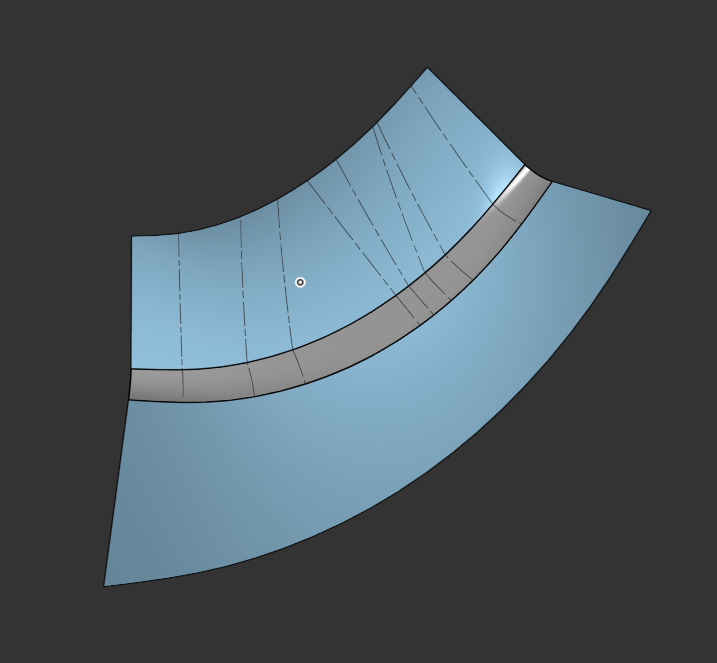
Ramon Yip | glassboard.com
1 -
Great, and you are right, i should correct myself - each connection map not representing all points in profile, it describes points in all consecutive profiles - one per each. This doesn't change much in my method however, just the outer iteration will go by path parameters and inner by profile indexes. In your case when you always have 2 profiles which are additionally quasi-parallel using evDistance to find match should be good enough probably. 👍
1 -
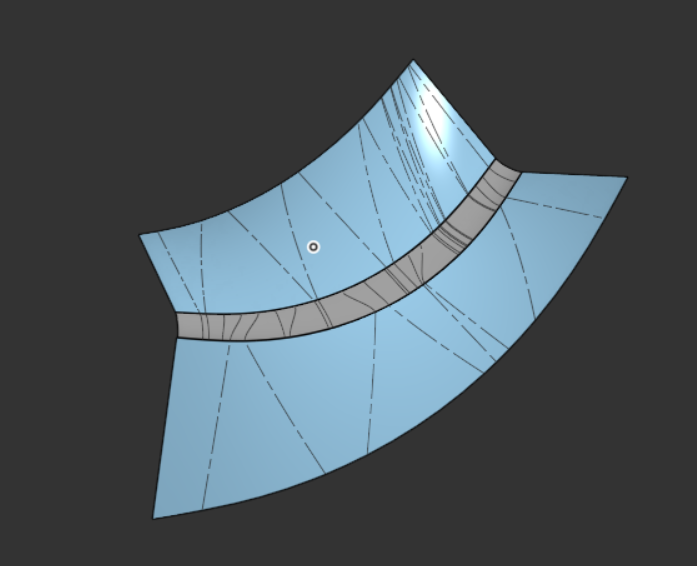
Yeah, from the looks of it, using evDistance is produces some slightly wavy results. I think I'll try manual path parameters to see how much better the results are.
Ramon Yip | glassboard.com
0