Welcome to the Onshape forum! Ask questions and join in the discussions about everything Onshape.
First time visiting? Here are some places to start:- Looking for a certain topic? Check out the categories filter or use Search (upper right).
- Need support? Ask a question to our Community Support category.
- Please submit support tickets for bugs but you can request improvements in the Product Feedback category.
- Be respectful, on topic and if you see a problem, Flag it.
If you would like to contact our Community Manager personally, feel free to send a private message or an email.
Filling a complex hollow shape.
 davis_daniell
Member Posts: 2 ✭
davis_daniell
Member Posts: 2 ✭
Hello im currently having trouble making some complex drafts for my project. As you can see in the image, Im trying to draft the block to the shape of the vent. The vent itself is not flat which is making it harder. I have used the fill feature to create a surface I like the look of but its holloww inside and I have been unable to extrude up to face or use boolean or even split. Thanks for any advice
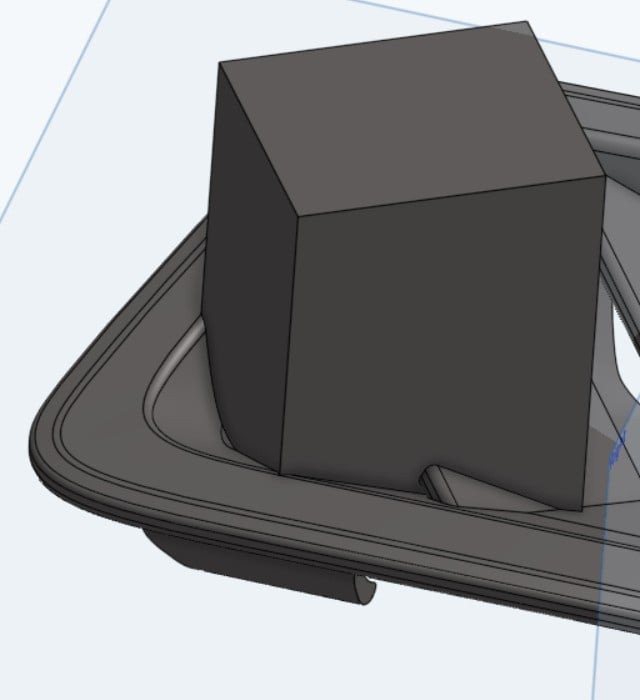

https://cad.onshape.com/documents/6dc0424826cfeefc7af3a570/w/d927a2929f55af3427ea636b/e/20f66b02530ffdd1243e01c2?renderMode=0&uiState=694301c2145efa5e72ae6bc7
Answers
2015 WRX. Sick.
Maybe just make the gauge holder its own part then do a boolean subtract?