Welcome to the Onshape forum! Ask questions and join in the discussions about everything Onshape.
First time visiting? Here are some places to start:- Looking for a certain topic? Check out the categories filter or use Search (upper right).
- Need support? Ask a question to our Community Support category.
- Please submit support tickets for bugs but you can request improvements in the Product Feedback category.
- Be respectful, on topic and if you see a problem, Flag it.
If you would like to contact our Community Manager personally, feel free to send a private message or an email.
Trying to make a linear pattern of a feature, not behaving as I'd expect
 joe_fisher391
Member Posts: 11 ✭
joe_fisher391
Member Posts: 11 ✭
I'm designing a bin with slots in the walls. I made a sketch on the face of the bottom of the bin, drew a little rectangle, and extruded it for my first slot.
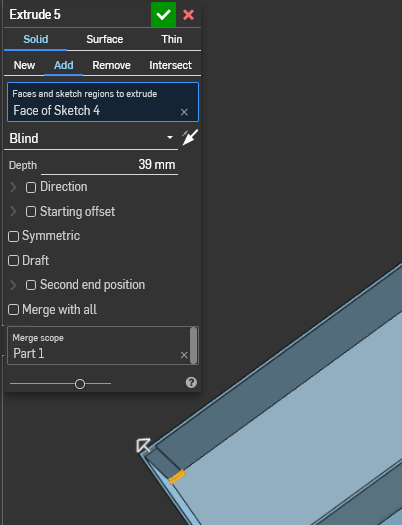
Then I want to do a linear pattern along the whole wall. But when I select "Feature pattern" and the extrusion it selects the entire base part.
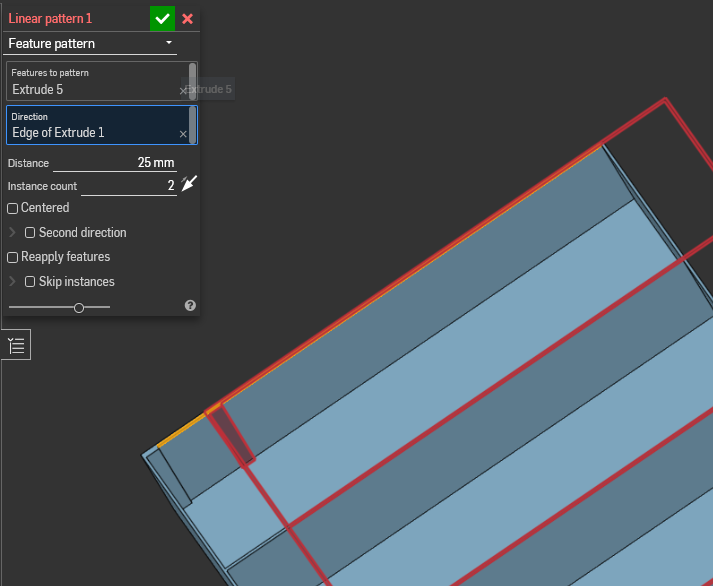
Which is of course not what I want. If I select "Reapply features" it seems to work, but then I have the same problem if I try to copy or mirror those features later.
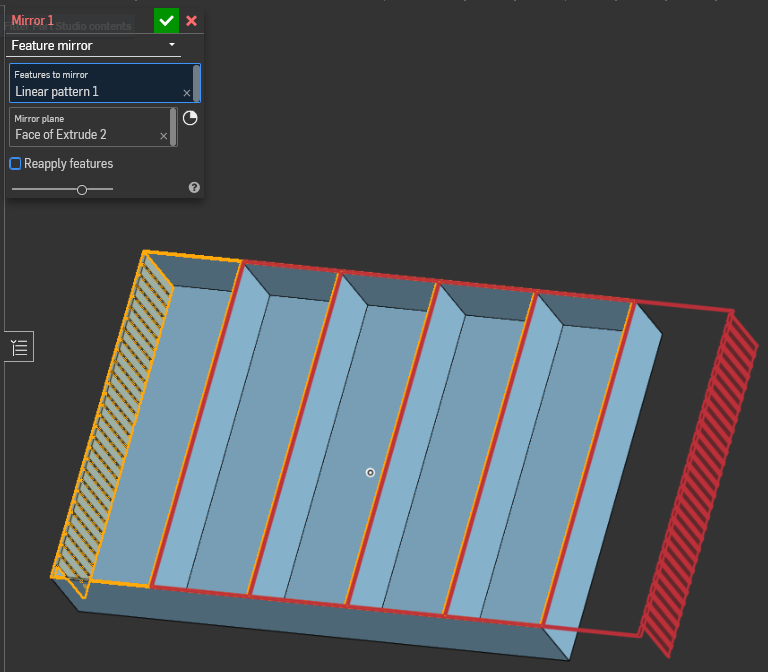
The only way I've found that works is to make the initial extrusion a new part and do it that way, but now I'm creating hundreds of separate parts to try merging together later and that doesn't seem like the intended solution.
I'd love some suggestions on the right way to pattern that feature along a wall. Thanks!
Comments
Forgot to add the project link: https://cad.onshape.com/documents/944fc117778c4488f4341a4a/w/8b9de6ca2320daa32d87a188/e/0ab39ed12e8b9cbeb1af3698
Hey Joe. I played around with a copy of your document. I created a plane midway between the walls of the first compartment to use for the mirror of the pattern, selecting both the #5 extrude and the linear pattern. Kinda expected that to work but it didn't although it didn't proclaim an error. What did work was to mirror the extrude and then linear pattern the extrude and the mirror.
Although not the method you would like to see succeed, you could create one compartment and then linear pattern the part.
- Scotty
Document
@joe_fisher391 Hi Joe.
This is a classic example of Symmetry and where Mirror and Pattern excel…. By using a different workflow approach you can to achieve what you are after, in a much more efficient way.
First - start with a Sketch the represents 1/2 of your basic pattern.
Second - Mirror that Sketch to produce the first Part.
Third - Pattern the Part with Merge Scope being the new Part.
Thanks for the suggestion, Scotty. I tried that too, but it still selects the entire part when I choose the extrusion. I'm clearly doing something wrong but I can't figure it out.
I ended up punting and doing the linear array in the sketch, then selecting the entire sketch to extrude. That worked just fine.
Still, I'd like to understand better how the feature mirroring is intended to work.