Welcome to the Onshape forum! Ask questions and join in the discussions about everything Onshape.
First time visiting? Here are some places to start:- Looking for a certain topic? Check out the categories filter or use Search (upper right).
- Need support? Ask a question to our Community Support category.
- Please submit support tickets for bugs but you can request improvements in the Product Feedback category.
- Be respectful, on topic and if you see a problem, Flag it.
If you would like to contact our Community Manager personally, feel free to send a private message or an email.
trying to make a ledge to drop lenses into on curved glasses

Hello,
I am trying to make a pair of glasses for a puppet. I have modelled the frame, and used the sweep feature to create the curvature, but now I am stumped trying to make a ledge inside each eye hole for a 3D printed lens (made separately) to be glued into. I want the ledge to come out 1mm from the edge and be recessed 1mm down from the front of the glasses. Imagine if a router had gone around each eye hole.
I am very new to onshape- so I need a step by step explanation please.
Here is a public link to my file- https://cad.onshape.com/documents/b0a5dfd2e217f94c008fa742/w/9f64cda7f21b522b8734cb6a/e/bb39fe1a5d25bd8f1d993574?page=2&email=katherine.hannaford%40det.nsw.edu.au&renderMode=0&uiState=696d9f0d7fc4798666cb28b0
Best Answer
-
I made a 1mm offset of your sketch, then used that to do an extruded cut up to the face of the frame plus 1mm (offset distance) - https://cad.onshape.com/documents/71ef81a86b19f394a6c561d2/w/7a47520f0ffc03db1e02f22f/e/eaa1963e63d0cdf71fcd7434?renderMode=0&uiState=696e315b465b25b4aa492002
Unemployed Onshaper- Operating on European time - More of me here ➤➤ https://linktr.ee/Liam.G1

Answers
-
I made a 1mm offset of your sketch, then used that to do an extruded cut up to the face of the frame plus 1mm (offset distance) - https://cad.onshape.com/documents/71ef81a86b19f394a6c561d2/w/7a47520f0ffc03db1e02f22f/e/eaa1963e63d0cdf71fcd7434?renderMode=0&uiState=696e315b465b25b4aa492002
Unemployed Onshaper- Operating on European time - More of me here ➤➤ https://linktr.ee/Liam.G1 -
Thank you CADNurd for taking the time to look at my question, What a great solution. I really appreciate the help. Katherine
0 -
@katherine_hannaford - No problem at all. I learned a couple of things myself in the process.
Unemployed Onshaper- Operating on European time - More of me here ➤➤ https://linktr.ee/Liam.G0 -
The glasses look great for a new user!
Here is another approach using surfaces. A 3d shape like this is often simpler with surface offsets.
https://cad.onshape.com/documents/ab88d06e11a1a034078630d4/v/86bff94333908aa02c645ab8/e/4d3226456457ac206bd7a636?showReturnToWorkspaceLink=true
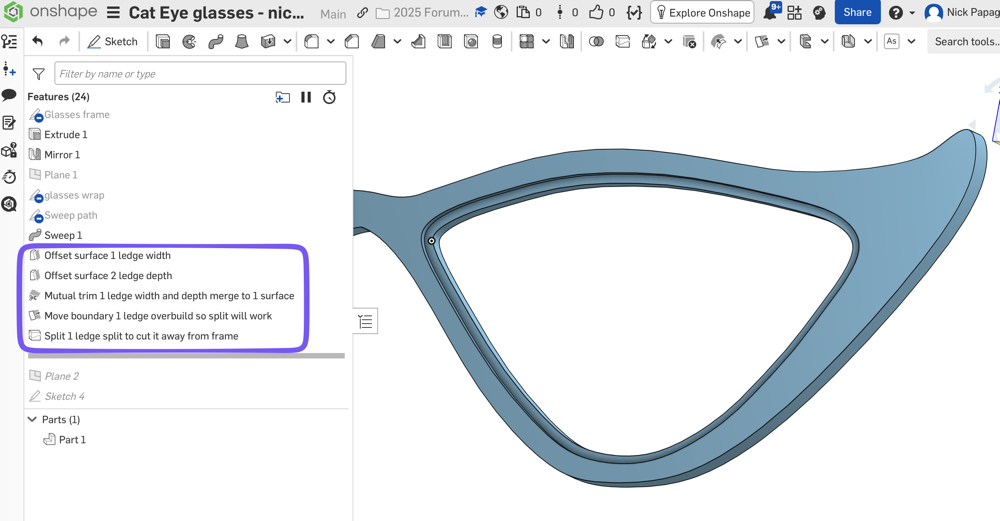
If you model half the glasses and then mirror at the end, it will save you a lot of work. You have the mirror at the beginning now, and are doing double work for each feature, such as the lens ledge, the hinges, etc.
You can keep the mirror so you have a sense of what the full glasses look like, then keep rolling back before the mirror to add new features.
The surfacing technique would also be helpful when you get around to making the lens. I'd probably make the lens much earlier, and use it to make the lip too. When you swept the shape of the frame, if that sweep was a single surface instead of a double sketch cut, it could be the lens surface too. Then you can offset/thicken that root surface separately; Once for the frame (thicker), then again for the lens (thinner)..
One more since you're new to OS, you can model everything together in the same part studio. The frame, the lens, the temple, etc. (and mirror all at the end).
1