Welcome to the Onshape forum! Ask questions and join in the discussions about everything Onshape.
First time visiting? Here are some places to start:- Looking for a certain topic? Check out the categories filter or use Search (upper right).
- Need support? Ask a question to our Community Support category.
- Please submit support tickets for bugs but you can request improvements in the Product Feedback category.
- Be respectful, on topic and if you see a problem, Flag it.
If you would like to contact our Community Manager personally, feel free to send a private message or an email.
Using pattern tool to duplicate organic parts or features
 mustafa_afaneh
Member Posts: 7 ✭
mustafa_afaneh
Member Posts: 7 ✭
in Drawings
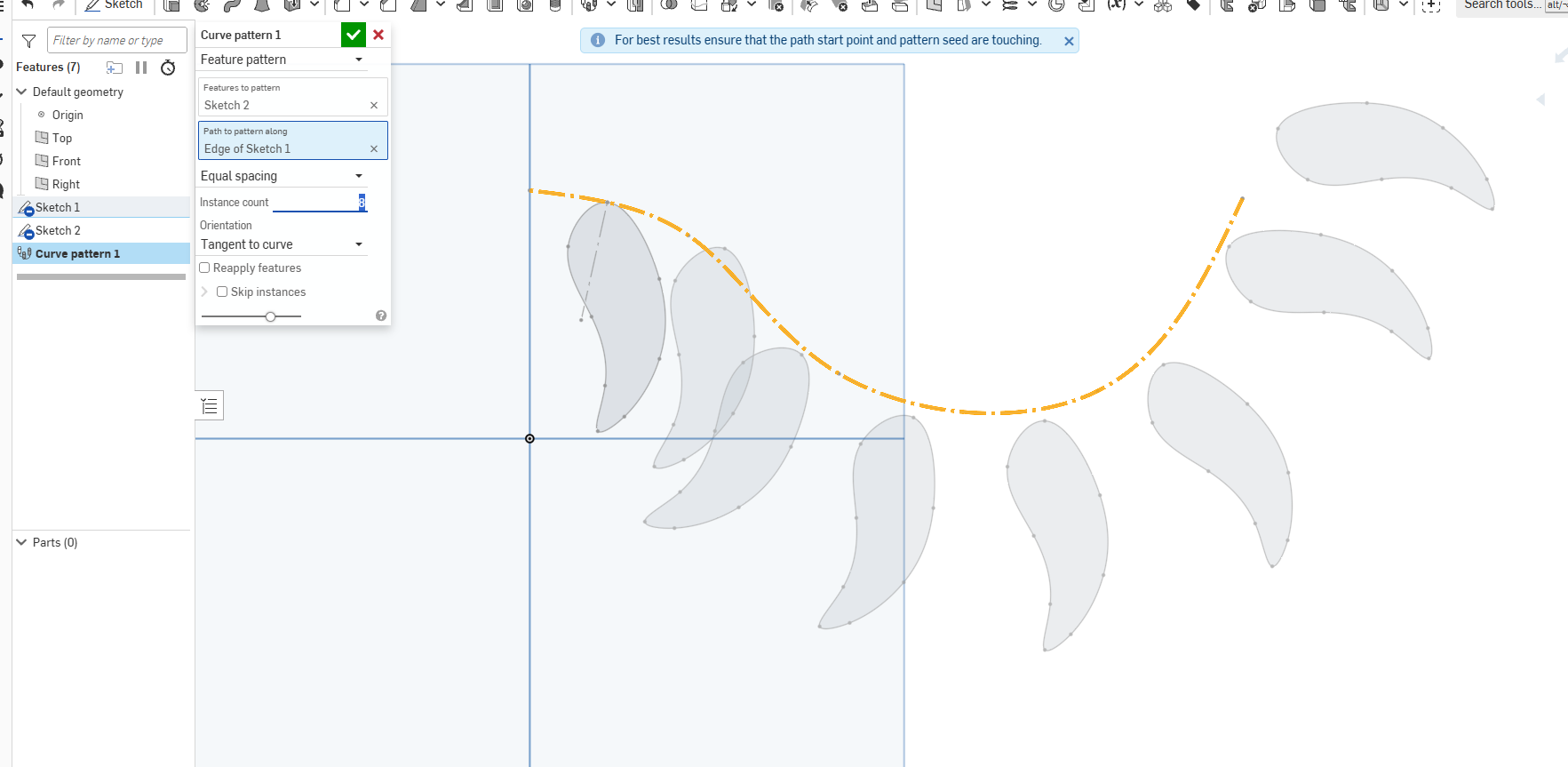
Hey guys, does anyone know how to use the pattern tool on organic shapes like this feather so that the root of the feather doesn't end up drifting off of the spline pattern? I tried so many methods but nothin is working. Also does the feather spline have to be constrained?
0
Comments
Your path needs to start at the contact point of your first instance as this how they are related to each other.
Side note: unless there is a very specific reason why you need to do this, patterning the sketches is usually not the best workflow, it's better to pattern bodies (solids or surfaces)
Thank you so much, it's working now! Also will take your advice on using patterns on bodies.