Welcome to the Onshape forum! Ask questions and join in the discussions about everything Onshape.
First time visiting? Here are some places to start:- Looking for a certain topic? Check out the categories filter or use Search (upper right).
- Need support? Ask a question to our Community Support category.
- Please submit support tickets for bugs but you can request improvements in the Product Feedback category.
- Be respectful, on topic and if you see a problem, Flag it.
If you would like to contact our Community Manager personally, feel free to send a private message or an email.
Drawing Templates - Several Questions
 andre_kvaternik
Member Posts: 13 ✭
andre_kvaternik
Member Posts: 13 ✭
I've created drawings for A, B, C, and D sized drawings. I've exported them as .DWT files to my Google Drive. I setup a separate Google Drive folder with all my templates in it, and wanted to select one of them from the folder, rather than having to import it each time. I want to use one of them when I create a drawing, but when I click on 'create drawing' while in an assembly, I only get the drawing templates that I've imported in to my model. Is that the way it is supposed to work?
My Drawing Templates are Greyed Out - How do I select them?
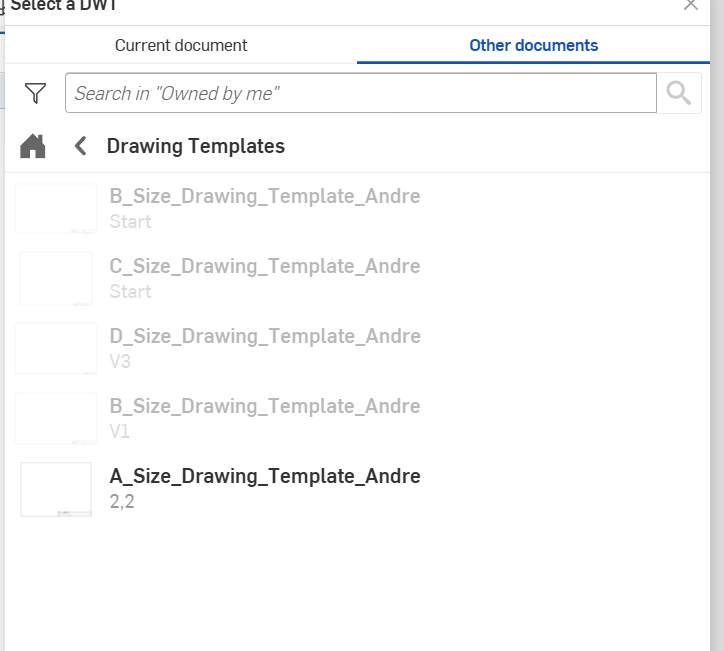
If I go into an existing drawing and want to change the drawing template, I click on the drawing 'sheet properties>format>Other documents' and all but one of my templates is greyed out (see below). What do I need to do to the template to make it selectable?
Comments
There is no need to use Google drive for this, just import all your DWTs into a single Onshape document somewhere (I have a folder called "admin files"), make sure you create a version and they should now be available.