Welcome to the Onshape forum! Ask questions and join in the discussions about everything Onshape.
First time visiting? Here are some places to start:- Looking for a certain topic? Check out the categories filter or use Search (upper right).
- Need support? Ask a question to our Community Support category.
- Please submit support tickets for bugs but you can request improvements in the Product Feedback category.
- Be respectful, on topic and if you see a problem, Flag it.
If you would like to contact our Community Manager personally, feel free to send a private message or an email.
Sweep around corners
 ProApe
Member Posts: 234 ✭✭
ProApe
Member Posts: 234 ✭✭
Hello,
How can I sweep the profile from Sketch 2 along the path from Sketch 1 so that the corners are clean?
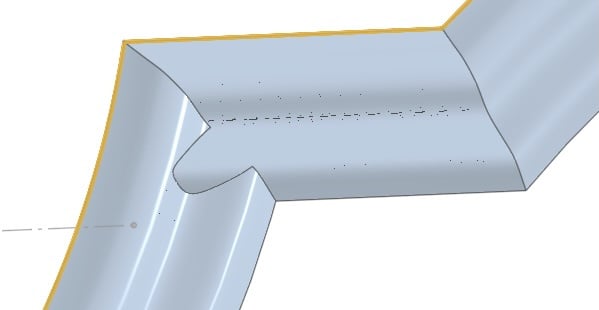
In reality, I want to trace (and mill) the ornaments on this door. This is a first test to master sweeping, and it didn't turn out very well!
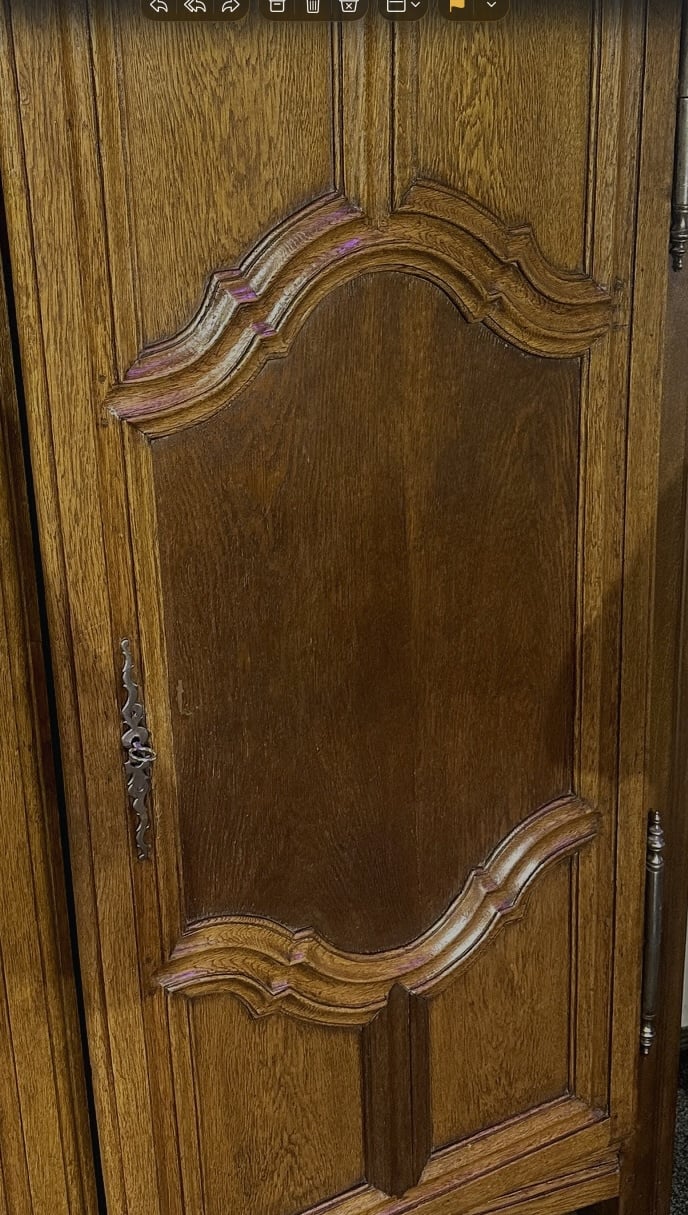
Another question: I don't know the dimensions yet, I only have the picture and will measure tomorrow.
I thought long and hard about how to determine the radius of the arcs, and then I came up with an idea – which works, even if not to the nearest millimetre – to use Onshape, specifically the ‘3-point arc’ function: I start at both ends and draw the arc to the apex.
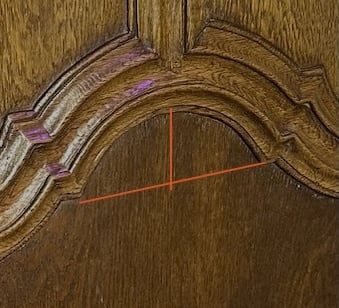
Is there another, better method?
And sometimes, when I enter the correct dimensions, the construction is torn apart (but not in this drawing). How can I prevent this?
https://cad.onshape.com/documents/3bc130c284fa6e67d45729ea/w/9baff6a5a011797e3110d6f7/e/07024d0013878e2408f57459?renderMode=0&uiState=697d367062da3f6df76071a5
Kind regards,
ProApe
Comments
This looks a lot like a textbook application for CADsharp's Pattern and Sweep feature.
Derek Van Allen | Engineering Consultant | MeddlerTry this.
https://cad.onshape.com/documents/c9134dadb94ebcd3c6c063d6/w/b88baecf32af7c197c1b8923/e/340bb3fcea692a20bdcae1e2
Thank you both very much!
Now I don't understand the world anymore!
When I started up my Mac and Onshape earlier, suddenly, without me doing anything, the left corner was neatly stitched (which wasn't the case when I closed it down yesterday evening!) and the right corner wasn't, which can be fixed by mirroring.
And when I start again from the beginning, suddenly everything is correct, even though I did exactly the same as before!
Onshape gaslighting? I don't know what you're talking about
Derek Van Allen | Engineering Consultant | MeddlerWhat do you mean by gaslighting?
https://www.google.com/search?q=gaslighting+definition&rlz=1C1CHBF_enUS999US999&oq=gaslighting+definition&gs_lcrp=EgZjaHJvbWUyEQgAEEUYORhGGPkBGLEDGIAEMgcIARAAGIAEMgcIAhAAGIAEMgcIAxAAGIAEMgcIBBAAGIAEMgcIBRAAGIAEMgcIBhAAGIAEMgcIBxAAGIAEMgcICBAAGIAEMgcICRAAGIAE0gEIOTk4N2owajeoAgCwAgA&sourceid=chrome&ie=UTF-8
I'm having trouble making the curved decorations at the ends taper off the way I want, e.g. the straight ones at 45° in the corners. I have no idea how to do this, since the sweep runs along a line.
The curved ones need to taper off vertically, but they don't because of the shape of the end line. I have found a way, but it's probably not the smartest: I placed a sketch under the body, drew a vertical line and removed the part that extends beyond this line.
And I did not succeed in making one part from those between the yellow lines on the screenshot.
https://cad.onshape.com/documents/780b1f652b3d444ca1ecf39d/w/f80a9913086cf1ac9292c354/e/2a120bc6daf25c0b7ae0e77e?renderMode=0&uiState=697fd7ad664092f57af1908e
P.S.: I wrote my post at the same time as you, michael3424, and therefore before I received it, and I have no intention of engaging in gaslighting intentionally ;).
Why can't I sweep on this path? At the right vertical line it stops working. Why?
https://cad.onshape.com/documents/1bb1c88a7df58e02434546fa/w/2710a79fba87b4f508178aa3/e/c47330f855bb2863a91ec207?renderMode=0&uiState=6987ab82a0ce94ddba3a6b62