Welcome to the Onshape forum! Ask questions and join in the discussions about everything Onshape.
First time visiting? Here are some places to start:- Looking for a certain topic? Check out the categories filter or use Search (upper right).
- Need support? Ask a question to our Community Support category.
- Please submit support tickets for bugs but you can request improvements in the Product Feedback category.
- Be respectful, on topic and if you see a problem, Flag it.
If you would like to contact our Community Manager personally, feel free to send a private message or an email.
Sweep
 ProApe
Member Posts: 230 ✭✭
ProApe
Member Posts: 230 ✭✭
Hi,
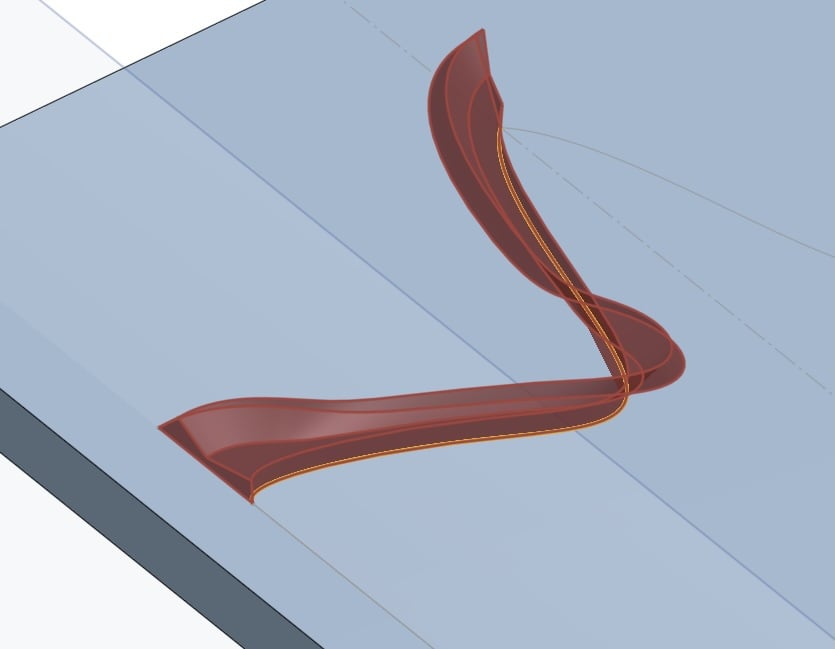
Why can't I sweep the figure of sketch 3 along the path in sketch 2?
In the image the result of my sweeping.
Kind regards
ProApe
https://cad.onshape.com/documents/9eade1081f2f93fb75689bbf/w/27f7c9b248a69cc1018262df/e/701771031e6e40053d0beae5?renderMode=0&uiState=698510d24a5334ffe3da193b
0
Comments
'Keep Profile Orientation' option
CADNurd's Linktree - find me everywhere else - https://linktr.ee/Liam.G
I don't understand where and why!
In Part Studio 2, I made another sweep that worked.
But what do I have to do to make the start and end points perpendicular to the line?
https://cad.onshape.com/documents/9eade1081f2f93fb75689bbf/w/27f7c9b248a69cc1018262df/e/21f82b1783ea433a239d6827?renderMode=0&uiState=6985153d4a5334ffe3da25ee
"'Keep Profile Orientation" helps, but although I have chosen that option, as well as modified the figure and the path, I am blocked at the corner in the middle.
https://cad.onshape.com/documents/9eade1081f2f93fb75689bbf/w/27f7c9b248a69cc1018262df/e/701771031e6e40053d0beae5?renderMode=0&uiState=69851a804a5334ffe3da3060
After some playing around . . . try to make sure your profile sketch is 'normal to' the start of your path. Done using - https://cad.onshape.com/help/Content/PartStudio/plane.htm#CurvePointD
Also, don't forget you can locate a sketch using a mate connector, and if you hover over the end of a spline you can usually select a 'normal to' one.
CADNurd's Linktree - find me everywhere else - https://linktr.ee/Liam.G