Welcome to the Onshape forum! Ask questions and join in the discussions about everything Onshape.
First time visiting? Here are some places to start:
- Looking for a certain topic? Check out the categories filter or use Search (upper right).
- Need support? Ask a question to our Community Support category.
- Please submit support tickets for bugs but you can request improvements in the Product Feedback category.
- Be respectful, on topic and if you see a problem, Flag it.
If you would like to contact our Community Manager personally, feel free to send a private message or an email.
About slicing a form

I've made a 1/2 a vase form using the loft and shell function. I would like to 'take it apart' to make a cookie cutter for each facet . What's the best way to accomplish this? I looked into slicing, but it only seems to cut it along a plane crossing, cutting through the entire object. This is the simplest form, like this, I'm working on.
https://cad.onshape.com/documents/b8bad6fbc4fd8dfe5546be8c/w/25a1049ada79a5ba6e09d140/e/865ec2d6a433dbe283d1f7d6?renderMode=0&uiState=698fa230f059ee7d75096c4e
Answers
-
Your facets are not actually flat - which might be a problem. You could try looking at the 'Flatten Surfaces' tool - https://cad.onshape.com/help/Content/View/analysis_tools.htm?cshid=showFlattenSurfaces#Flatten
Unemployed Onshaper- Operating on European time - More of me here ➤➤ https://linktr.ee/Liam.G1 -
Hey Bruce. Found something that works if you don't mind cheating a bit. - Scotty
0 -
Cheating isn't cheating
How did you do it
0 -
Notice that in Loft 2, the options for Remove and Thick are chosen and the thickness entered is .001". The loft creates a .001" gap with a depth of whatever is determined in the loft by the lengths of the lines of Sketch 2 and Sketch 3; I didn't check but it looks like they are equal (doesn' t matter). The thickness of the gap comes from losing some 'material' from the joint where the sides of the vase comes together. It's like cutting with an ideal saw that is .001" thick.
Thus, the cheating. One thousandth of an inch thickness was removed from each joint of the sides. So, after the loft and the circular pattern, the X lengths of the top and bottom faces of a side (segment) will no longer be the same lengths as the top and bottom faces of the sides of the original whole vase.
However, to overcome the loss there is a tool called Move Face. You could get back the loss that way, but the moved face must be put back on the edge face of the segment (side) of the vase that the loft took from. (Gotta put it back where it came from)
- Scotty
0 -
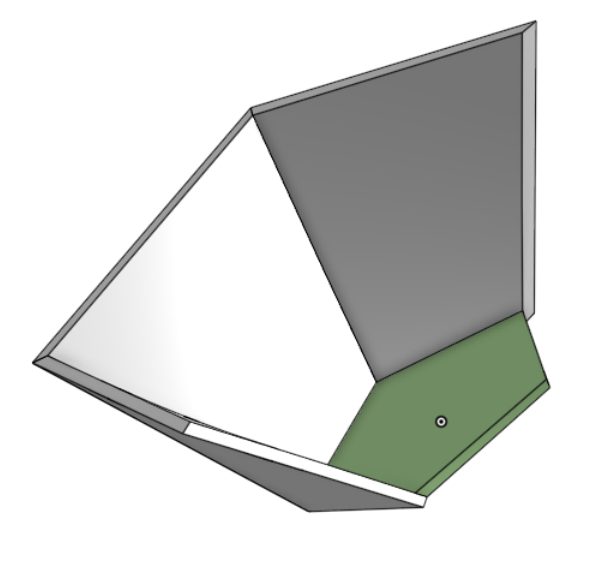
Here's a sample that gets clean parts for the sides and bottom but I'm not sure about flattening to make cooky cutters sides. All the edges come out beveled.
 0
0 -
Miter Warlock was developed with this kind of panelization in mind, but it doesn't currently support twisted input faces like this for the exact flattening problem you've all identified. If you untwist the vase it will get you mitered panels as an output. If you need to have flattenable panels that have squared faces and not miters you could use a technique similar to that time I jailbroke the sheet metal features to make a lofted sheet metal pumpkin for the rendering competition. All you have to do is use the flatten surfaces analysis tool on the mid-surfaces of the sheet metal parts output by my jailbroken sheet metal feature and reimport them to Onshape as parasolid surfaces.
0


