Welcome to the Onshape forum! Ask questions and join in the discussions about everything Onshape.
First time visiting? Here are some places to start:- Looking for a certain topic? Check out the categories filter or use Search (upper right).
- Need support? Ask a question to our Community Support category.
- Please submit support tickets for bugs but you can request improvements in the Product Feedback category.
- Be respectful, on topic and if you see a problem, Flag it.
If you would like to contact our Community Manager personally, feel free to send a private message or an email.
Sketch could not be solved - why?

I'm trying to do a very simple sketch:
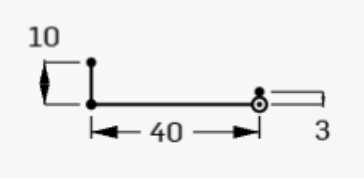
Now I connect the top of the 10 mm line with the top of the 3 mm line with a straight line (line tool):
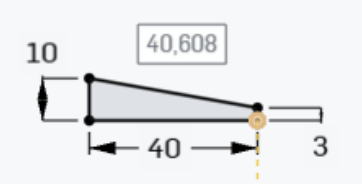
When I just hit enter to accept the 40,608 mm length, I get a 'Sketch could not be solved' message:
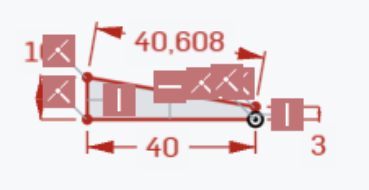
Why is that so? If I now hit the 'undo' button, everything turns black again and my 40,608 mm line is still there in black. Just the dimension is not shown, but can be easily added with the dimension tool. This 'problem' happens to me every once in a while and while it can easily be resolved it is still annoying. The above example is recreatable.
Best Answers
-
40.608 is rounded, If you manually calculate the hypotenuse you'll get ~40.607881008… By putting in 40.608, that bottom line has to become 40.49703… but you have constrained it to 40 so obviously this results in a conflict
2 -
This issue appears to come up time and again. Users place a line on two already constrained points and the sketch becomes overconstrained as soon as they accept the automatically placed dimension. Would it be possible to have the algorithm just NOT place a lenght dimension if it immediately lead to an overconstrained sketch? That would possibly catch most of these cases of intense headscratching while not doing much harm elsewhere.
2

Answers
-
40.608 is rounded, If you manually calculate the hypotenuse you'll get ~40.607881008… By putting in 40.608, that bottom line has to become 40.49703… but you have constrained it to 40 so obviously this results in a conflict
2 -
This issue appears to come up time and again. Users place a line on two already constrained points and the sketch becomes overconstrained as soon as they accept the automatically placed dimension. Would it be possible to have the algorithm just NOT place a lenght dimension if it immediately lead to an overconstrained sketch? That would possibly catch most of these cases of intense headscratching while not doing much harm elsewhere.
2 -
looks like onshape would need to do a 'fully defined check' every time an auto dimension was going to be placed on a sketch object, and then not put the dimension in there if defined. Seems like what Martin is suggesting would work because…. When you just draw the whole perimeter in one go it takes that last dimension out to avoid the over constraint situation. or rather does let you hit enter to accept it as is.
0
