Welcome to the Onshape forum! Ask questions and join in the discussions about everything Onshape.
First time visiting? Here are some places to start:- Looking for a certain topic? Check out the categories filter or use Search (upper right).
- Need support? Ask a question to our Community Support category.
- Please submit support tickets for bugs but you can request improvements in the Product Feedback category.
- Be respectful, on topic and if you see a problem, Flag it.
If you would like to contact our Community Manager personally, feel free to send a private message or an email.
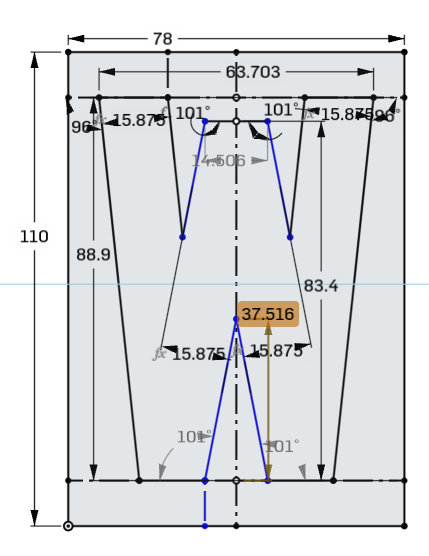
I can drag a point but as soon as I set a position constraint whole sketch overconstrained

The top of the bottom notch of this "W" should be 81mm 31.8mm from the bottom of the rest of the letter, but every time I try to set a constraint on it the entire sketch becomes over constrained. I can drag the point up and down manually so I don't see why setting that constraint should be a problem.
Best Answer
-
I don't see how the
bottom notch of this "W" should be 81mm from the bottom of the rest of the letterwhilst keeping that stroke width… Did you mean 81mm? 31mm looks good :)
I assume this letter is symmetric, so I'd be inclined to use symmetric constraints and clear up the display a bit. This is fully constrained now.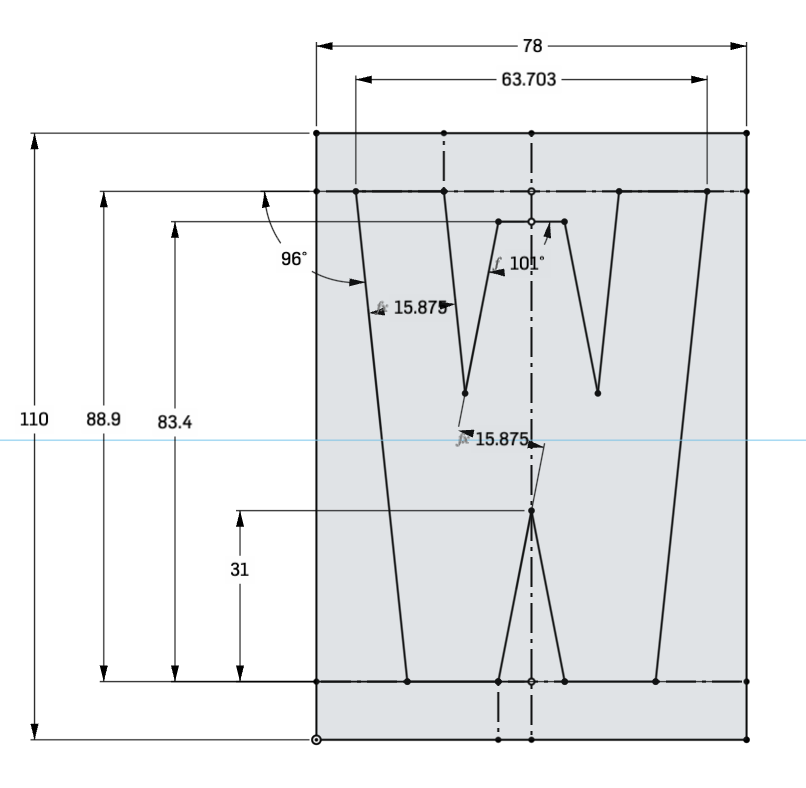 1
1


Answers
-
I don't see how the
bottom notch of this "W" should be 81mm from the bottom of the rest of the letterwhilst keeping that stroke width… Did you mean 81mm? 31mm looks good :)
I assume this letter is symmetric, so I'd be inclined to use symmetric constraints and clear up the display a bit. This is fully constrained now.
1 -
I think after playing with it a bit more the root issue is a combination of the inner lines being parallel and specifying the stroke width on both sides.Then adding the height constraint on the lower points over-constrained it because both 15.875s weren't needed any more.. I thought Onshape allowed "extra" driving dimensions as long as they were the same. I just tried that with the 110 though and when I force changed the duplicate definition to a driving dimension it all became over-constrained. I think what tripped me up is I didn't expect it to break the way it did. It would be nice if it could detect and flag "duplicate" driving dimensions, assuming that my guess is correct.
I removed constraints and started dragging lines around and I noticed that the left line moved oddly so I deleted it and re-added it and "everything worked" when I set the 38.1mm. I played a bit more and re-added the 15.875 dimension and it broke again and that's what made me guess what I wrote above.
0