Welcome to the Onshape forum! Ask questions and join in the discussions about everything Onshape.
First time visiting? Here are some places to start:- Looking for a certain topic? Check out the categories filter or use Search (upper right).
- Need support? Ask a question to our Community Support category.
- Please submit support tickets for bugs but you can request improvements in the Product Feedback category.
- Be respectful, on topic and if you see a problem, Flag it.
If you would like to contact our Community Manager personally, feel free to send a private message or an email.
How to use curved or otherwise complex shapes as guides for cutting, trimming, splitting, etc?
 evgenii_fyodorov
Member Posts: 10 ✭
evgenii_fyodorov
Member Posts: 10 ✭
Redesigned this too many times for what it is:
https://cad.onshape.com/documents/c2528b5705ffd6b1e15a6c0e/w/86f01a5e0239ac9d8aa9fbab/e/acd2328214ffaabd5ca33dc4?renderMode=0&uiState=6998f72a1c44221d19685f1e
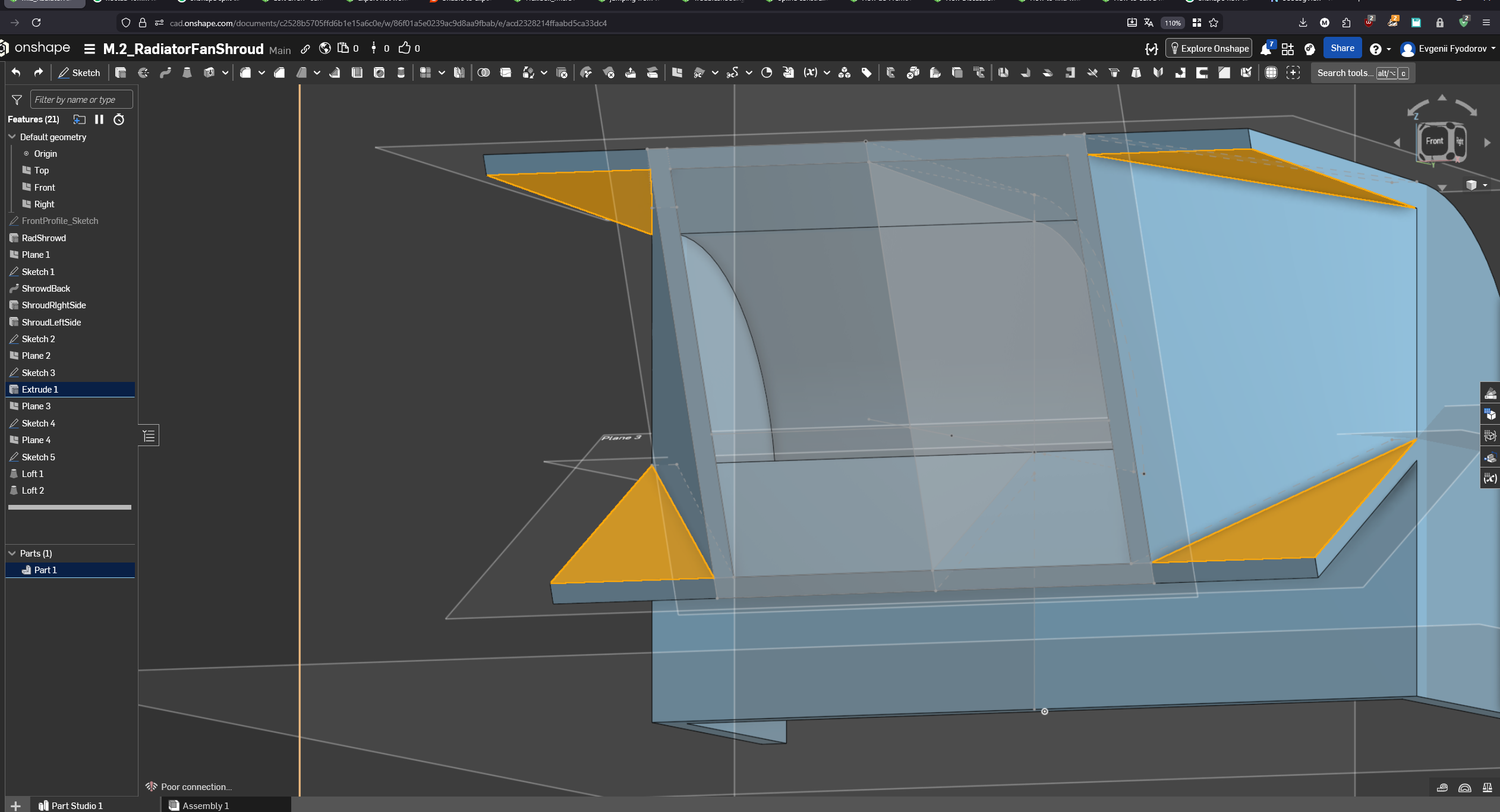
It seems reasonable to assume that I should be able to reference the twisted face of the lofts to cut those ears clean off. But I can't find a way to do so.
Sorry for the features not being named correctly. I stopped naming them in my 3rd attempt at redesigning this.
My English is limited to specific CAD terms, so I failed in explaining to Google what I want to learn. AI is even more worthless (no surprises here).
Can somebody point me in the direction of a way of dealing with those kinds of things? Because it feels very much wrong to use something like a bridging curve + fill+mirror combo whenever geometry get's bend assymetrically.
Thanks in advance.
Comments
It looks to me like you are over-complicating things quite a bit. Frist of all only draw half of a symmetric part and mirror at the end!
Here's a first simplified option, you just need to add the split and replace face feature:
And here is taking a quick step back to really simplify things: 3 sketches and 3 features (+ the mirror):
Public doc:
https://cad.onshape.com/documents/7b5f1559bee5f759852ae47a/w/0524c273db5e4388718090c1/e/450f53f815c36a64941f1099?renderMode=0&tangentEdgeStyle=1&uiState=699a06f051082bd4215d1b1f
Actually here's an other way to "fix" this from where you were using a replace face, but as I showed above you can model it much more simply and avoid this issue altogether: