Welcome to the Onshape forum! Ask questions and join in the discussions about everything Onshape.
First time visiting? Here are some places to start:- Looking for a certain topic? Check out the categories filter or use Search (upper right).
- Need support? Ask a question to our Community Support category.
- Please submit support tickets for bugs but you can request improvements in the Product Feedback category.
- Be respectful, on topic and if you see a problem, Flag it.
If you would like to contact our Community Manager personally, feel free to send a private message or an email.
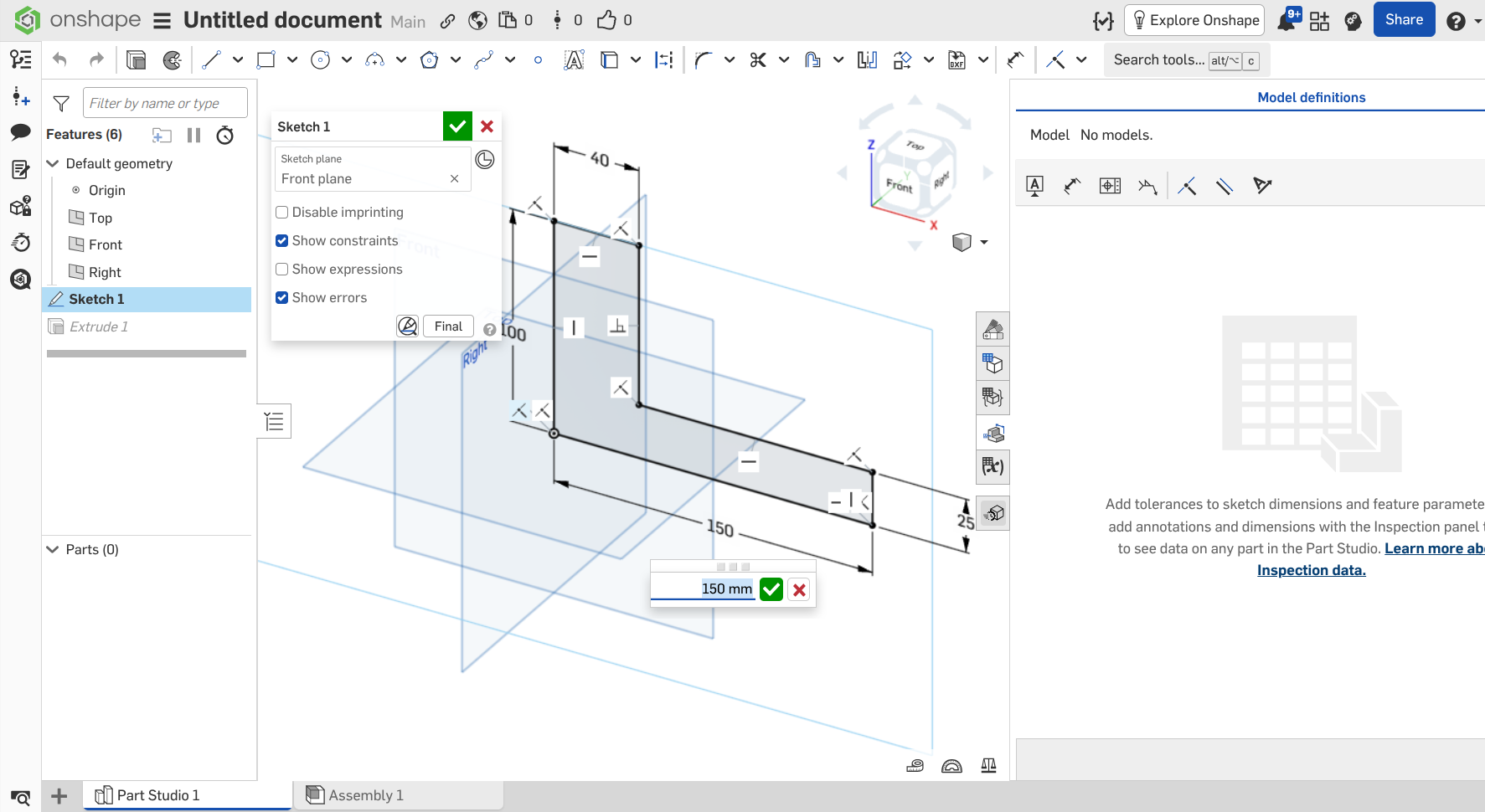
MBD seems to have disappeared.

MBD seems to have disappeared.
Chrome Browser - running on a chromebook - same issue in an incognito window.
Unemployed Onshaper - Operating on European time - More of me here ➤➤ https://linktr.ee/Liam.G
0
Comments
Is the dimension from point to point? I think that does not work. You need to dimension line to line, or line to point.
The option to make a dimension tolerant will only show up if you are dimensioning something that can be measured in real life, like a diameter or the distance between two faces. In your example, don't dimension that bottom line. Dimension between the far left (100 mm) and far right (25 mm) lines and you should get the option to make tolerant. Because those two lines will become parallel faces after you extrude.
@sebastian_glanzner and @Matt_Shields - Yep. That was the problem. Was it set up like that from Day 1? I don't remember that happening when doing some testing last week.
Unemployed Onshaper - Operating on European time - More of me here ➤➤ https://linktr.ee/Liam.G
Glad it got solved, that happens a lot and there were some similar comments with the same issue.
Maybe you made a rectangle sketch feature which works out of the box?
It would be useful if Onshape just made the tolerance button gray and if you hover over it, it could tell you that the dimension selection isn't compatible with MDB.
No, I definitely don't remember it being this problematic. When I tried it first, it worked just like in the official sales pitch, which was that MBD was now a baked-in option when creating most sketch dimensions.
Anyone else remember it like that?
Unemployed Onshaper - Operating on European time - More of me here ➤➤ https://linktr.ee/Liam.G
So . . . maybe nothing HAS changed after all. Found this 11 day old comment . . .
No mention in the video about this limitation, which is probably going to trip up a lot of people going forward.
Unemployed Onshaper - Operating on European time - More of me here ➤➤ https://linktr.ee/Liam.G
No MBD behavior has changed since its release. The behavior in the video still exists.
Nothing changed. If you read through the new releases thread, people ran into the same thing on day 1 that it doesn’t work point to point.
Since this is a new feature, we should be clear about it's use. You really just need a dimension between two valid pieces of geometry. Point-to-point will work, just not a single edge.
Ideally, when dimensioning an edge, the tool would be smart enough to rearrange itself when the 'make tolerant' gets invoked. Why would anyone care if their 'edge' dimension got automatically converted to point-to-point?
Unemployed Onshaper - Operating on European time - More of me here ➤➤ https://linktr.ee/Liam.G
I agree, this seems overly pedantic to disallow someone to dimension the edge length. Is there some good functional reason why this is the case?
Simon Gatrall | Product Development, Engineering, Design, Onshape | Ex- IDEO, PCH, Unagi, Carbon | LinkedIn
I'd personally be mad about that. If my design intent is for an edge length, the point to point length is a different metric that doesn't match what I put in. Could lead to issues with sketch stability if I go back and modify things or change constraints assuming it was dimensioned with one and not the other. In the case of straight lines on planes the two cases might appear to always resolve the same but the projects I work on are a magnet for nontrivial geometric cases and I would hate to find the cases where point to point and edge length dimension definitions differ from one another fundamentally without trying to start myself on that path intentionally.
Derek Van Allen | Engineering Consultant | Meddler