Welcome to the Onshape forum! Ask questions and join in the discussions about everything Onshape.
First time visiting? Here are some places to start:- Looking for a certain topic? Check out the categories filter or use Search (upper right).
- Need support? Ask a question to our Community Support category.
- Please submit support tickets for bugs but you can request improvements in the Product Feedback category.
- Be respectful, on topic and if you see a problem, Flag it.
If you would like to contact our Community Manager personally, feel free to send a private message or an email.
Improvements to Onshape - March 13, 2026


Has it been another 3 weeks? This update brings a focused set of refinements across CAD, Model-Based Definition, Render Studio and Mobile, delivering greater precision, clarity, and creative control across Onshape workflows. Let's jump right in.
CAD
URDF EXPORT
Onshape exports natively to the Unified Robot Description Format (URDF), the standard file format for describing robot models in simulation environments such as ROS, NVIDIA Isaac Sim, and more. This eliminates the need for external conversion tools and streamlines robotics design workflows end to end.
EDIT CURVE – CONTROL POINT IMPROVEMENTS
Edit Curve ships with improved control point behavior, delivering smoother and more predictable curve manipulation. Achieving the exact desired shape takes fewer adjustments and less time.
CONNECTION ANALYSIS – G3 SUPPORT
Connection analysis evaluates G3 (curvature rate of change) continuity, giving surfacing designers the ability to verify the smoothest possible transitions between surfaces. This is a critical capability for Class-A and aesthetic surfacing work.
MBD – MINIMUM AND MAXIMUM CYLINDER DISTANCE
MBD dimensions support minimum and maximum cylinder distance annotations, enabling more complete and precise communication of cylindrical feature requirements directly within the 3D model.
MBD – FILLET DIMENSION
A new Fillet dimension tool in MBD automatically associates the fillet default tolerance schema, ensuring the correct tolerance value is applied every time on both native and imported parts.
IMPROVED ROW HIGHLIGHT FOR TABLE ROWS IN ONSHAPE TABLES
Table row highlighting in Onshape tables delivers sharper visual clarity. Active rows stand out more clearly across BOMs, configurations, and custom tables, reducing errors and speeding up review.
IN-CONTEXT WITHOUT INSERTION
Parts created in-context within a Part Studio no longer require immediate insertion into the originating assembly.
MATE CONNECTOR AS REFERENCE COORDINATE SYSTEM FOR MEASUREMENT
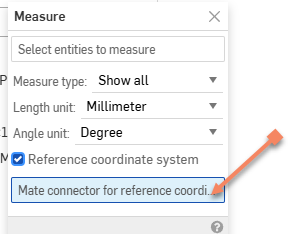
The measure tool accepts a Mate Connector as a reference coordinate system, returning dimensions relative to both the position and orientation of the selected Mate Connector rather than the default coordinate system. A new quick list view for measurement selections also makes it faster to review and remove any selected references.
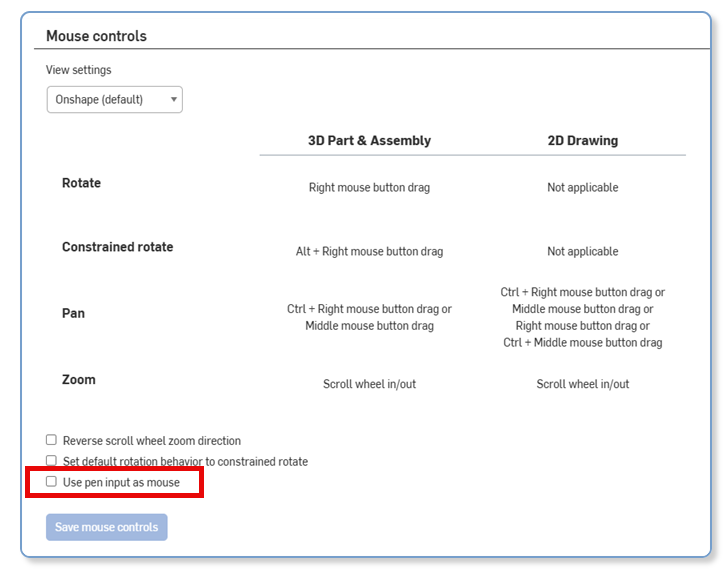
USE PEN INPUT AS MOUSE
Onshape treats stylus and pen input devices as full mouse equivalents. Users on pen-enabled tablets and touchscreen devices get a more natural and fluid design experience without any loss of precision.
SIMULATION
SOLVER PERFORMANCE
A new update to the Onshape Simulation solver for Professional and Enterprise users delivers noticeable speed improvements in Modal Analysis and Linear Static Inertial Relief.
RENDER STUDIO
RENDER STUDIO PROJECTOR AUTO-FIT
The Render Studio projector gains an auto-fit option, automatically adjusting the projection to best match scene geometry. Scene setup moves faster, and projected textures and patterns align correctly without manual fine-tuning.
RENDER STUDIO ADVANCED – ENVIRONMENT LIGHTING
Render Studio Advanced introduces expanded controls for environment lighting, opening more creative options for scene composition. Fine-tune environment maps, manage multiple light sources, and produce more realistic and polished product visualizations.
CAM STUDIO
POST-PROCESSORS
Machine support has been added for the following:Post support for Mach 3
MOBILE
SKETCH CHAMFER
Sketch Chamfer arrives in the Onshape mobile app for iOS and Android. Add chamfers to sketch profiles directly from a mobile device.
SECTION VIEW PRESERVED FOR IN-CONTEXT EDITS
Inside of an assembly on iOS, you can create a Part studio and preserve the Section view if it is active when creating the context state, enabling for better visualization of your assembly's current position when designing parts in-context.
LEARNING CENTER
MODEL-BASED DEFINITION (MBD)
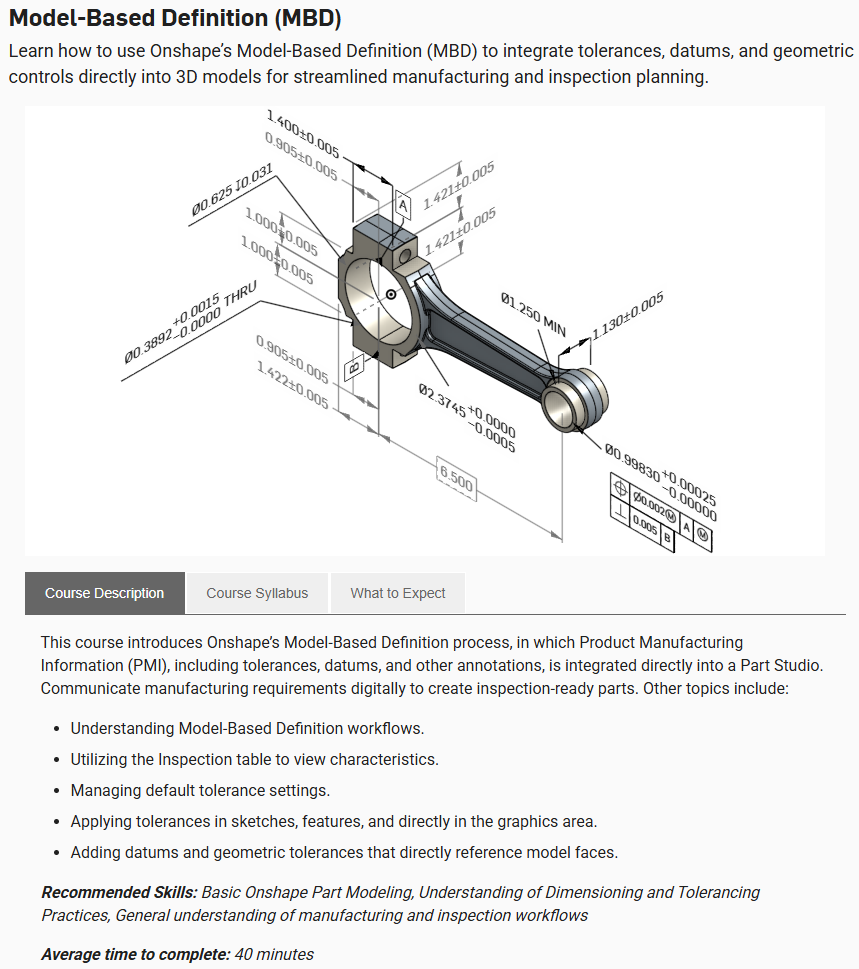
The Learning Center now offers the Model-Based Definition (MBD) course, where you learn how to work with the Inspection table and build out your MBD data directly in Onshape.
Please take a moment to try out these new features and leave your comments below. For a detailed list of all the changes in this update, please see the changelog.
Remember: The updates listed here are now live for all users when creating new Documents. Over the next few days, these features will also be available in Documents created before this update. Mobile app interface updates occur via the Apple App Store or Google Play Store and happen in the days following the update.
Comments
-
I’d like to think my posts and messages about working on an “edit curve plus” helped inspire the new curve edit modes. I’m very excited to see them in the first party tool.
Simon Gatrall | Product Development, Engineering, Design, Onshape | Ex- IDEO, PCH, Unagi, Carbon | LinkedIn
3 -
Nice touch to the edit curve feature, looking forward to practicing with that later.
G3 checking must mean more G3 surface, fillet, and face blend settings are on there way!
The measure option at first glance appears to solve a long standing request of mine. Normal to measurement of planar surface to point/edge not inline with WCS
In-context upgrade also looks great.
Solid update!⭐️
6 -
I'm excited to back-port the manipulator enhancements to my surface editing functions since many things make more sense in UVN context than in XYZ.
I'm curious if the URDF exports have an API endpoint associated with them. I've been working on a GLTF viewer app that I never intended to get mate behavior ported to but seeing the capability demonstrated here I kinda want to see it integrated into a future version of the app.1 -
I like the attention to even the small improvements, as those little attention to detail are just annoyance removal.
Table row highlighting, MBD dimensions support minimum and maximum cylinder distance,
Big plus for the Create in Context and not have to put back into an assembly to update the in context reference.
Thanks for the MBD learning module.
3 -
Happy to see the MBD course in the Learning Center. I'm looking forward to adding that shingle to my collection.
2 -
Solid update. I'm particularly excited about Mate Connector as Reference Coordinate System for Measurement. This just makes everyday life in Onshape easier.
8 -
Great :)
0 -
For those interested in MBD and how FeatureScript can create tolerant dimensions, I had previously created this simple slot feature:
> Demonstration Custom Slot feature <
Note that I just updated it to demonstrate maximum dimension between cylinders (i.e. the extents of the slot) which we released today. Check it out ^^^^ if you like.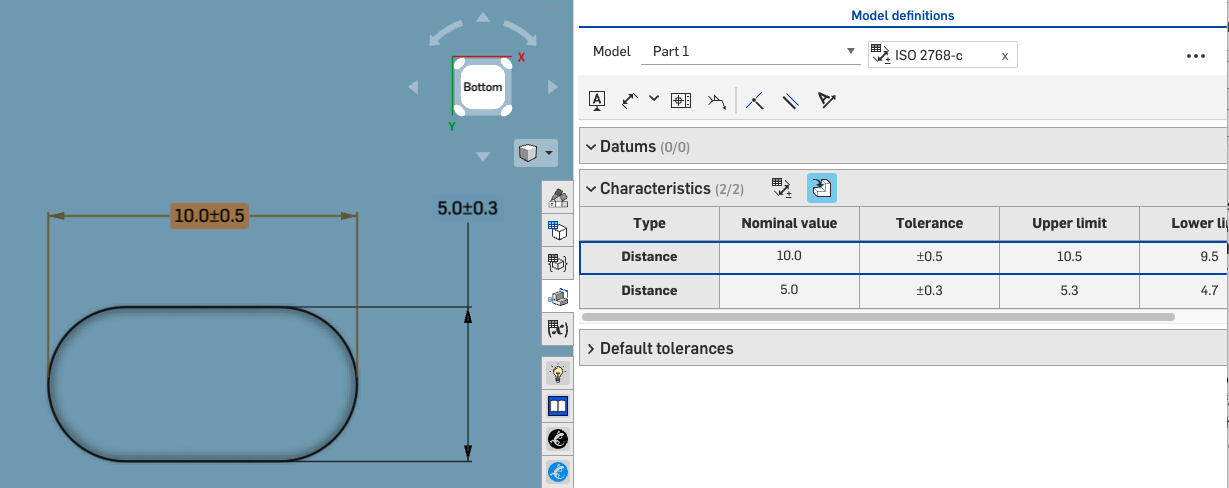 8
8 -
Great to see a URDF exporter natively built in. Will there be and documentation about this?
I'd love to see Mujoco support added too.
1 -
You made dark mode work on my Chromebook! My eyes thank you!
1 -
This is some good stuff! Love the emphasis and touch ups and optimisation over forcing new features. Looking at you Microvellum
0 -
Use
/assemblies/d/{did}/{wv}/{wvid}/e/{eid}/translationswith a request body something like this depending on where you want to save to, etc:
{

"couldBeAssembly":true,

"formatName": "URDF",

"urdfMeshFormat": "GLTF",

"storeInDocument":true

}
1 -
Like the mate connector reference in measure
0 -
Amazing as always!, I hope you give more features and support to the CAM module; including the tutorials.
1 -
Very happy about the edit curves improvements.
These weekly sprints are just awesome. just yesterday I was pondering if one could measure with xyz in a mate connector reference space and there it is! I feel psychically connected to the onshape team today…
3 -
A fantastic upgrade for the URDF exporter would be to specify configurations for visual and collision (and output in different formats, should really include OBJ for visual for backwards compatibility). That way we could create a configuration for collision that removes any aesthetic features without having to export them separately.
1 -
These are all gerat improventes! From a bread and butter point of view, curve editing and the mate connector measuring are my favourites.
2 -
this is a massive update. ty team!
.
RENDERCAD
rendercad.ai - Photorealistic product rendering.
▚▞▚▞▚▞▚▞▚
________________________________________________________________________0 -
Agreed that referencing a coordinate system for measurement is useful, but it seems that the measure tool does not work inside of editing a sketch anymore, meaning it will exit the sketch first and remove any prior selections made. Unless I'm mistaken I don't think it was working that way before.
0 -
The updates to the edit curve will be helpful, but I have already found that you can not deselect-selected points by simply selecting another point. To deselect the multipoint selection you either have to clear the control point indices in the selection box or deselect the points on the actual curve. Previously it would automatically deselect points when choosing another point and this made micro adjustments easier. It seems that this is only an issue when in XYZ with multipoint selection, as both UVN options do not allow for multipoint selection. I would love to have the option of turning multipoint selection on and off for XYZ, thoughts?
2 -
Referencing a coordinate system for measurement. This will be a huge upgrade to my workflow. Thank you.
1 -
I had to use the reference coordinate today. I was a little disappointed to see I had to first create a mate connector before measuring. then go back and delete it.
Can we please add an implicit mate connector here?
Most of the time I just need a temporary measurement.
 7
7 -
I'm not happy with the measuring tool updates😕:
- you can't use it inside of a sketch like we use to
- clicking on the background does not clear the selection anymore
2 -
With the new “use pen input as mouse” preference, I can now do some more things in Onshape in the browser on my iPad, but I can’t seem to double click. Single click and hover are working. Is there something else that I need to change?
Simon Gatrall | Product Development, Engineering, Design, Onshape | Ex- IDEO, PCH, Unagi, Carbon | LinkedIn
1 -
Please check again tonight (18th) for using inside a sketch.
5 -
Can we please add an implicit mate connector here?
Most of the time I just need a temporary measurement
You are not the only person to have asked :)
2 -
As a follow on, some of you who are looking to automate URDF export of configured assemblies using a single api call, note that you can include a
configurationin the payload. For example:{ "formatName": "URDF", "urdfMeshFormat": "GLTF", "configuration":"List_ajSD8wfAIewokB=fastened;arms=false" }(just make sure you format the configuration string properly for your doc!)
1 -
So somebody has to ask…
I expect the Onshape team will be busy hunting for eggs tomorrow so is today "early Friday", or is Monday going to be it!?1 -
@eric_pesty Man, I have serious F5 Syndrome and you talk about late updates 🥺🤣
And yes, F5 Syndrome is a real thing and not a late april fools joke:
https://suno.com/s/veLEXVUFrp8xsHvO
1 -
Don't wear out your F5 key today, we're still on our 3 week timeline in this reality. I can't say for sure if tomorrow will be the same reality.
2