Welcome to the Onshape forum! Ask questions and join in the discussions about everything Onshape.
First time visiting? Here are some places to start:- Looking for a certain topic? Check out the categories filter or use Search (upper right).
- Need support? Ask a question to our Community Support category.
- Please submit support tickets for bugs but you can request improvements in the Product Feedback category.
- Be respectful, on topic and if you see a problem, Flag it.
If you would like to contact our Community Manager personally, feel free to send a private message or an email.
Best approach for a curved object?
 peter_hutter435
Member Posts: 2 ✭
peter_hutter435
Member Posts: 2 ✭
I want to build & 3D print a model car and am getting frustrated because I can't get the rear end to look the way I want it to.
Basically, it should be rounded in all directions and have a raised section behind the driver's seat, similar to classic race cars from the 1950s.

Here are to two projects I've only reproduced that also show roughly how I imagine the rear end should look like.
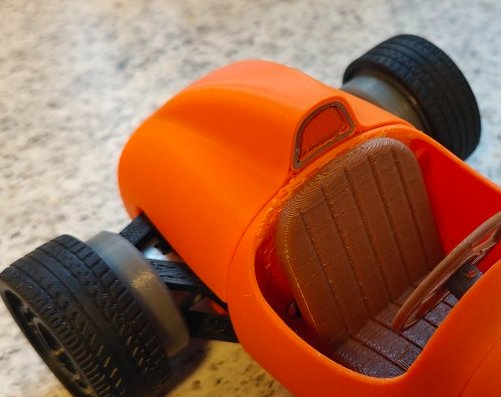
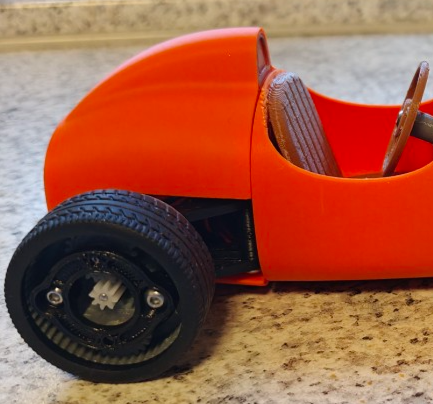
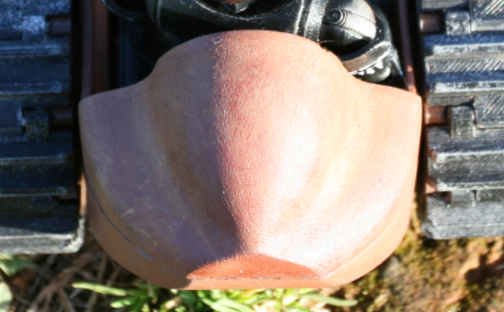
I've already tried using solids and fillets, etc., but quickly reached my limits, especially with the transition from the driver's cab to the rear. Then I started experiments with planes and lofts, and yesterday I found my master with 3D fit spline, composite curve, and surfacing ☹ Somehow, the generated surfaces always turn red (if any are created at all) and have cracy shapes.
What would be your approach or plan and set of tools to getting a part that has some similarity to the rear ends above?
Answers
You are on the right track when you assume this is surface modeling. Try this:
https://cad.onshape.com/documents/63646fe1441530595f4cc318/w/95fdc3108cc812e969277682/e/ba592447ded3b57e694a055a?renderMode=0&uiState=69b08e72a2fda612f9cec3b1
Are you having trouble creating the basic shapes or the transition between the shapes? Or both?
Oh damn! I hit the wrong button again and now I can't delete this empty post it created! Sorry. Can someone please make the SAVE COMMENT button smaller so there's a little more space between it and the HOME button on Firefox?