Welcome to the Onshape forum! Ask questions and join in the discussions about everything Onshape.
First time visiting? Here are some places to start:- Looking for a certain topic? Check out the categories filter or use Search (upper right).
- Need support? Ask a question to our Community Support category.
- Please submit support tickets for bugs but you can request improvements in the Product Feedback category.
- Be respectful, on topic and if you see a problem, Flag it.
If you would like to contact our Community Manager personally, feel free to send a private message or an email.
Circular pattern not working

I have been having issues with circular patterns. I am trying to create a modular cylinder that uses a twist snap connection. I did some test prints with a different file that I was able to create the revolve 1 and revolve 2 and extrude 3 features and then circular pattern them 4 times across the full 360 degrees. However when I remodeled the same mechanism in a new document, the revolve 2 feature will not pattern. I was able to work around this by patterning the sketch instead but it is irritating to have to do multiple patterns. Additionally I created another version to try again (not listed in the linked document) that I was able to reapply the same feature, but it would only pattern to 2 instances, and changing the number of instances would change the angle between the 2 instance as if it was creating the correct number (120 degrees for 3 instance, 90 for 4 etc). Why is this happening? https://cad.onshape.com/documents/92de50cf2695024d78570be3/w/ccc1a79a112f2875f7e7c325/e/35275c8417eb5453a78e02a0
Answers
-
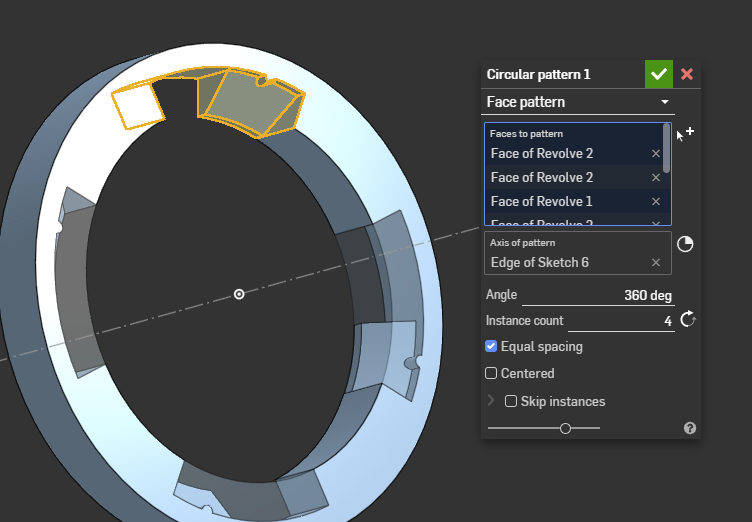
It works fine if you use a face pattern.
It would probably be simpler to just model 1/4 of the part and pattern the part itself!
 0
0 -
It works if you pattern the features separately, so Onshape must be struggling by doing these add and remove operations all at the same time. Especially both the revolves: one cuts material and the other fills part of it back in. Try making them both cut without overlap. Then I think everything will work fine.
0 -
Unrelated, but fyi, all of these features should have been one sketch and one extrude. There is no need to break them up as you did.
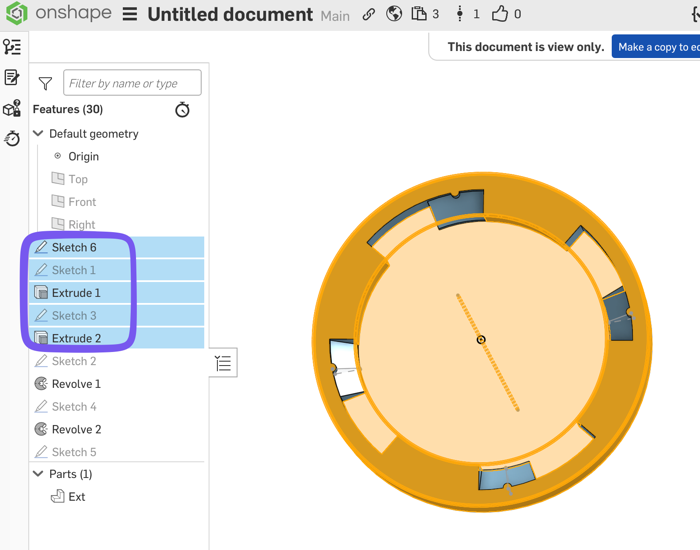
For your pattern question, as Eric mentioned this design might be best to model 1/4 of it, then pattern the whole thing.
To keep the approach you have, I personally like making the features as "new" instead of "cut" or "add", resulting in a new part. Then pattern that new part as "part" in the pattern dialog. They will be overlapping each other. When everything is the way you want it, do a boolean cut and a boolean add to get the final shape. This way gives you more control for complex shapes, imo.
0 -
Personally I actually do split up my sketches and features into many smaller single purpose job-doers if I can. Just because something *can* be represented in fewer sketches or fewer features doesn't necessarily mean that's the best way to get the job done. I find that it's actually more readable and stable to changes by doing many simpler steps than few complex ones.
0 -
Did you actually open up his sketches though? If you do, you’ll agree.
0 -
I have to say I am with Nick on this one!
The "construction axis" is not needed and the other two are just the OD an ID of the "ring" so in this case I agree a single sketch and extrude would actually be clearer in this case.
0

