Welcome to the Onshape forum! Ask questions and join in the discussions about everything Onshape.
First time visiting? Here are some places to start:
- Looking for a certain topic? Check out the categories filter or use Search (upper right).
- Need support? Ask a question to our Community Support category.
- Please submit support tickets for bugs but you can request improvements in the Product Feedback category.
- Be respectful, on topic and if you see a problem, Flag it.
If you would like to contact our Community Manager personally, feel free to send a private message or an email.
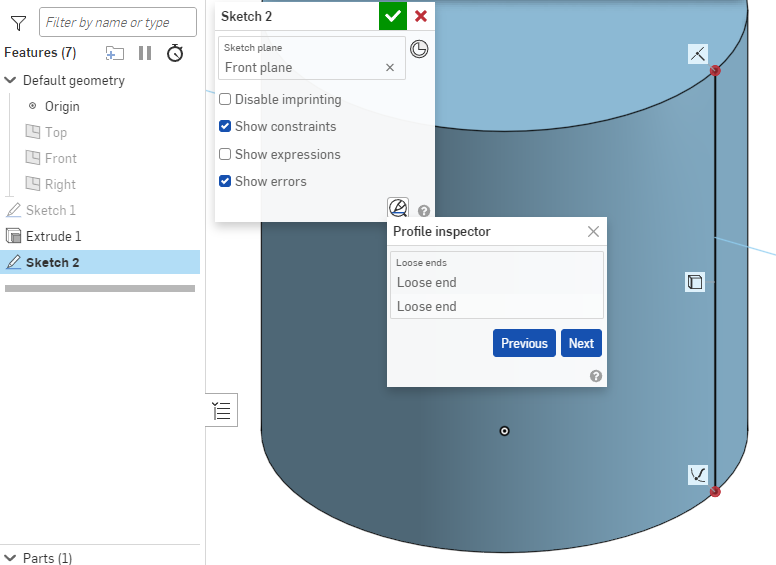
What causes "loose" endpoints in a silhouette edge?

- Draw a circle in the top plane and extrude a cylinder.
- Create a sketch on the front plane and view normal to the sketch plane.
- Use the "use" tool to create a silhouette edge on the side of the cylinder.
The sketch is not fully defined. In the sketch diagnostics tools, the endpoints of the silhouette edge are considered "loose ends."
- Select an endpoint of the silhouette edge and the edge of the cylinder that it lies on.
- Add a coincident constraint.
- Repeat for the other endpoint and edge.
The endpoints turn black as expected, but are still considered "loose ends" and the sketch is still not fully defined.
- "Use" the top and bottom faces of the cylinder projected in the front plane.
The sketch is now fully defined. The dangling ends of the construction lines on the top and bottom of the cylinder are not "loose."
Why are the endpoints of a silhouette edge on the side of the cylinder considered "loose", but not the endpoints of a line across the end of the cylinder?
Example document: https://cad.onshape.com/documents/503348464d044ca27010d4fd/w/a8e22fac9b2d5dae9345c154/e/b71dad81a4143fa50afa775c
Answers
-
Try pierce instead of coincident.
0 -
My original post was wrong in a few details. The projection of the end of a cylinder does have loose ends, but they are not blue and do not keep the sketch from being fully defined.
With the endpoint selected: "A pierce constraint requires a curve or point from the sketch and an external edge."
With the endpoint and edge of the cylinder selected: "Could not add constraint."
It remains unclear exactly what is undefined about a silhouette edge on the side of a cylinder, especially after the endpoints are made coincident and turn black. This may be a simple reproduction of all the issues people have with sketches not being fully defined when nothing is blue.
0 -
Ah, I understand what you mean now that I'm on a PC. You're looking at the profile inspector. The point of the profile inspector is to check if a sketched profile is fully closed. Sometimes things don't line up perfectly and are just off by a tiny amount. The profile inspector helps you find those spots. You are drawing a single line, so it's not a closed profile and therefore you have 2 loose ends. As long as the sketch is fully defined (with either coincident or pierce on the cylinder's edges), it's all correct.
 0
0